
Our Community is getting an upgrade! To get everything ready for the relaunch, we’ll be placing the site in read-only mode starting September 21st.
We really appreciate your understanding while we get things set up behind the scenes. Catch up on all the exciting details about the move here.
Need help or have questions? Drop us a line at [email protected]

Archives of Support Questions (Read Only)
- Cloudera Community
- Board Archive
- Archives of Support Questions (Read Only)
- How to set the authority/right of Atlas Web UI Use...
- Subscribe to RSS Feed
- Mark Question as New
- Mark Question as Read
- Float this Question for Current User
- Bookmark
- Subscribe
- Mute
- Printer Friendly Page
- Subscribe to RSS Feed
- Mark Question as New
- Mark Question as Read
- Float this Question for Current User
- Bookmark
- Subscribe
- Mute
- Printer Friendly Page
How to set the authority/right of Atlas Web UI User?


Created on 08-26-2016 06:18 AM - edited 08-19-2019 03:31 AM
- Mark as New
- Bookmark
- Subscribe
- Mute
- Subscribe to RSS Feed
- Permalink
- Report Inappropriate Content
I want to add a new user account for atlas Web UI, so I append a line text into <atlas-conf>/users-credentials.properties
zte=ADMIN::8d969eef6ecad3c29a3a629280e686cf0c3f5d5a86aff3ca12020c923adc6c92
This means that, the user name is zte, and the password is 123456.
But when I login in the Atlas Web UI by using this user name and password, it shown like this:
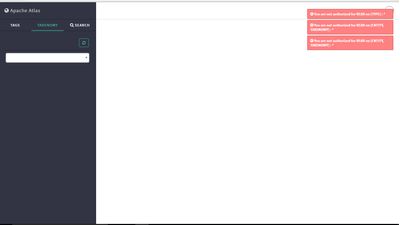
The tips which on the top right of this screenshot showed that, this account are not authorized for READ *.
So, how can I set the authority/right of my new user account ?
Thank you very much.



Created 08-26-2016 07:00 AM
- Mark as New
- Bookmark
- Subscribe
- Mute
- Subscribe to RSS Feed
- Permalink
- Report Inappropriate Content
Simple Authorization
The default setting is Simple, and the following properties are automatically set under Advanced application-properties on the Advanced tab.
Table: Apache Atlas Simple Authorization
| Property | Value |
|---|---|
| atlas.authorizer.impl | simple |
| atlas.auth.policy.file | {{conf_dir}}/policy-store.txt |
The policy-store.txt file has the following format:
Policy_Name;;User_Name:Operations_Allowed;;Group_Name:Operations_Allowed;;Resource_Type:Resource_Name
For example:
adminPolicy;;admin:rwud;;ROLE_ADMIN:rwud;;type:*,entity:*,operation:*,taxonomy:*,term:*
userReadPolicy;;readUser1:r,readUser2:r;;DATA_SCIENTIST:r;;type:*,entity:*,operation:*,taxonomy:*,term:*
userWritePolicy;;writeUser1:rwu,writeUser2:rwu;;BUSINESS_GROUP:rwu,DATA_STEWARD:rwud;;type:*,entity:*,operation:*,taxonomy:*,term:*
In this example readUser1, readUser2, writeUser1 and writeUser2 are the user IDs, each with its corresponding access rights. The User_Name, Group_Name and Operations_Allowed are comma-separated lists.
Authorizer Resource Types:
- Operation
- Type
- Entity
- Taxonomy
- Term
- Unknown
Operations_Allowed are r = read, w = write, u = update, d = delete
Let me know if you have Ranger enabled in your cluster, different operations would be needed for Ranger authorization.


Created 07-05-2018 09:22 AM
- Mark as New
- Bookmark
- Subscribe
- Mute
- Subscribe to RSS Feed
- Permalink
- Report Inappropriate Content
Hi, User sync has solved the problem.
Regards,
Varun

Created 07-13-2018 10:46 AM
- Mark as New
- Bookmark
- Subscribe
- Mute
- Subscribe to RSS Feed
- Permalink
- Report Inappropriate Content
Created 07-19-2018 04:52 AM
- Mark as New
- Bookmark
- Subscribe
- Mute
- Subscribe to RSS Feed
- Permalink
- Report Inappropriate Content
Hi Alex It is Ranger user sync.

- « Previous
-
- 1
- 2
- Next »

