
Our Community is getting an upgrade! To get everything ready for the relaunch, we’ll be placing the site in read-only mode starting September 21st.
We really appreciate your understanding while we get things set up behind the scenes. Catch up on all the exciting details about the move here.
Need help or have questions? Drop us a line at [email protected]

Archives of Support Questions (Read Only)
- Cloudera Community
- Board Archive
- Archives of Support Questions (Read Only)
- How to specify Python version to use with Pyspark ...
- Subscribe to RSS Feed
- Mark Question as New
- Mark Question as Read
- Float this Question for Current User
- Bookmark
- Subscribe
- Mute
- Printer Friendly Page
- Subscribe to RSS Feed
- Mark Question as New
- Mark Question as Read
- Float this Question for Current User
- Bookmark
- Subscribe
- Mute
- Printer Friendly Page
How to specify Python version to use with Pyspark in Jupyter?
- Labels:
-
Apache Ambari
-
Apache Spark


Created on 09-25-2017 02:02 PM - edited 09-16-2022 05:17 AM
- Mark as New
- Bookmark
- Subscribe
- Mute
- Subscribe to RSS Feed
- Permalink
- Report Inappropriate Content
Hello, I've installed Jupyter through Anaconda and I've pointed Spark to it correctly by setting the following environment variables in my bashrc file :
export PYSPARK_PYTHON=/home/ambari/anaconda3/bin/python
export PYSPARK_DRIVER_PYTHON=jupyter
export PYSPARK_DRIVER_PYTHON_OPTS='notebook --no-browser --ip 0.0.0.0 --port 9999'.
When i tap $python --version, i got Python 3.5.2 :: Anaconda 4.2.0 (64-bit).
When i tap $which python, i got ~/anaconda3/bin/python.
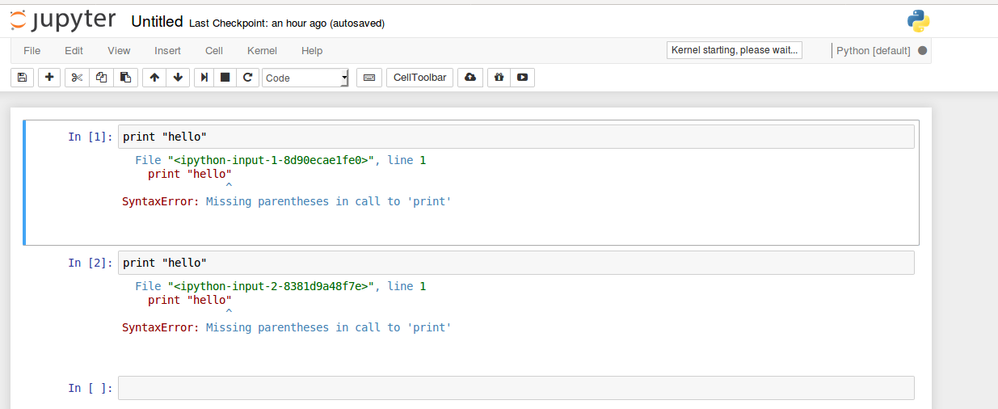
So, i conclude that I'm using python 3 when i run PySpark in Jupyter. But, i got the error message shown in "result.png" when i used simple instruction in jupyter. So, there's a conflict in python version even if i updated
PYSPARK_PYTHON to /home/ambari/anaconda3/bin/python3 instead of /home/ambari/anaconda3/bin/python and refreshed my bashrc file.
so, how can i fix this issue and use Python 3?



Created 09-25-2017 02:42 PM
- Mark as New
- Bookmark
- Subscribe
- Mute
- Subscribe to RSS Feed
- Permalink
- Report Inappropriate Content
Based on your result.png, you are actually using python 3 in jupyter, you need the parentheses after print in python 3 (and not in python 2). To make sure, you should run this in your notebook:
import sys
print(sys.version)
Created 09-25-2017 02:42 PM
- Mark as New
- Bookmark
- Subscribe
- Mute
- Subscribe to RSS Feed
- Permalink
- Report Inappropriate Content
Based on your result.png, you are actually using python 3 in jupyter, you need the parentheses after print in python 3 (and not in python 2). To make sure, you should run this in your notebook:
import sys
print(sys.version)
Created 09-25-2017 02:54 PM
- Mark as New
- Bookmark
- Subscribe
- Mute
- Subscribe to RSS Feed
- Permalink
- Report Inappropriate Content
Thank you so much. I was really confused about which version of Python that requires parentheses after print. I thought it was Python2.


