
Our Community is getting an upgrade! To get everything ready for the relaunch, we’ll be placing the site in read-only mode starting September 21st.
We really appreciate your understanding while we get things set up behind the scenes. Catch up on all the exciting details about the move here.
Need help or have questions? Drop us a line at [email protected]

Archives of Support Questions (Read Only)
- Cloudera Community
- Board Archive
- Archives of Support Questions (Read Only)
- How to use Apache NiFi EvaluateJsonPath for JSON t...
- Subscribe to RSS Feed
- Mark Question as New
- Mark Question as Read
- Float this Question for Current User
- Bookmark
- Subscribe
- Mute
- Printer Friendly Page
- Subscribe to RSS Feed
- Mark Question as New
- Mark Question as Read
- Float this Question for Current User
- Bookmark
- Subscribe
- Mute
- Printer Friendly Page
How to use Apache NiFi EvaluateJsonPath for JSON to CSV/Text extract
- Labels:
-
Apache NiFi


Created on 08-07-2017 11:27 PM - edited 08-17-2019 09:33 PM
- Mark as New
- Bookmark
- Subscribe
- Mute
- Subscribe to RSS Feed
- Permalink
- Report Inappropriate Content
Hi all,
I am getting my arse kicked by the EvaluateJsonPath.
So the task is to be able to extract some json attribute values into a CSV format or a text format that will be used for inserting into file, db ,etc..
So here is what i got so far:
GetFile (it reads a json file) --> SplitJson --> EvaluateJsonPath --> PutFile (i will throw a merge in between after i get after the EvaluateJsonPath to work "understand how it work").
The json used is:
- this is just a dummy json data
{
  "results": [
    {
      "gender": "female",
      "name": {
        "title": "ms",
        "first": "juliette",
        "last": "schmitt"
      },
      "location": {
        "street": "7260 esplanade du 9 novembre 1989",
        "city": "le havre",
        "state": "lot",
        "postcode": 58491
      },
      "email": "[email protected]",
      "login": {
        "username": "smallcat938",
        "password": "horizon",
        "salt": "fvaSIrep",
        "md5": "3d1a182db3002dc88cd54b258838aa89",
        "sha1": "71600ad7a6f65ec00fed7521bcf3d943a87a8172",
        "sha256": "cd9bfc086b5b83a935c99b496c27fc58716521a43c2630e286f87147e4b4dd8a"
      },
      "dob": "1959-08-16 23:11:26",
      "registered": "2010-07-16 20:27:45",
      "phone": "04-09-99-35-16",
      "cell": "06-87-17-31-45",
      "id": {
        "name": "INSEE",
        "value": "259755098491 56"
      },
      "picture": {
        "large": "https://randomuser.me/api/portraits/women/71.jpg",
        "medium": "https://randomuser.me/api/portraits/med/women/71.jpg",
        "thumbnail": "https://randomuser.me/api/portraits/thumb/women/71.jpg"
      },
      "nat": "FR"
    }
  ],
  "info": {
    "seed": "ca021f036c48503a",
    "results": 1,
    "page": 1,
    "version": "1.1"
  }
}
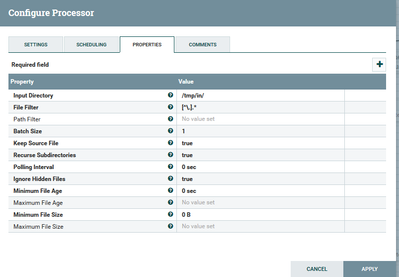
1- GetFile setup:
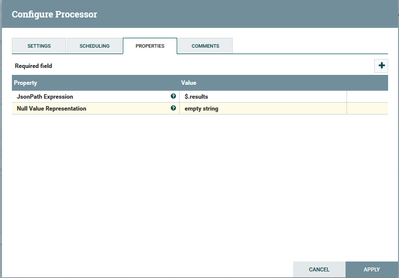
2- SplitJson setup:
3- EvaluateJsonPath
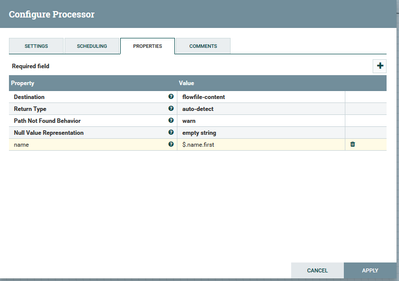
Note: this one is working!
Now adding a new property to the EvaluateJsonPath gets me stuck
The documentation is not very illustrative on how this should be used and i am not an json expert.
I am trying to understand how the does the twitter template actually does it ?
-where multiple paths are declared.
thanks all

Created 08-08-2017 05:25 AM
- Mark as New
- Bookmark
- Subscribe
- Mute
- Subscribe to RSS Feed
- Permalink
- Report Inappropriate Content
If you set the Destination to flowfile-content, you can have only one JSON Path expression. You could set the Destination to flowfile-attribute instead, then each JSON Path will be extracted to the named attribute value. If you need the results in the content of the Flow File, use a ReplaceText processor afterwards to collect the attribute values into the content.
Created 08-08-2017 05:25 AM
- Mark as New
- Bookmark
- Subscribe
- Mute
- Subscribe to RSS Feed
- Permalink
- Report Inappropriate Content
If you set the Destination to flowfile-content, you can have only one JSON Path expression. You could set the Destination to flowfile-attribute instead, then each JSON Path will be extracted to the named attribute value. If you need the results in the content of the Flow File, use a ReplaceText processor afterwards to collect the attribute values into the content.


Created 06-20-2018 05:18 AM
- Mark as New
- Bookmark
- Subscribe
- Mute
- Subscribe to RSS Feed
- Permalink
- Report Inappropriate Content
Hi @Hellmar Becker,thanks for the info. But can you please give an example what should be the jsonpath like..?
Created on 08-08-2017 06:49 AM - edited 08-17-2019 09:33 PM
- Mark as New
- Bookmark
- Subscribe
- Mute
- Subscribe to RSS Feed
- Permalink
- Report Inappropriate Content
Ok ,

I need to give you a big hug !!!
I was going out of my mind with this !!! Could not imagine why was not working !
thank you so much ! you made my day 🙂

Created 06-12-2018 07:48 PM
- Mark as New
- Bookmark
- Subscribe
- Mute
- Subscribe to RSS Feed
- Permalink
- Report Inappropriate Content
@Adrian Oprea
Hi Adrian, I am trying your example with the JSON data you've provided but I am getting an error in SplitJSON processor as below:
2018-06-12 13:44:33,320 ERROR [Timer-Driven Process Thread-3] o.a.nifi.processors.standard.SplitJson SplitJson[id=f57cffea-0163-1000-2a56-c76e963c1ea2] FlowFile StandardFlowFileRecord[uuid=70f23330-cb67-472f-9ccc-2d9f1ecb3d5f,claim=StandardContentClaim [resourceClaim=StandardResourceClaim[id=1528832661718-625, container=default, section=625], offset=0, length=18],offset=0,name=40718.toc,size=18] did not have valid JSON content.
Any pointers please?
Created 06-12-2018 11:52 PM
- Mark as New
- Bookmark
- Subscribe
- Mute
- Subscribe to RSS Feed
- Permalink
- Report Inappropriate Content
Can you post you json file content ?
Test your json path definition at http://jsonpath.com/? , is easy and debug any issues with the json format.
Created 06-13-2018 09:04 PM
- Mark as New
- Bookmark
- Subscribe
- Mute
- Subscribe to RSS Feed
- Permalink
- Report Inappropriate Content
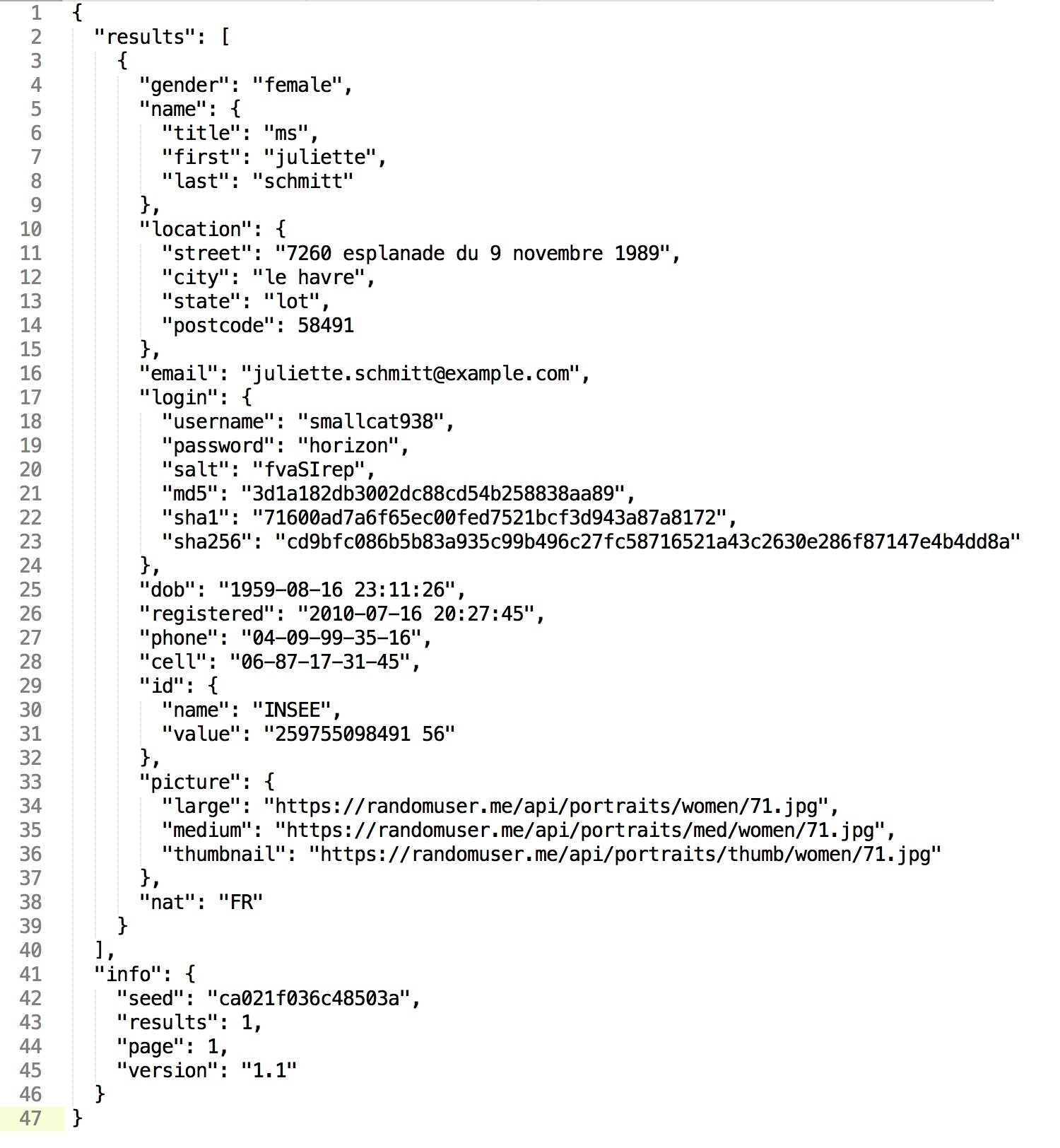
Thanks for your reply. Please find attached the JSON file: json.jpeg
In the SplitJson processor, the JsonPath Expression is "$.results" so I can grab all the 25 features/columns inside of it. But where to provide the "$.info" so I can grab the seed, results, page, and version columns?
Thanks for your time.

Created 08-14-2018 06:43 AM
- Mark as New
- Bookmark
- Subscribe
- Mute
- Subscribe to RSS Feed
- Permalink
- Report Inappropriate Content
Hi @Vikas Singh , SplitJson Processor is used to split Json Array and EvaluateJsonPath is used to extract Json fields as attribute or content. In your case: Step 1:Use EvaluateJsonPath Processor to extract info fields of Json. For example: is you want to extarct info fileds: .$info.seed,.$info.page,.$info.version,.$info.results and save it as Flowfile Attribute. Step 2:Use SplitJson Processor :$.results Step 3:USe EvaluateJsonPath Processor to extract Json Array fields.


