
Archives of Support Questions (Read Only)
- Cloudera Community
- Board Archive
- Archives of Support Questions (Read Only)
- I am working on Hortonworks Big Data, and installe...
- Subscribe to RSS Feed
- Mark Question as New
- Mark Question as Read
- Float this Question for Current User
- Bookmark
- Subscribe
- Mute
- Printer Friendly Page
- Subscribe to RSS Feed
- Mark Question as New
- Mark Question as Read
- Float this Question for Current User
- Bookmark
- Subscribe
- Mute
- Printer Friendly Page
I am working on Hortonworks Big Data, and installed putty and virtual box, when i try to install pip through putty , i found this error please rectify this error
- Labels:
-
Apache Hadoop


Created on 10-08-2017 06:39 AM - edited 08-17-2019 08:18 PM
- Mark as New
- Bookmark
- Subscribe
- Mute
- Subscribe to RSS Feed
- Permalink
- Report Inappropriate Content
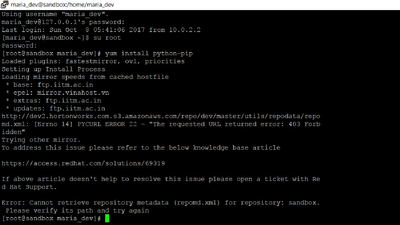
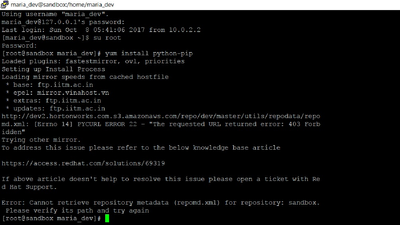
II am working on Hortonworks Big Data, and installed putty and virtual box, when i try to install pip through putty , i found this error please rectify this error


Created 10-08-2017 07:23 AM
- Mark as New
- Bookmark
- Subscribe
- Mute
- Subscribe to RSS Feed
- Permalink
- Report Inappropriate Content
Hi @Karthick Raja,
Try setting the value of enabled to 0 in sandbox.repo file.
vi /etc/yum.repos.d/sandbox.repo
Your sandbox.repo file should look like below
# cat /etc/yum.repos.d/sandbox.repo
[sandbox]
baseurl=http://dev2.hortonworks.com.s3.amazonaws.com/repo/dev/master/utils/
name=Sandbox repository (tutorials)
gpgcheck=0
enabled=0
After making the change, run
yum clean all
Thanks,
Aditya
Created 10-08-2017 07:23 AM
- Mark as New
- Bookmark
- Subscribe
- Mute
- Subscribe to RSS Feed
- Permalink
- Report Inappropriate Content
Hi @Karthick Raja,
Try setting the value of enabled to 0 in sandbox.repo file.
vi /etc/yum.repos.d/sandbox.repo
Your sandbox.repo file should look like below
# cat /etc/yum.repos.d/sandbox.repo
[sandbox]
baseurl=http://dev2.hortonworks.com.s3.amazonaws.com/repo/dev/master/utils/
name=Sandbox repository (tutorials)
gpgcheck=0
enabled=0
After making the change, run
yum clean all
Thanks,
Aditya
Created 10-14-2017 09:03 AM
- Mark as New
- Bookmark
- Subscribe
- Mute
- Subscribe to RSS Feed
- Permalink
- Report Inappropriate Content
Thanks Aditya,
After editing how to save and exit that command, and i couldnt find the #cat /etc/yum.repos.d/sandbox.repo this line , could you help me please


