
Our Community is getting an upgrade! To get everything ready for the relaunch, we’ll be placing the site in read-only mode starting September 21st.
We really appreciate your understanding while we get things set up behind the scenes. Catch up on all the exciting details about the move here.
Need help or have questions? Drop us a line at [email protected]

Archives of Support Questions (Read Only)
- Cloudera Community
- Board Archive
- Archives of Support Questions (Read Only)
- I can't stop Ambari Metris and Grafana
- Subscribe to RSS Feed
- Mark Question as New
- Mark Question as Read
- Float this Question for Current User
- Bookmark
- Subscribe
- Mute
- Printer Friendly Page
- Subscribe to RSS Feed
- Mark Question as New
- Mark Question as Read
- Float this Question for Current User
- Bookmark
- Subscribe
- Mute
- Printer Friendly Page
I can't stop Ambari Metris and Grafana
- Labels:
-
Apache Ambari


Created on 02-24-2017 05:54 PM - edited 08-19-2019 03:11 AM
- Mark as New
- Bookmark
- Subscribe
- Mute
- Subscribe to RSS Feed
- Permalink
- Report Inappropriate Content
Following this steps for restarting Ambari Metrics I'm sticking on stopping Grafana.
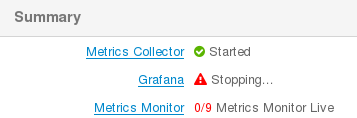
And the background operation list

Should I kill it manually? Thanks in advance.
Created 02-24-2017 07:15 PM
- Mark as New
- Bookmark
- Subscribe
- Mute
- Subscribe to RSS Feed
- Permalink
- Report Inappropriate Content
I found the problem: the device that was filled up has this file
/var/lib/ambari-agent/data/structured-out-status.json
that differs with the other nodes. I following this steps as root
rm -f /var/lib/ambari-agent/data/structured-out-status.json
ambari-agent restart
And I deleted the PID files in /var/run for applications that aren't responding for restart (like Zookeeper and Ambari Metrics Collector).
After that Ambari shows the process down. So I started them and now it works correctly.



Created 02-24-2017 06:05 PM
- Mark as New
- Bookmark
- Subscribe
- Mute
- Subscribe to RSS Feed
- Permalink
- Report Inappropriate Content
You can kill it from linux command from the server that run Ambari metrics and grafana. But also you may need to check the log why it is not able to shutdown.
pkill -KILL -u ams
Created 02-24-2017 06:24 PM
- Mark as New
- Bookmark
- Subscribe
- Mute
- Subscribe to RSS Feed
- Permalink
- Report Inappropriate Content
An application filled up the HDD and after the cleaning the log is corrupted (there are the last five lines)
2017/02/24 05:30:15 [I] Completed XXX.XXX.XXX.XXX - "GET / HTTP/1.1" 500 Internal Server Error 2528 bytes in 26900us
2017/02/24 05:31:15 [I] Completed XXX.XXX.XXX.XXX - "GET / HTTP/1.1" 500 Internal Server Error 2528 bytes in 14789us
2017/02/24 05:32:15 [I] Completed XXX.XXX.XXX.XXX - "GET / HTTP/1.1" 500 Internal Server Error 2528 bytes in 20252us
2017/02/24 05:33:15 [I] Completed XXX.XXX.XXX.XXX - "GET / HTTP/1.1" 500 Internal Server Error 2528 bytes in 16111us
2017/02
Created 02-24-2017 07:15 PM
- Mark as New
- Bookmark
- Subscribe
- Mute
- Subscribe to RSS Feed
- Permalink
- Report Inappropriate Content
I found the problem: the device that was filled up has this file
/var/lib/ambari-agent/data/structured-out-status.json
that differs with the other nodes. I following this steps as root
rm -f /var/lib/ambari-agent/data/structured-out-status.json
ambari-agent restart
And I deleted the PID files in /var/run for applications that aren't responding for restart (like Zookeeper and Ambari Metrics Collector).
After that Ambari shows the process down. So I started them and now it works correctly.


