
Our Community is getting an upgrade! To get everything ready for the relaunch, we’ll be placing the site in read-only mode starting September 21st.
We really appreciate your understanding while we get things set up behind the scenes. Catch up on all the exciting details about the move here.
Need help or have questions? Drop us a line at [email protected]

Archives of Support Questions (Read Only)
- Cloudera Community
- Board Archive
- Archives of Support Questions (Read Only)
- Re: I installed Single node HDP2.4.0.0 Cluster on ...
- Subscribe to RSS Feed
- Mark Question as New
- Mark Question as Read
- Float this Question for Current User
- Bookmark
- Subscribe
- Mute
- Printer Friendly Page
- Subscribe to RSS Feed
- Mark Question as New
- Mark Question as Read
- Float this Question for Current User
- Bookmark
- Subscribe
- Mute
- Printer Friendly Page
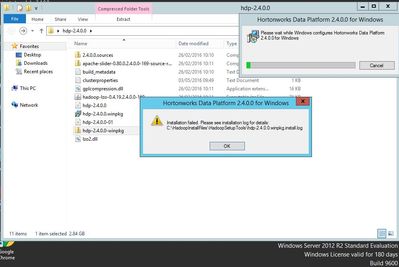
I installed Single node HDP2.4.0.0 Cluster on windows server 2012 R2 Standard in VM Workstation.When i install the package it shows errors.Here i am sharing Error Image and log files..Please give me the solution..
- Labels:
-
Hortonworks Data Platform (HDP)


Created on 05-03-2016 09:02 AM - edited 08-19-2019 02:56 AM
- Mark as New
- Bookmark
- Subscribe
- Mute
- Subscribe to RSS Feed
- Permalink
- Report Inappropriate Content
logs.txt Please see the attachments and give me the best solution to complete my installation Used Ref Link https://docs.hortonworks.com/HDPDocuments/HDP2/HDP-2.4.0-Win/bk_QuickStart_HDPWin/bk_QuickStart_HDPW...


Created 05-03-2016 02:27 PM
- Mark as New
- Bookmark
- Subscribe
- Mute
- Subscribe to RSS Feed
- Permalink
- Report Inappropriate Content
Problem is user hadoop password:
CREATE-USER: Creating user hadoop
CREATE-USER: Setting password for hadoop
CREATE-USER FAILURE: Exception calling "SetInfo" with "0" argument(s): "The password does not meet the password policy requirements. Check the minimum password length, password complexity and password history requirements.
After this error setup start unistall process
HDP: Starting rollback
HDP: C:\HadoopInstallFiles\HadoopPackages\hdp-2.4.0.0-winpkg\scripts\uninstall.ps1
Try to respect complexity of password set on your win2012 server. (8 characters, symbol, number, etc).
Created 05-03-2016 02:27 PM
- Mark as New
- Bookmark
- Subscribe
- Mute
- Subscribe to RSS Feed
- Permalink
- Report Inappropriate Content
Problem is user hadoop password:
CREATE-USER: Creating user hadoop
CREATE-USER: Setting password for hadoop
CREATE-USER FAILURE: Exception calling "SetInfo" with "0" argument(s): "The password does not meet the password policy requirements. Check the minimum password length, password complexity and password history requirements.
After this error setup start unistall process
HDP: Starting rollback
HDP: C:\HadoopInstallFiles\HadoopPackages\hdp-2.4.0.0-winpkg\scripts\uninstall.ps1
Try to respect complexity of password set on your win2012 server. (8 characters, symbol, number, etc).
Created 05-04-2016 10:41 AM
- Mark as New
- Bookmark
- Subscribe
- Mute
- Subscribe to RSS Feed
- Permalink
- Report Inappropriate Content
Yes after change the password complexity its successfully installed ...Thank u


