
Our Community is getting an upgrade! To get everything ready for the relaunch, we’ll be placing the site in read-only mode starting September 21st.
We really appreciate your understanding while we get things set up behind the scenes. Catch up on all the exciting details about the move here.
Need help or have questions? Drop us a line at [email protected]

Archives of Support Questions (Read Only)
- Cloudera Community
- Board Archive
- Archives of Support Questions (Read Only)
- I used GetFTP processor to get a CSV file from fil...
- Subscribe to RSS Feed
- Mark Question as New
- Mark Question as Read
- Float this Question for Current User
- Bookmark
- Subscribe
- Mute
- Printer Friendly Page
- Subscribe to RSS Feed
- Mark Question as New
- Mark Question as Read
- Float this Question for Current User
- Bookmark
- Subscribe
- Mute
- Printer Friendly Page
I used GetFTP processor to get a CSV file from filezilla and transferred it to a PUTFILE. it worked but when I open the directory where I wanted the file to save in laptop. It's not there.
- Labels:
-
Apache NiFi


Created on 09-21-2017 12:33 AM - edited 09-16-2022 05:16 AM
- Mark as New
- Bookmark
- Subscribe
- Mute
- Subscribe to RSS Feed
- Permalink
- Report Inappropriate Content

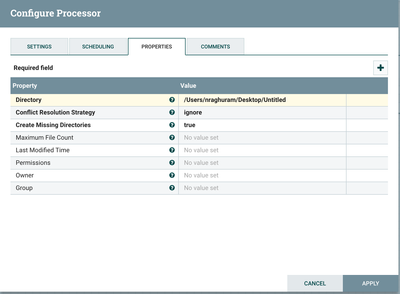
As you can see the 3 mb got transferred in screenshot - 1. And in the screenshot -2 I am specifying my Path where I want it stored. I basically want the CSV file written in the untitled text file. Am I doing it right.? I very new to NIFI. Please Help..:


Created on 09-21-2017 10:03 PM - edited 08-18-2019 12:22 AM
- Mark as New
- Bookmark
- Subscribe
- Mute
- Subscribe to RSS Feed
- Permalink
- Report Inappropriate Content
@Shailesh Nookala
Sure, if you are thinking to insert the data to Sql Server we
can do that by using NiFi, You don’t have to download the file at all.
You can do that couple of ways by using ExtractText Processor and extract all the contents of csv file into attributes and prepare insert statement by using ReplaceText Processor and push the data to Sql server.
Another method is preparing json document for input CSV file
and extracting all the attributes of flow file and prepare record to insert
data to SQL server.
I’m using Json method which is easy to extract attributes of flowfiles.
Example:-
Let’s consider you
are having the csv file having just 2 records in it.
1,test,1000
2,test1,2000
As I’m using NiFi 1.1 there is no direct processor which can convert the incoming csv file to json.
we need to follow
InferAvroSchema--> ConvertCSVToAvro --> ConvertAvroToJSON
the output would be in Json format with the same contents of our input
CSV file.
But in new versions of NiFi(I think from 1.3) there are processors to convert
CSV to Json directly using ConvertRecord Processor.
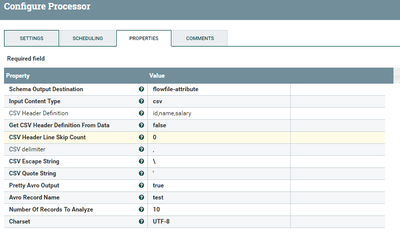
InferAvroSchema:-
In this processor I’m giving the incoming csv file
definition (or) you can read header definition from incoming flowfile by
changing Get CSV Header Definition From Data property to true NiFi can
read definition from 1 line of file.
as I know my incoming file having id,name,salary I have given this definition
and keep Schema Output Destination to flowfile-attribute we can make use
of this schema in ConvertCSVToAvro
processor.
ConvertCSVToAvro:-
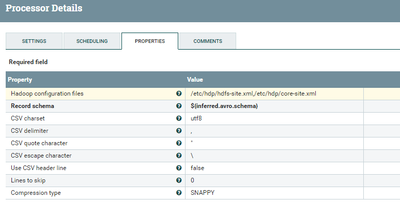
change the Record Schema property to
${inferred.avro.schema}Which can infer the schema from flowfile attribute.
ConvertAvroToJSON:-
drag and drop ConvertAvroToJSON processor and leave the properties
to default.
Output:-
[{"id": 1, "name":
"test", "salary": 1000},{"id": 2,
"name": "test1", "salary": 2000}]
SplitJson:-
If you are having more than 1 record in your csv file use
splitjson processor because if ConvertAvroToJSON
processors find more than one record in the flowfile it will make an array and
keep all the records inside the array.
As we need only 1 record in the flowfile before inserting data to Sqlserver.
If your flowfile having array then json path expression property should be
$.*
as it will dynamically splits the array of records to one record for one flowfile.
Input:-
[{"id": 1, "name": "test","salary": 1000},{"id": 2, "name":"test1", "salary": 2000}]Output:-
flowfile1:-
{"id": 1, "name": "test", "salary":
1000}flowfile2:-
{"id": 2, "name": "test1", "salary":
2000}
As Splijson splits the array into individual records.
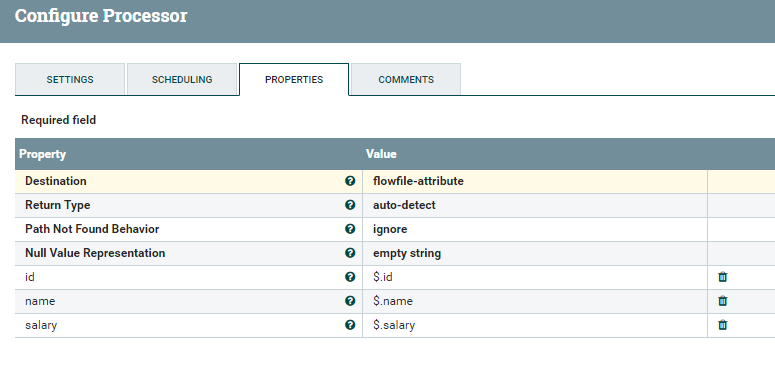
EvaluateJsonPath configs:-
in this processor extracting all the contents of flowfile to attributes
by changing the list of properties
Destination as flowfile-attribute
extracting contents of json file by adding new properties by clicking + symbol on right corner.
id as $.id

name as $.name

salary as $.salary
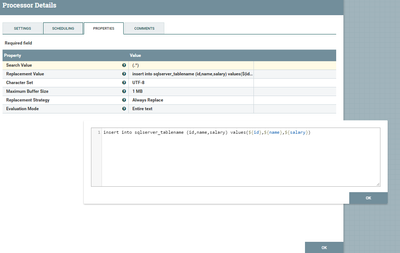
ReplaceText Configs:-
We are preparing insert statement in this processor and change
Replacement Strategy property as AlwaysReplace
Use insert statement and give destination table name and use the extracted attributes to replace the contents of values dynamically.
insert into sqlserver_tablename (id,name,salary) values (${id},${name},${salary})output:-
flowfile1 content:-
insert into sqlserver_tablename (id,name,salary) values(1,test,1000)
flowfile2 content:-
insert into sqlserver_tablename (id,name,salary) values(2,test1,2000)
use putsql processor and make a connection pool to sql server enable and use the connection pool.
so Putsql processor will executes all the insert statements that we are having contents of the flowfile and all the data will get inserted to sql server.
FlowScreenshot:-
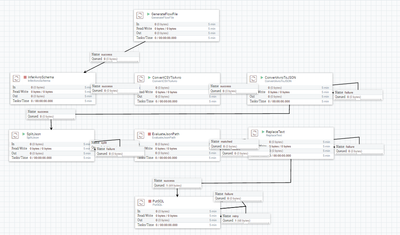
Created on 09-24-2017 09:36 PM - edited 08-18-2019 12:21 AM
- Mark as New
- Bookmark
- Subscribe
- Mute
- Subscribe to RSS Feed
- Permalink
- Report Inappropriate Content
Hi..I changed the relationship in all my processors. I get this error in all of them. Please take a look.
I am getting the relationship error in all my processors.
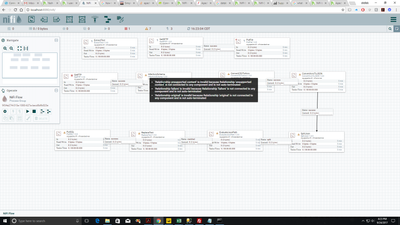
This is what I did in the bridge that connects "InferAvroSchema" and "convert CSV to AVRO".(screenshot - 2)
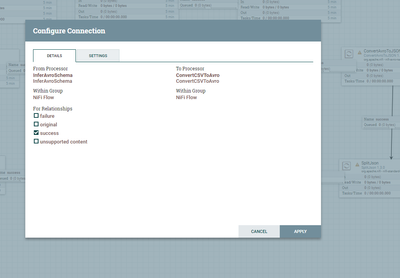
This is my "inferavro" configuration
.
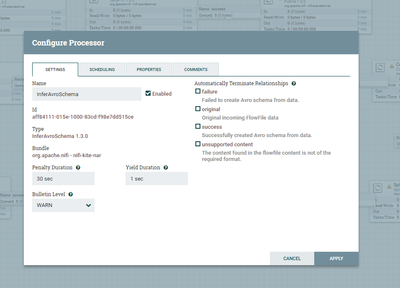
When I select success in "Automatically terminate relationships" it gets selected and after I connect it to the next processor it gets un-selected automatically.
Please take a look.
Created on 09-24-2017 11:42 PM - edited 08-18-2019 12:21 AM
- Mark as New
- Bookmark
- Subscribe
- Mute
- Subscribe to RSS Feed
- Permalink
- Report Inappropriate Content
@Shailesh Nookala
as you have given Inferavroschema processor Success relation to convertAvrotoJson processor then you need to
- Except success relation
- Auto terminate the following relations failure,original,unsupported content i.e click on the check boxes for these 3 relations.
- Make sure you haven't selected success relation.
- Click on Apply button
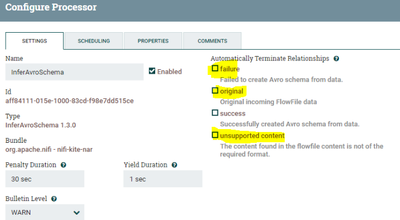
why we haven't Autoterminated Success Relation?
Reason is we have connected success relation to convertavrotojson processor.
Once you are done with this do the same steps for all the other processors auto terminate all the relations Except the relation that you have connected to the next processor.
For the final processor(PutSQL) Auto Terminate success and reconnect failure and retry to the same processor.
Created on 10-08-2017 04:27 AM - edited 08-18-2019 12:21 AM
- Mark as New
- Bookmark
- Subscribe
- Mute
- Subscribe to RSS Feed
- Permalink
- Report Inappropriate Content
Can you please help me fix this error. It says Incorrect syntax near','. Not able to figure out where I am making this error.

This is my CSV file.
My insert statement is
insert into [test_shailesh].[dbo].[nifiTest](policyID,statecode,county) values (${policyID},${statecode},${county})
Created on 10-08-2017 04:03 PM - edited 08-18-2019 12:20 AM
- Mark as New
- Bookmark
- Subscribe
- Mute
- Subscribe to RSS Feed
- Permalink
- Report Inappropriate Content
This is the output of my EVALUATEJSONPATH Processor -

Guess this is fine.
This is the output of my REPLACETEXT processor
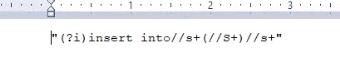
Don't really much about this.
This is the output of my PUTSQL processor

If you see the values section is blank with just two commas. Can you please tell me what is going wrong.
My insert statement in REPLACETEXT processor
insert into [test_shailesh].[dbo].[nifiTest](policyID,statecode,county) values (${policyID},${statecode},${county})
my overall flow -
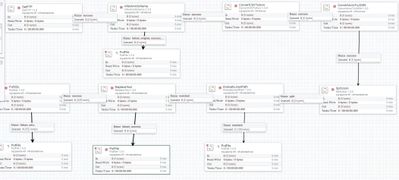
Created 10-08-2017 05:11 PM
- Mark as New
- Bookmark
- Subscribe
- Mute
- Subscribe to RSS Feed
- Permalink
- Report Inappropriate Content
I am not able to attach my CSV file. My CSV file has these two records.
policyID,statecode,county
498960,498960,498960
498960,498960,792148
name of my CSV file - FL_insurance_sample.csv
I created a table in my sql server with these three columns names all being varchar data type.
Created 10-08-2017 05:41 PM
- Mark as New
- Bookmark
- Subscribe
- Mute
- Subscribe to RSS Feed
- Permalink
- Report Inappropriate Content
@Shailesh Nookala, i tested out with your csv file its working fine, can you attach all of your processors configs screenshots please.
Created on 10-09-2017 12:37 PM - edited 08-18-2019 12:19 AM
- Mark as New
- Bookmark
- Subscribe
- Mute
- Subscribe to RSS Feed
- Permalink
- Report Inappropriate Content
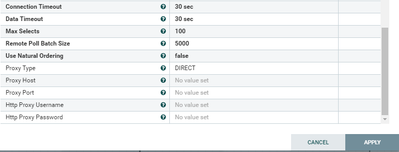
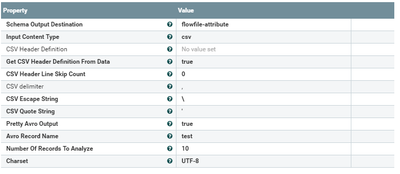
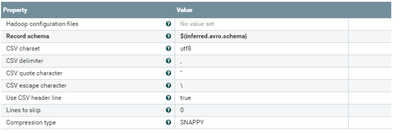
Sure man. Here are the screenshots of all my processors -
1) GetFTP processor -
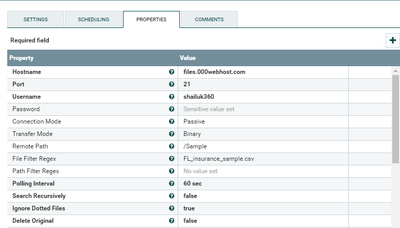
(contd)
2) InferAROSchema -
3) ConvertCSVtoAVRO
4) AVROToJSON -

(I'll post the rest it in the next answer since I allowed to post only 5 attachments)
Created 10-09-2017 01:43 PM
- Mark as New
- Bookmark
- Subscribe
- Mute
- Subscribe to RSS Feed
- Permalink
- Report Inappropriate Content
It worked man! Thank you so very much:)
LoL. One last thing, What if the my table has more number of columns lets say 15-20 columns. Do we still have to hard code all the column names in the processors.?
eg -
In the insert statement (in replaceText processor) where we do
insert into table_name value (${column1},${column2}................)
Is there a way that nifi can do this dynamically? I mean if there are 20-25 columns in my table then it would be a pain to mention all the column names in the insert statement. Can I use regex or something.?

- « Previous
-
- 1
- 2
- Next »

