
Our Community is getting an upgrade! To get everything ready for the relaunch, we’ll be placing the site in read-only mode starting September 21st.
We really appreciate your understanding while we get things set up behind the scenes. Catch up on all the exciting details about the move here.
Need help or have questions? Drop us a line at [email protected]

Archives of Support Questions (Read Only)
- Cloudera Community
- Board Archive
- Archives of Support Questions (Read Only)
- I was installing sqoop on a node but it failed due...
- Subscribe to RSS Feed
- Mark Question as New
- Mark Question as Read
- Float this Question for Current User
- Bookmark
- Subscribe
- Mute
- Printer Friendly Page
- Subscribe to RSS Feed
- Mark Question as New
- Mark Question as Read
- Float this Question for Current User
- Bookmark
- Subscribe
- Mute
- Printer Friendly Page
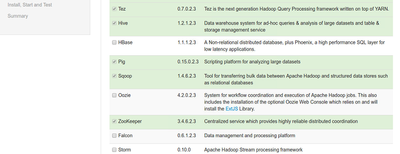
I was installing sqoop on a node but it failed due to repository error. It's actually not installed but displays on Ambari UI as in pic. No option to install again through +Add Service. How to remove it from Amabri to install again?
- Labels:
-
Apache Ambari
-
Apache Sqoop


Created on 04-14-2017 11:16 PM - edited 08-17-2019 10:36 PM
- Mark as New
- Bookmark
- Subscribe
- Mute
- Subscribe to RSS Feed
- Permalink
- Report Inappropriate Content




Created 04-15-2017 03:13 AM
- Mark as New
- Bookmark
- Subscribe
- Mute
- Subscribe to RSS Feed
- Permalink
- Report Inappropriate Content
Did you try using the Ambari UI "Sqoop" --> "Service Actions" --> "Delete Service" option to delete Sqoop client ?
Else you can try the Ambari API approach as well to delete the sqoop as following:
curl -iv -u admin:admin -H "X-Requested-By: ambari" -X DELETE http://${AMBARI_HOSTNMAE}:8080/api/v1/clusters/Sandbox/services/SQOOP
.
Created 04-15-2017 03:13 AM
- Mark as New
- Bookmark
- Subscribe
- Mute
- Subscribe to RSS Feed
- Permalink
- Report Inappropriate Content
Did you try using the Ambari UI "Sqoop" --> "Service Actions" --> "Delete Service" option to delete Sqoop client ?
Else you can try the Ambari API approach as well to delete the sqoop as following:
curl -iv -u admin:admin -H "X-Requested-By: ambari" -X DELETE http://${AMBARI_HOSTNMAE}:8080/api/v1/clusters/Sandbox/services/SQOOP
.
Created 04-15-2017 09:14 PM
- Mark as New
- Bookmark
- Subscribe
- Mute
- Subscribe to RSS Feed
- Permalink
- Report Inappropriate Content
Hello Jay. where is these tabs you mentioned: Sqoop" --> "Service Actions" --> "Delete Service.
Created 04-15-2017 09:32 PM
- Mark as New
- Bookmark
- Subscribe
- Mute
- Subscribe to RSS Feed
- Permalink
- Report Inappropriate Content
Ambari API worked for me. Thanks for the help.
Created 04-15-2017 03:17 AM
- Mark as New
- Bookmark
- Subscribe
- Mute
- Subscribe to RSS Feed
- Permalink
- Report Inappropriate Content


