
Our Community is getting an upgrade! To get everything ready for the relaunch, we’ll be placing the site in read-only mode starting September 21st.
We really appreciate your understanding while we get things set up behind the scenes. Catch up on all the exciting details about the move here.
Need help or have questions? Drop us a line at [email protected]

Archives of Support Questions (Read Only)
- Cloudera Community
- Board Archive
- Archives of Support Questions (Read Only)
- Re: In Azure, I ssh into my Sandbox VM but can't S...
- Subscribe to RSS Feed
- Mark Question as New
- Mark Question as Read
- Float this Question for Current User
- Bookmark
- Subscribe
- Mute
- Printer Friendly Page
- Subscribe to RSS Feed
- Mark Question as New
- Mark Question as Read
- Float this Question for Current User
- Bookmark
- Subscribe
- Mute
- Printer Friendly Page
In Azure, I ssh into my Sandbox VM but can't SETUP AMBARI ADMIN PASSWORD MANUALLY
- Labels:
-
Hortonworks Data Platform (HDP)


Created 02-02-2017 11:59 PM
- Mark as New
- Bookmark
- Subscribe
- Mute
- Subscribe to RSS Feed
- Permalink
- Report Inappropriate Content
As you can see below, I am in my Azure VM. I am trying to reset the admin password for the ambari following this link (http://hortonworks.com/hadoop-tutorial/learning-the-ropes-of-the-hortonworks-sandbox/#explore-ambari-azure)
I see that I have HDP 2.5.0. I don't see the ambari-admin-password or ambari-agent commands.
Can someone explain how I can manually reset the ambari admin password assuming that is needed to ambari dashboard on port 8080 as admin. I can successfully use the ambari dashboard as maria_dev.
thanks. - Colin
.....
[azure@sandbox ~]$ sudo ambari-admin-password-reset sudo: ambari-admin-password-reset: command not found [azure@sandbox ~]$ sudo ambari-admin-password-reset sudo: ambari-admin-password-reset: command not found [azure@sandbox ~]$ sudo su - root Last login: Thu Feb 2 23:28:33 UTC 2017 on pts/1 Last failed login: Thu Feb 2 23:48:17 UTC 2017 from 58.218.204.183 on ssh:notty There were 361 failed login attempts since the last successful login. [root@sandbox ~]# sudo ambari-admin-password-reset sudo: ambari-admin-password-reset: command not found [root@sandbox ~]# ambari-agent restart -bash: ambari-agent: command not found [root@sandbox ~]#


Created on 02-03-2017 12:30 AM - edited 08-18-2019 05:11 AM
- Mark as New
- Bookmark
- Subscribe
- Mute
- Subscribe to RSS Feed
- Permalink
- Report Inappropriate Content
It looks like the tutorial has you ssh into port 22. However, the Azure setup page has the following:
ssh into the VM by going to http://<hostname/ipaddress>:4200 and
log in with the credentials provided during the setup of offering.
Here is the screenshot from my setup:
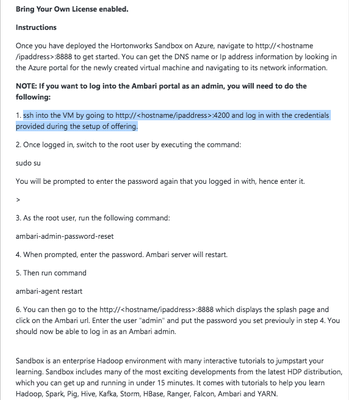
You should also be able to use the web ssh client via the GUI to connect to the shell.
Created on 02-03-2017 12:30 AM - edited 08-18-2019 05:11 AM
- Mark as New
- Bookmark
- Subscribe
- Mute
- Subscribe to RSS Feed
- Permalink
- Report Inappropriate Content
It looks like the tutorial has you ssh into port 22. However, the Azure setup page has the following:
ssh into the VM by going to http://<hostname/ipaddress>:4200 and
log in with the credentials provided during the setup of offering.
Here is the screenshot from my setup:
You should also be able to use the web ssh client via the GUI to connect to the shell.
Created 02-03-2017 02:50 AM
- Mark as New
- Bookmark
- Subscribe
- Mute
- Subscribe to RSS Feed
- Permalink
- Report Inappropriate Content
@Michael Young I won't claim to understand but, after adding WebSSL at port 4200 into my network security group and disconnecting from VPN (to avoid SOCKS proxy details), I was able to login as root/hadoop. i then changed the root password and am back on my feet. Thank you. I am curious where you found the detail on the need for port 4200 that you pasted. It is not contained in the Azure HDP Sandbox tutorial. Thanks again, - Colin
Created 02-03-2017 03:24 PM
- Mark as New
- Bookmark
- Subscribe
- Mute
- Subscribe to RSS Feed
- Permalink
- Report Inappropriate Content


