
Our Community is getting an upgrade! To get everything ready for the relaunch, we’ll be placing the site in read-only mode starting September 21st.
We really appreciate your understanding while we get things set up behind the scenes. Catch up on all the exciting details about the move here.
Need help or have questions? Drop us a line at [email protected]

Archives of Support Questions (Read Only)
- Cloudera Community
- Board Archive
- Archives of Support Questions (Read Only)
- Increasing the HDFS Disk size in HDP 2.3 3 node cl...
- Subscribe to RSS Feed
- Mark Question as New
- Mark Question as Read
- Float this Question for Current User
- Bookmark
- Subscribe
- Mute
- Printer Friendly Page
- Subscribe to RSS Feed
- Mark Question as New
- Mark Question as Read
- Float this Question for Current User
- Bookmark
- Subscribe
- Mute
- Printer Friendly Page
Increasing the HDFS Disk size in HDP 2.3 3 node cluster
- Labels:
-
Apache Hadoop


Created on 02-25-2016 11:45 AM - edited 08-18-2019 05:06 AM
- Mark as New
- Bookmark
- Subscribe
- Mute
- Subscribe to RSS Feed
- Permalink
- Report Inappropriate Content
In the 3 node cluster installation for POC, My 3rd note is datanode, it has a disk space of about 200 GB.
As per the widget, my current HDFS Usage is as follows:
DFS Used: 512.8 MB (1.02%); non DFS used 8.1 GB (16.52%); remaining 40.4GB (82.46 %)
When I do df -h to check the disk size i can see a lot of space is taken by tmpfs as shown in the following screenshot:
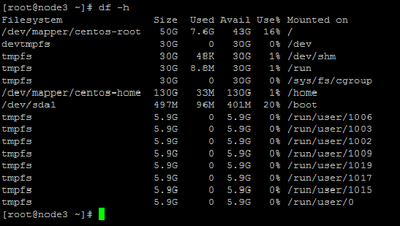
How can I increase my HDFS disk size?


Created 02-25-2016 11:49 AM
- Mark as New
- Bookmark
- Subscribe
- Mute
- Subscribe to RSS Feed
- Permalink
- Report Inappropriate Content
tmpfs is out of pic.
You need to increase /home space ...Is it a vm? If yes then you can reach out to system admin to allocate more space to /home
If it's bare metal then attach another disk and make it part of your cluster.
Created 02-26-2016 10:06 AM
- Mark as New
- Bookmark
- Subscribe
- Mute
- Subscribe to RSS Feed
- Permalink
- Report Inappropriate Content
Yes as its your root where you have hadoop data
Created 02-28-2016 01:07 PM
- Mark as New
- Bookmark
- Subscribe
- Mute
- Subscribe to RSS Feed
- Permalink
- Report Inappropriate Content
@Kunal Gaikwad Did it work out fine?
Created 03-16-2016 01:54 PM
- Mark as New
- Bookmark
- Subscribe
- Mute
- Subscribe to RSS Feed
- Permalink
- Report Inappropriate Content
yes we did increase the root space without hampering the installation, we did follow simple process of increasing the size. we created a external virtual space and merged with root


Created 09-21-2016 02:29 PM
- Mark as New
- Bookmark
- Subscribe
- Mute
- Subscribe to RSS Feed
- Permalink
- Report Inappropriate Content
how to increase it for no vm please @Neeraj Sabharwal

Created 03-07-2016 06:52 AM
- Mark as New
- Bookmark
- Subscribe
- Mute
- Subscribe to RSS Feed
- Permalink
- Report Inappropriate Content
How did you solve this problem ?

- « Previous
-
- 1
- 2
- Next »

