
Our Community is getting an upgrade! To get everything ready for the relaunch, we’ll be placing the site in read-only mode starting September 21st.
We really appreciate your understanding while we get things set up behind the scenes. Catch up on all the exciting details about the move here.
Need help or have questions? Drop us a line at [email protected]

Archives of Support Questions (Read Only)
- Cloudera Community
- Board Archive
- Archives of Support Questions (Read Only)
- 'Input directory' validated against '/tmp/nifi/inp...
- Subscribe to RSS Feed
- Mark Question as New
- Mark Question as Read
- Float this Question for Current User
- Bookmark
- Subscribe
- Mute
- Printer Friendly Page
- Subscribe to RSS Feed
- Mark Question as New
- Mark Question as Read
- Float this Question for Current User
- Bookmark
- Subscribe
- Mute
- Printer Friendly Page
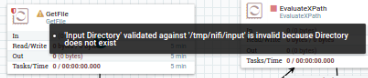
'Input directory' validated against '/tmp/nifi/input' is invalid because directory does not exist


Created on 05-15-2017 09:42 PM - edited 09-16-2022 04:37 AM
- Mark as New
- Bookmark
- Subscribe
- Mute
- Subscribe to RSS Feed
- Permalink
- Report Inappropriate Content
Hello,
i'm on the tutorial 'ANALYZE TRAFFIC PATTERNS WITH APACHE NIFI', unfortunately i'm having a problem, nifi can't access the repository where my data is.
Here is the general schema:
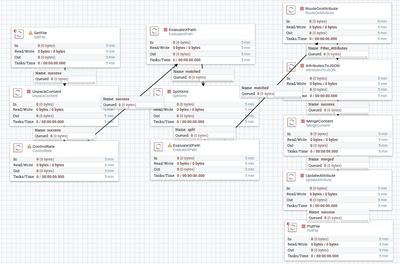
The error: (Getfile processor)
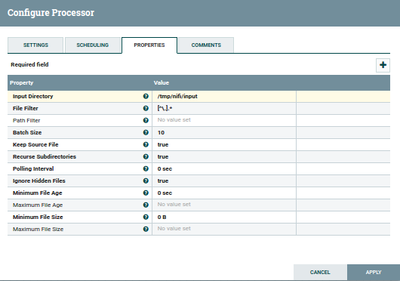
The processor configuration.
The directory on files view:

versions: HDP 2.6
Nifi: nifi-1.1.0.2.1.2.0-10-bin (added as a service to hdp sandbox)
Thanks !


Created 05-16-2017 12:54 AM
- Mark as New
- Bookmark
- Subscribe
- Mute
- Subscribe to RSS Feed
- Permalink
- Report Inappropriate Content
The file path in GetFile configuration is referring to the local file path where the NiFi instance is installed. Your screenshot showing /tmp/nifi/input is on HDFS, not the local OS.
Please create /tmp/nifi/input on the linux OS where nifi is installed and place your data in there. Your GetFile processor, as configured, will find it there.
(Note: if you wanted to retrieve a file for hdfs, you would use GetHDFS processor https://nifi.apache.org/docs.html. Part of the config for this is pointing to a local copy of hadoop config files pulled from the cluster. The processor uses these files to connect to hdfs. See link for details.)
Created 05-16-2017 12:54 AM
- Mark as New
- Bookmark
- Subscribe
- Mute
- Subscribe to RSS Feed
- Permalink
- Report Inappropriate Content
The file path in GetFile configuration is referring to the local file path where the NiFi instance is installed. Your screenshot showing /tmp/nifi/input is on HDFS, not the local OS.
Please create /tmp/nifi/input on the linux OS where nifi is installed and place your data in there. Your GetFile processor, as configured, will find it there.
(Note: if you wanted to retrieve a file for hdfs, you would use GetHDFS processor https://nifi.apache.org/docs.html. Part of the config for this is pointing to a local copy of hadoop config files pulled from the cluster. The processor uses these files to connect to hdfs. See link for details.)

Created 06-14-2017 12:14 PM
- Mark as New
- Bookmark
- Subscribe
- Mute
- Subscribe to RSS Feed
- Permalink
- Report Inappropriate Content
You can follow below steps
1 -- Hi you can do one thing manually move to tmp folder(or any folder) in your VirtualBox/VM and there just create a folder name it as nifi , and again under nifi create another folder named it as input .
2 -- if you have downloade that auto_script.zip then its fine you can proceed with the tutorial.
3 -- If not then manually download the traffic_simulator.zip file inside the input folder, from trafficLocs_data_for_simulator.zip(https://raw.githubusercontent.com/hortonworks/data-tutorials/master/tutorials/hdf/analyze-traffic-pattern-with-apache-nifi/assets/trafficLocs_data_for_simulator.zip).
4 -- Now you can start/run your dataflow.


