
Our Community is getting an upgrade! To get everything ready for the relaunch, we’ll be placing the site in read-only mode starting September 21st.
We really appreciate your understanding while we get things set up behind the scenes. Catch up on all the exciting details about the move here.
Need help or have questions? Drop us a line at [email protected]

Archives of Support Questions (Read Only)
- Cloudera Community
- Board Archive
- Archives of Support Questions (Read Only)
- Installed sandbox but can't get the welcome / HDP ...
- Subscribe to RSS Feed
- Mark Question as New
- Mark Question as Read
- Float this Question for Current User
- Bookmark
- Subscribe
- Mute
- Printer Friendly Page
- Subscribe to RSS Feed
- Mark Question as New
- Mark Question as Read
- Float this Question for Current User
- Bookmark
- Subscribe
- Mute
- Printer Friendly Page
Installed sandbox but can't get the welcome / HDP page working
- Labels:
-
Hortonworks Data Platform (HDP)


Created on 01-16-2016 11:37 AM - edited 09-16-2022 02:57 AM
- Mark as New
- Bookmark
- Subscribe
- Mute
- Subscribe to RSS Feed
- Permalink
- Report Inappropriate Content
Hi, I have installed HDP2.3.2 sandbox and can login to the linux env. Before that, I get the page where instructions ask to login to welcome/HDP page using http://<ip_address>/. When i try this using Chrome/IE versions as per the instructed versions, it comes back with "This webpage is not available". I also tried using port 8888 and 8080 along with ip_address, but still the response is same. I further tried to execute sanbox in "host-only" configuration, now the ip is changed to 127.0.0.1, but the start up process gives error of adaptor not available and still the welcome/HDP page doesn't come up.
Please guide if i am missing anything important. Thanks a lot in advance for all your valuable feedback.


Created 01-16-2016 03:50 PM
- Mark as New
- Bookmark
- Subscribe
- Mute
- Subscribe to RSS Feed
- Permalink
- Report Inappropriate Content



Created 01-16-2016 03:19 PM
- Mark as New
- Bookmark
- Subscribe
- Mute
- Subscribe to RSS Feed
- Permalink
- Report Inappropriate Content
@Gagan Dutt It's hard to tell from the description but are you able to ssh to the vm via root@<ipaddress>? Instead of the ip have you also tried using "http://sandbox.hortonworks.com:8080"
Created 01-16-2016 04:25 PM
- Mark as New
- Bookmark
- Subscribe
- Mute
- Subscribe to RSS Feed
- Permalink
- Report Inappropriate Content
@Scott Shaw I can do ssh via root@<ipaddress> as well as [email protected]. I also tried using http://sandbox.hortonworks.com:8080, but the result is same "This webpage is not available".
Created 01-16-2016 03:50 PM
- Mark as New
- Bookmark
- Subscribe
- Mute
- Subscribe to RSS Feed
- Permalink
- Report Inappropriate Content
Created 01-16-2016 07:34 PM
- Mark as New
- Bookmark
- Subscribe
- Mute
- Subscribe to RSS Feed
- Permalink
- Report Inappropriate Content
Created 01-17-2016 03:34 PM
- Mark as New
- Bookmark
- Subscribe
- Mute
- Subscribe to RSS Feed
- Permalink
- Report Inappropriate Content
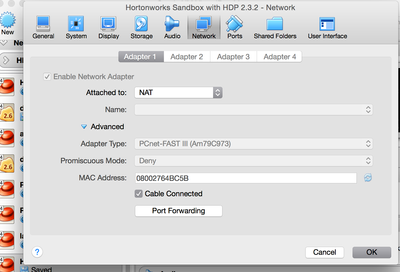
@Neeraj Sabharwal http://127.0.0.1:8080 results in same error message .. The webpage is not available. I can run hadoop and other commands though in sandbox env. [This with adapter setting as "NAT"]
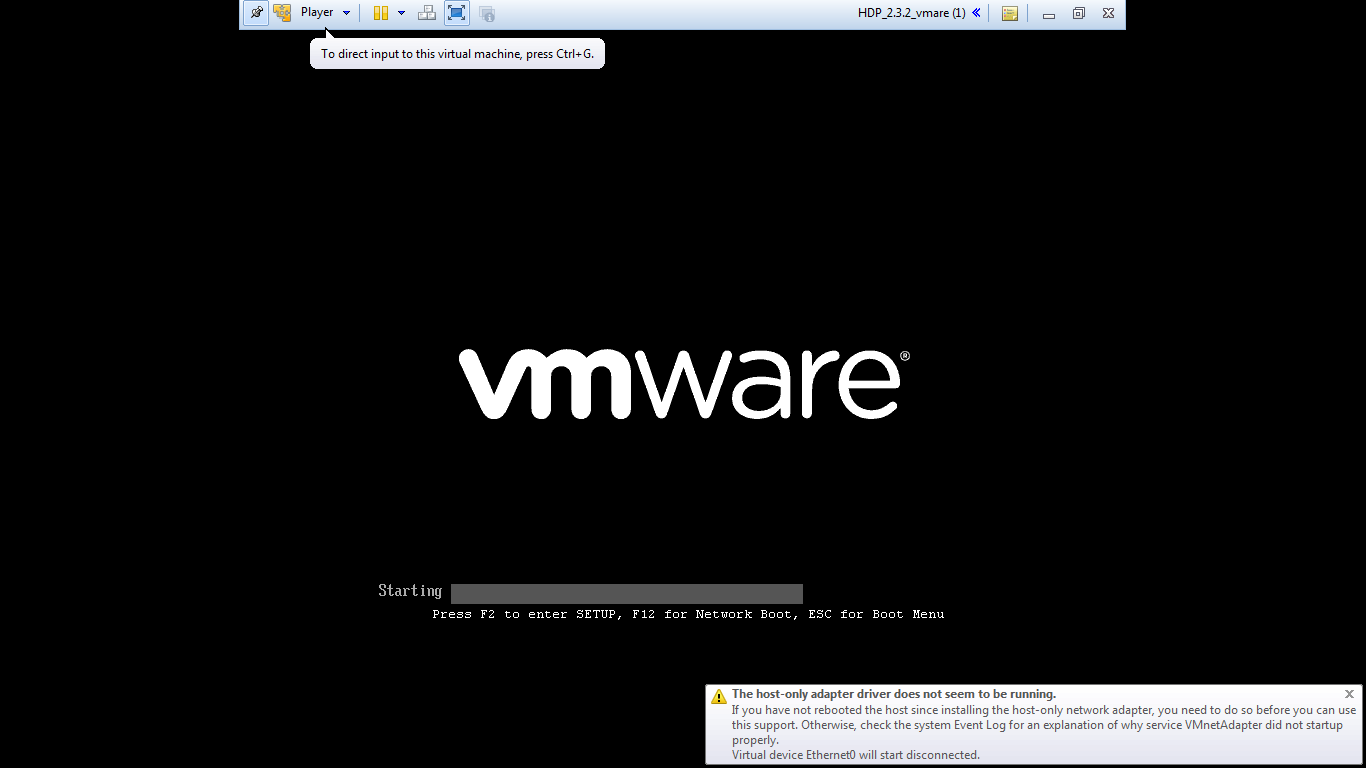
When trying to run sandbox in host-only configuration, it gives the error "The host-only adapter does not seems to be running". And same response for welcome/HDP page comes up.
Created 01-17-2016 03:35 PM
- Mark as New
- Bookmark
- Subscribe
- Mute
- Subscribe to RSS Feed
- Permalink
- Report Inappropriate Content
Screen shot ?
Created 01-17-2016 03:54 PM
- Mark as New
- Bookmark
- Subscribe
- Mute
- Subscribe to RSS Feed
- Permalink
- Report Inappropriate Content
error-screen-shot.jpeg Please find it attached.
Created on 01-17-2016 04:50 PM - edited 08-19-2019 05:10 AM
- Mark as New
- Bookmark
- Subscribe
- Mute
- Subscribe to RSS Feed
- Permalink
- Report Inappropriate Content
@Gagan Dutt I am sure that you have rebooted the vm.
In my case, I have only 1 adapter configure and 127.0.0.1:8080 works.
telnet 127.0.0.1 8080 --> whats the output of this?
Created 01-18-2016 09:07 AM
- Mark as New
- Bookmark
- Subscribe
- Mute
- Subscribe to RSS Feed
- Permalink
- Report Inappropriate Content
@Neeraj Sabharwal telnet with and without port (8080,8888) results in "Could not open connection to the host, on port 23(default)/Specified Port: Connect failed"


