
Our Community is getting an upgrade! To get everything ready for the relaunch, we’ll be placing the site in read-only mode starting September 21st.
We really appreciate your understanding while we get things set up behind the scenes. Catch up on all the exciting details about the move here.
Need help or have questions? Drop us a line at [email protected]

Archives of Support Questions (Read Only)
- Cloudera Community
- Board Archive
- Archives of Support Questions (Read Only)
- InvokeHTTP error.
- Subscribe to RSS Feed
- Mark Question as New
- Mark Question as Read
- Float this Question for Current User
- Bookmark
- Subscribe
- Mute
- Printer Friendly Page
- Subscribe to RSS Feed
- Mark Question as New
- Mark Question as Read
- Float this Question for Current User
- Bookmark
- Subscribe
- Mute
- Printer Friendly Page
InvokeHTTP error.


Created on 10-13-2016 09:05 PM - edited 08-19-2019 02:30 AM
- Mark as New
- Bookmark
- Subscribe
- Mute
- Subscribe to RSS Feed
- Permalink
- Report Inappropriate Content
Hi,
I am trying to use InvokeHTTP with the same info as below..(this is generated from a successful call from the vendors test page)...and getting sockettimeout error.
curl -X POST --header "Content-Type: application/x-www-form-urlencoded" --header "Accept: application/vnd.api+json" -d "grant_type=password&client_id=myclientid&client_secret=myclientsecret&username=Saikrishna.Tarapareddy@mycompany&password=mypassword" "https://api.socialcode.com/oauth2/token"
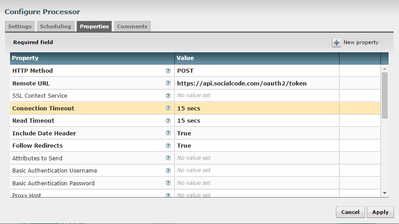
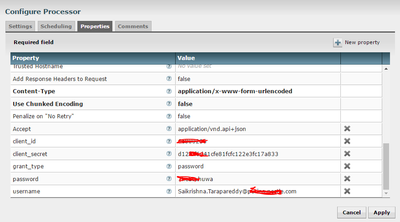
Here is how my invokeHttp process looks.i tried to match all inputs as dynamic properties.
thanks for your help..
Created on 10-20-2016 07:53 PM - edited 08-19-2019 02:30 AM
- Mark as New
- Bookmark
- Subscribe
- Mute
- Subscribe to RSS Feed
- Permalink
- Report Inappropriate Content
it worked when i changed my ReplaceText to the format below. i think this has to do with the mime-type urlencoded.
remember we cannot send special chars like @
i had to send it as %40
This is how the ReplaceText processor looks..
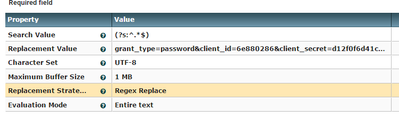
grant_type=password&client_id=6e880286&client_secret=d12f0f6d41cfe81fcfc122e3fc17a833&username=Saikrishna.Tarapareddy%40purina.nestle.com&password=7heStuhuwa
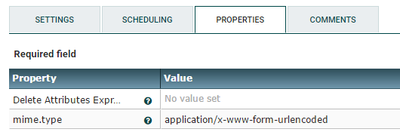
also i had mime.type = application/x-www-form-urlencoded in my updateattribute processor.
Thanks you all.


Created 10-13-2016 09:12 PM
- Mark as New
- Bookmark
- Subscribe
- Mute
- Subscribe to RSS Feed
- Permalink
- Report Inappropriate Content
According to the curl man page, the "-d" denotes the data. So everything you have in the quotes after "-d" would have to be the content of the FlowFile (which gets posted as the body).
Created 10-14-2016 03:46 PM
- Mark as New
- Bookmark
- Subscribe
- Mute
- Subscribe to RSS Feed
- Permalink
- Report Inappropriate Content
Since there is a similar thread below , i posted a detailed flow there.
i tried to send it as content from a flowfile but still not working.
Regards,
Sai



Created 10-13-2016 11:48 PM
- Mark as New
- Bookmark
- Subscribe
- Mute
- Subscribe to RSS Feed
- Permalink
- Report Inappropriate Content
You need to create an SSL context
see how to set up SSL here: https://community.hortonworks.com/articles/61180/streaming-ingest-of-google-sheets-into-a-connected....
Created 10-14-2016 12:03 AM
- Mark as New
- Bookmark
- Subscribe
- Mute
- Subscribe to RSS Feed
- Permalink
- Report Inappropriate Content
@Timothy Spann,
My NiFi is not SSL configured yet , can I still create SSL Context even if my NiFi instance is not.??
Created on 10-20-2016 07:53 PM - edited 08-19-2019 02:30 AM
- Mark as New
- Bookmark
- Subscribe
- Mute
- Subscribe to RSS Feed
- Permalink
- Report Inappropriate Content
it worked when i changed my ReplaceText to the format below. i think this has to do with the mime-type urlencoded.
remember we cannot send special chars like @
i had to send it as %40
This is how the ReplaceText processor looks..
grant_type=password&client_id=6e880286&client_secret=d12f0f6d41cfe81fcfc122e3fc17a833&username=Saikrishna.Tarapareddy%40purina.nestle.com&password=7heStuhuwa
also i had mime.type = application/x-www-form-urlencoded in my updateattribute processor.
Thanks you all.


