
Our Community is getting an upgrade! To get everything ready for the relaunch, we’ll be placing the site in read-only mode starting September 21st.
We really appreciate your understanding while we get things set up behind the scenes. Catch up on all the exciting details about the move here.
Need help or have questions? Drop us a line at [email protected]

Archives of Support Questions (Read Only)
- Cloudera Community
- Board Archive
- Archives of Support Questions (Read Only)
- Re: Is there a chance to bring the nfs gateway on ...
- Subscribe to RSS Feed
- Mark Question as New
- Mark Question as Read
- Float this Question for Current User
- Bookmark
- Subscribe
- Mute
- Printer Friendly Page
- Subscribe to RSS Feed
- Mark Question as New
- Mark Question as Read
- Float this Question for Current User
- Bookmark
- Subscribe
- Mute
- Printer Friendly Page
Is there a chance to bring the nfs gateway on HDP 2.5 sandbox up


Created on 09-30-2016 12:50 PM - edited 09-16-2022 03:42 AM
- Mark as New
- Bookmark
- Subscribe
- Mute
- Subscribe to RSS Feed
- Permalink
- Report Inappropriate Content
NFS Gateway Service seems to be broken on HDP 2.5 sanbox. I only see 0/1 Services started. Is there a chance to fix it quickly?

Created 10-21-2016 06:01 PM
- Mark as New
- Bookmark
- Subscribe
- Mute
- Subscribe to RSS Feed
- Permalink
- Report Inappropriate Content
Change the nfs dump directory to /tmp/.nfs OR /tmp/.hdfsnfs (remove - in the directory name) instead of /tmp/.hdfs-nfs via Ambari configs page. This will solve the issue.


Created 10-01-2016 02:58 PM
- Mark as New
- Bookmark
- Subscribe
- Mute
- Subscribe to RSS Feed
- Permalink
- Report Inappropriate Content
@Marc Schriever according to release notes for HDP 2.5 Sandbox, nfs is up automatically http://hortonworks.com/hadoop-tutorial/hortonworks-sandbox-guide/#section_1
HDFS Portmap – org.apache.hadoop.portmap.Portmap NameNode – org.apache.hadoop.hdfs.server.namenode.NameNode DataNode – org.apache.hadoop.hdfs.server.datanode.DataNode Nfs
Portmap – Unlike the other processes that are launched by hdfs user, these are run as root user. The nfs process doesn’t show up as a name for jps output
Created on 10-06-2016 11:13 AM - edited 08-19-2019 04:45 AM
- Mark as New
- Bookmark
- Subscribe
- Mute
- Subscribe to RSS Feed
- Permalink
- Report Inappropriate Content
Im wondering since the Amabari interface indicates, that the NFS Gateway is not started.
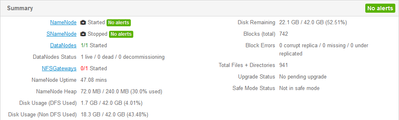
When I try to start it manually by typing
hdfs nfs3
I get the following error message
************************************************************/
16/10/06 11:08:15 INFO nfs3.Nfs3Base: registered UNIX signal handlers for [TERM, HUP, INT]
16/10/06 11:08:15 INFO impl.MetricsConfig: loaded properties from hadoop-metrics2.properties
16/10/06 11:08:16 INFO impl.MetricsSystemImpl: Scheduled snapshot period at 10 second(s).
16/10/06 11:08:16 INFO impl.MetricsSystemImpl: Nfs3 metrics system started
16/10/06 11:08:16 INFO oncrpc.RpcProgram: Will accept client connections from unprivileged ports
16/10/06 11:08:16 INFO security.ShellBasedIdMapping: Not doing static UID/GID mapping because '/etc/nfs.map' does not exist.
16/10/06 11:08:16 INFO nfs3.WriteManager: Stream timeout is 600000ms.
16/10/06 11:08:16 INFO nfs3.WriteManager: Maximum open streams is 256
16/10/06 11:08:16 INFO nfs3.OpenFileCtxCache: Maximum open streams is 256
16/10/06 11:08:16 INFO nfs3.RpcProgramNfs3: Configured HDFS superuser is
16/10/06 11:08:16 INFO nfs3.RpcProgramNfs3: Create new dump directory /tmp/.hdfs-nfs
Exception in thread "main" java.io.IOException: Cannot create dump directory /tmp/.hdfs-nfs
        at org.apache.hadoop.hdfs.nfs.nfs3.RpcProgramNfs3.clearDirectory(RpcProgramNfs3.java:239)
        at org.apache.hadoop.hdfs.nfs.nfs3.RpcProgramNfs3.<init>(RpcProgramNfs3.java:210)
        at org.apache.hadoop.hdfs.nfs.nfs3.RpcProgramNfs3.createRpcProgramNfs3(RpcProgramNfs3.java:225)
        at org.apache.hadoop.hdfs.nfs.nfs3.Nfs3.<init>(Nfs3.java:45)
        at org.apache.hadoop.hdfs.nfs.nfs3.Nfs3.startService(Nfs3.java:67)
        at org.apache.hadoop.hdfs.nfs.nfs3.Nfs3.main(Nfs3.java:73)
16/10/06 11:08:16 INFO nfs3.Nfs3Base: SHUTDOWN_MSG:
/************************************************************
SHUTDOWN_MSG: Shutting down Nfs3 at sandbox.hortonworks.com/172.17.0.2
************************************************************/
I didn't changed anything (except the admin password) on the sandbox environment.
Created 10-06-2016 03:15 PM
- Mark as New
- Bookmark
- Subscribe
- Mute
- Subscribe to RSS Feed
- Permalink
- Report Inappropriate Content
@Marc Schriever can you check permissions on /tmp directory
Created 10-07-2016 09:32 AM
- Mark as New
- Bookmark
- Subscribe
- Mute
- Subscribe to RSS Feed
- Permalink
- Report Inappropriate Content
[root@sandbox ~]# ls -la / | grep tmp
drwxrwxrwt   1 root  root    4096 Oct  7 09:25 tmp
When I try to create the directory manually, it doesn't work because of the following error message:
[root@sandbox ~]# mkdir -p /tmp/.hdfs-nfs
mkdir: cannot create directory `/tmp/.hdfs-nfs': Invalid Argument
If I try to create any other Directory, it works fine.
[root@sandbox ~]# mkdir -p /tmp/.hdfs-nfs_
[root@sandbox ~]#
Something blocks the creation of the Directory, but I don't know what.
Created 10-07-2016 12:53 PM
- Mark as New
- Bookmark
- Subscribe
- Mute
- Subscribe to RSS Feed
- Permalink
- Report Inappropriate Content
do ls on the directory, I believe it already exists, you just need to give it more permissions rather than try to create it.
Created 10-10-2016 12:51 PM
- Mark as New
- Bookmark
- Subscribe
- Mute
- Subscribe to RSS Feed
- Permalink
- Report Inappropriate Content
The Directory doesn't exist in /tmp.
[root@sandbox tmp]# ls -latr *hdfs-nfs*
ls: cannot access *hdfs-nfs*: No such file or directory

Created 10-21-2016 09:17 AM
- Mark as New
- Bookmark
- Subscribe
- Mute
- Subscribe to RSS Feed
- Permalink
- Report Inappropriate Content
up ? i've the same issue
Created 10-21-2016 06:01 PM
- Mark as New
- Bookmark
- Subscribe
- Mute
- Subscribe to RSS Feed
- Permalink
- Report Inappropriate Content
Change the nfs dump directory to /tmp/.nfs OR /tmp/.hdfsnfs (remove - in the directory name) instead of /tmp/.hdfs-nfs via Ambari configs page. This will solve the issue.

Created 12-24-2016 06:59 AM
- Mark as New
- Bookmark
- Subscribe
- Mute
- Subscribe to RSS Feed
- Permalink
- Report Inappropriate Content
Yes, after changing the directory name for 'NFSGateway dump directory' it works for me.
Regards
Niranjan


