
Our Community is getting an upgrade! To get everything ready for the relaunch, we’ll be placing the site in read-only mode starting September 21st.
We really appreciate your understanding while we get things set up behind the scenes. Catch up on all the exciting details about the move here.
Need help or have questions? Drop us a line at [email protected]

Archives of Support Questions (Read Only)
- Cloudera Community
- Board Archive
- Archives of Support Questions (Read Only)
- Issues In Installation for ambari Repo and Agent ...
- Subscribe to RSS Feed
- Mark Question as New
- Mark Question as Read
- Float this Question for Current User
- Bookmark
- Subscribe
- Mute
- Printer Friendly Page
- Subscribe to RSS Feed
- Mark Question as New
- Mark Question as Read
- Float this Question for Current User
- Bookmark
- Subscribe
- Mute
- Printer Friendly Page
Issues In Installation for ambari Repo and Agent Manually - Please assist
- Labels:
-
Apache Ambari


Created 05-05-2016 08:09 AM
- Mark as New
- Bookmark
- Subscribe
- Mute
- Subscribe to RSS Feed
- Permalink
- Report Inappropriate Content
Hi
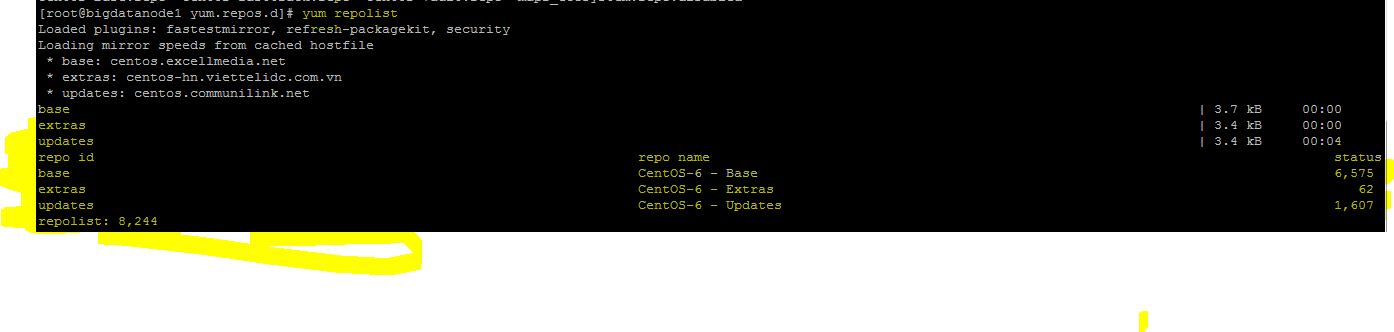
I am doing the manual installation of ambari following the steps (please see the screenshot - ambari-agent.jpg As given in this , I cannot see the below , on executing the yum repolist:
| AMBARI.2.2.1.1-2.x | Ambari 2.x | 8 |
Please see the screeshot - yum-repolist.jpg Please guide me on this :(((
@drussell - Will appreciate your assistance :))))



Created 05-05-2016 01:32 PM
- Mark as New
- Bookmark
- Subscribe
- Mute
- Subscribe to RSS Feed
- Permalink
- Report Inappropriate Content
Try this
export http_proxy=http://proxy.tcs.com:8080
wget --proxy-user=1105949 --proxy-password='Bvs#...' http://public-repo-1.hortonworks.com/ambari/centos6/2.x/updates/2.2.1.1/ambari.repo -O /etc/yum.repos.d/ambari.repo
Type your full password on the second line, and confirm proxy URL and the proxy user. If it works you will get ambari.repo and you should be good to go since your yum proxy looks good. Confirm with "yum repolist", and try to install ambari-agent.
Created 05-05-2016 11:27 AM
- Mark as New
- Bookmark
- Subscribe
- Mute
- Subscribe to RSS Feed
- Permalink
- Report Inappropriate Content
@drussell Please assist i have made the changes as you said ... please check the above comment
Created 05-05-2016 12:23 PM
- Mark as New
- Bookmark
- Subscribe
- Mute
- Subscribe to RSS Feed
- Permalink
- Report Inappropriate Content
I shared the in my actualquery on this , why ambari version is not displayed on doing yum repolist
Created 05-05-2016 01:32 PM
- Mark as New
- Bookmark
- Subscribe
- Mute
- Subscribe to RSS Feed
- Permalink
- Report Inappropriate Content
Try this
export http_proxy=http://proxy.tcs.com:8080
wget --proxy-user=1105949 --proxy-password='Bvs#...' http://public-repo-1.hortonworks.com/ambari/centos6/2.x/updates/2.2.1.1/ambari.repo -O /etc/yum.repos.d/ambari.repo
Type your full password on the second line, and confirm proxy URL and the proxy user. If it works you will get ambari.repo and you should be good to go since your yum proxy looks good. Confirm with "yum repolist", and try to install ambari-agent.

- « Previous
-
- 1
- 2
- Next »

