
Our Community is getting an upgrade! To get everything ready for the relaunch, we’ll be placing the site in read-only mode starting September 21st.
We really appreciate your understanding while we get things set up behind the scenes. Catch up on all the exciting details about the move here.
Need help or have questions? Drop us a line at [email protected]

Archives of Support Questions (Read Only)
- Cloudera Community
- Board Archive
- Archives of Support Questions (Read Only)
- Lab 3 - Pig Risk Factor Analysis: Application rema...
- Subscribe to RSS Feed
- Mark Question as New
- Mark Question as Read
- Float this Question for Current User
- Bookmark
- Subscribe
- Mute
- Printer Friendly Page
- Subscribe to RSS Feed
- Mark Question as New
- Mark Question as Read
- Float this Question for Current User
- Bookmark
- Subscribe
- Mute
- Printer Friendly Page
Lab 3 - Pig Risk Factor Analysis: Application remains in running status
- Labels:
-
Apache Pig


Created 02-20-2016 12:36 PM
- Mark as New
- Bookmark
- Subscribe
- Mute
- Subscribe to RSS Feed
- Permalink
- Report Inappropriate Content
Hi,
Could you help me to run a pig script with successful status.
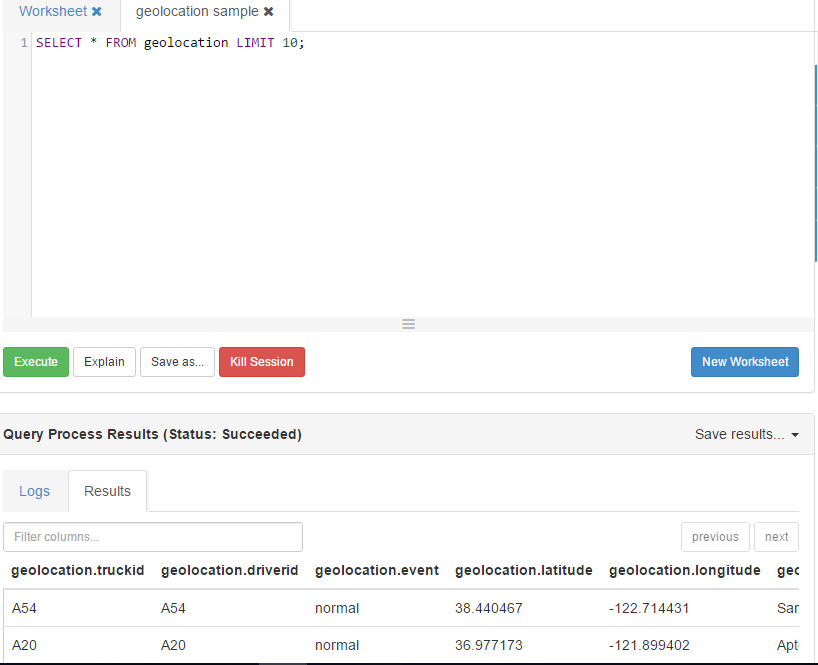
As mentioned in the Lab 3 exercise, geolocation table was created in hive and the pig script was created with only load transformation.
a = LOAD 'geolocation' using org.apache.hive.hcatalog.pig.HCatLoader();
DUMP a LIMIT 1;
Tried executing the script(not on Tez) arguments with -useHCatalog.
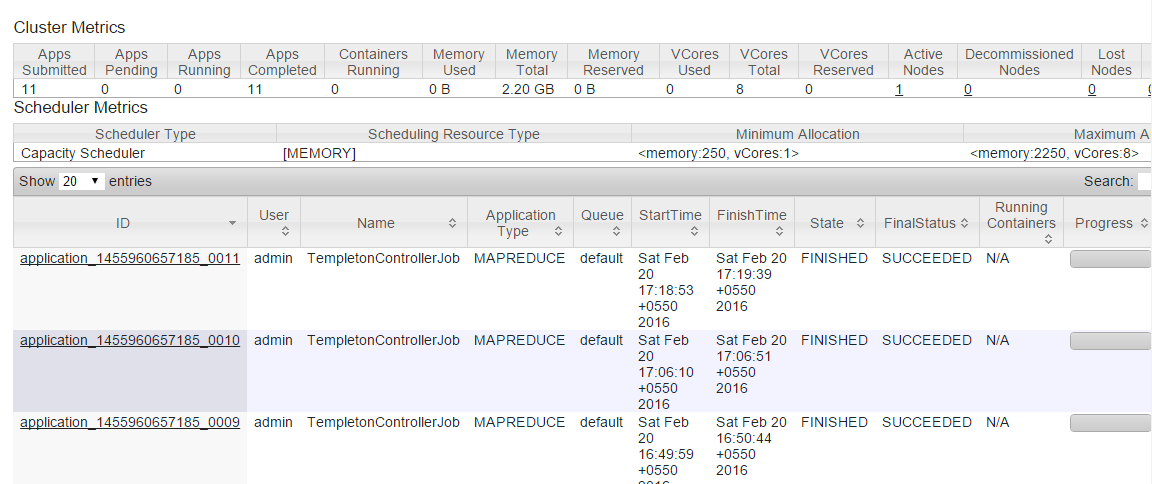
In the ResourceManagerUI the status show succeeded with Cantainers allocated 2. But, in the PIGUI the status is still RUNNING. It neither errors or return a result tab.
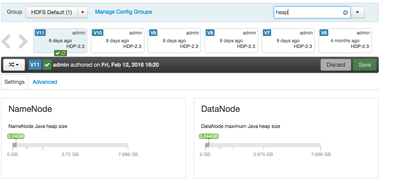
What might be the issue? How to check if the metadata exist in HCatalog? WebHCat server is in started status. Where should I look for Heap memory?
Thanks In advance for the support.


Created 02-21-2016 02:29 AM
- Mark as New
- Bookmark
- Subscribe
- Mute
- Subscribe to RSS Feed
- Permalink
- Report Inappropriate Content
Package is incorrect its USING org.apache.hive.hcatalog.pig.HCatLoader();
It was fixed in future release of sandbox use tez and make sure to use the HcatLoader I specified.

Created 02-20-2016 12:48 PM
- Mark as New
- Bookmark
- Subscribe
- Mute
- Subscribe to RSS Feed
- Permalink
- Report Inappropriate Content
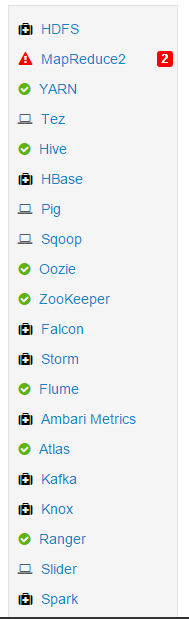
1) Check MapReduce --> what are those alerts? Make sure that HDFS, Yarn and MapReduce services are up
2) It looks like your pig job did finish but check the pig view log
3)hive.png - You can see geolocation table , thats your hive table
Created on 02-20-2016 12:53 PM - edited 08-18-2019 05:58 AM
- Mark as New
- Bookmark
- Subscribe
- Mute
- Subscribe to RSS Feed
- Permalink
- Report Inappropriate Content


Created 02-21-2016 02:19 AM
- Mark as New
- Bookmark
- Subscribe
- Mute
- Subscribe to RSS Feed
- Permalink
- Report Inappropriate Content
Thank you.
I have tried with MapReduce2 and Tez2. The MapReduce2 is set to green. The heap size is same as in the attachement.
job-1456016544519-0006-logs.txt
job-1456016544519-0007-logs.txt
It errors with Could not resolve org.apache.hcatalog.pig.HCatLoader. In the arguments -useHCatalog is set.
ERROR org.apache.pig.PigServer - exception during parsing: Error during parsing. Could not resolve org.apache.hcatalog.pig.HCatLoader using imports: [, java.lang., org.apache.pig.builtin., org.apache.pig.impl.builtin.] Failed to parse: Pig script failed to parse: <file script.pig, line 1, column 29> pig script failed to validate: org.apache.pig.backend.executionengine.ExecException: ERROR 1070: Could not resolve org.apache.hcatalog.pig.HCatLoader using imports: [, java.lang., org.apache.pig.builtin., org.apache.pig.impl.builtin.] at org.apache.pig.parser.QueryParser
Created 02-21-2016 02:55 AM
- Mark as New
- Bookmark
- Subscribe
- Mute
- Subscribe to RSS Feed
- Permalink
- Report Inappropriate Content
@Revathy Mourouguessane Please see this
http://stackoverflow.com/questions/29990236/flag-usehcatalog-not-working
See this
I was facing the issue in HDP 2.3 and Pig 0.15 .
Package name for HCatLoader() class is different in Hortonworks distribution.
The following worked for me
USING org.apache.hive.hcatalog.pig.HCatLoader()
instead of USING org.apache.hcatalog.pig.HCatLoader();
Created 02-20-2016 01:40 PM
- Mark as New
- Bookmark
- Subscribe
- Mute
- Subscribe to RSS Feed
- Permalink
- Report Inappropriate Content
Make sure mapreduce is up if youre not executing using Tez. It is preferred if you use tez though as it is faster.
Created 02-21-2016 02:20 AM
- Mark as New
- Bookmark
- Subscribe
- Mute
- Subscribe to RSS Feed
- Permalink
- Report Inappropriate Content
I tried both and get org.apache.hcatalog.pig.HCatLoader. The arguments of script is set as -useHCatalog. Thanks!!!
Created 02-21-2016 02:29 AM
- Mark as New
- Bookmark
- Subscribe
- Mute
- Subscribe to RSS Feed
- Permalink
- Report Inappropriate Content
Package is incorrect its USING org.apache.hive.hcatalog.pig.HCatLoader();
It was fixed in future release of sandbox use tez and make sure to use the HcatLoader I specified.
Created 02-21-2016 07:07 AM
- Mark as New
- Bookmark
- Subscribe
- Mute
- Subscribe to RSS Feed
- Permalink
- Report Inappropriate Content
Thank you.
It is working fine now.
Created 02-21-2016 07:09 AM
- Mark as New
- Bookmark
- Subscribe
- Mute
- Subscribe to RSS Feed
- Permalink
- Report Inappropriate Content
Thanks. Its working fine now.


