
Our Community is getting an upgrade! To get everything ready for the relaunch, we’ll be placing the site in read-only mode starting September 21st.
We really appreciate your understanding while we get things set up behind the scenes. Catch up on all the exciting details about the move here.
Need help or have questions? Drop us a line at [email protected]

Archives of Support Questions (Read Only)
- Cloudera Community
- Board Archive
- Archives of Support Questions (Read Only)
- Limit memory for Hadoop sandbox in VirtualBox
- Subscribe to RSS Feed
- Mark Question as New
- Mark Question as Read
- Float this Question for Current User
- Bookmark
- Subscribe
- Mute
- Printer Friendly Page
- Subscribe to RSS Feed
- Mark Question as New
- Mark Question as Read
- Float this Question for Current User
- Bookmark
- Subscribe
- Mute
- Printer Friendly Page
Limit memory for Hadoop sandbox in VirtualBox
- Labels:
-
Apache Hadoop


Created 12-29-2015 09:37 AM
- Mark as New
- Bookmark
- Subscribe
- Mute
- Subscribe to RSS Feed
- Permalink
- Report Inappropriate Content
Hi,
My laptop has total 8GB of memory and the HortonWorks Hadoop Sandbox that I downloaded today is consuming all 8GB which is causing system stability issues. I am running Windows 10 64 bit and VirtualBox 5.0.12.
Can I restrict the Hadoop Sandbox to use maximum 6GB? If so then how?
Please help! Thanks in advance!


Created on 12-29-2015 10:25 AM - edited 08-19-2019 05:23 AM
- Mark as New
- Bookmark
- Subscribe
- Mute
- Subscribe to RSS Feed
- Permalink
- Report Inappropriate Content
Open virtualbox and select the snadbox.
Click on settings. You will see something like below.
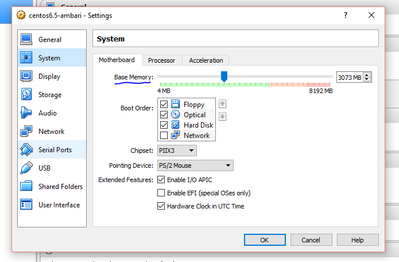
Select System Option and drag slider of Base memory as per your need.
Created on 12-29-2015 10:25 AM - edited 08-19-2019 05:23 AM
- Mark as New
- Bookmark
- Subscribe
- Mute
- Subscribe to RSS Feed
- Permalink
- Report Inappropriate Content
Open virtualbox and select the snadbox.
Click on settings. You will see something like below.
Select System Option and drag slider of Base memory as per your need.
Created 12-29-2015 03:46 PM
- Mark as New
- Bookmark
- Subscribe
- Mute
- Subscribe to RSS Feed
- Permalink
- Report Inappropriate Content
Thanks Rahul! The options under motherboard is greyed out. please see the attached screenshot.system-vbox.png



Created 12-29-2015 10:10 PM
- Mark as New
- Bookmark
- Subscribe
- Mute
- Subscribe to RSS Feed
- Permalink
- Report Inappropriate Content
Make sure the VM is stopped, otherwise it will not let you modify the memory settings
Created 12-30-2015 06:14 AM
- Mark as New
- Bookmark
- Subscribe
- Mute
- Subscribe to RSS Feed
- Permalink
- Report Inappropriate Content
Thanks Ali very much! I paused the VM, threfore it did not allow me to change the memory config. After stopping the VM as you suggested , I was able to configure the memory.


