
Our Community is getting an upgrade! To get everything ready for the relaunch, we’ll be placing the site in read-only mode starting September 21st.
We really appreciate your understanding while we get things set up behind the scenes. Catch up on all the exciting details about the move here.
Need help or have questions? Drop us a line at [email protected]

Archives of Support Questions (Read Only)
- Cloudera Community
- Board Archive
- Archives of Support Questions (Read Only)
- List all created spark jobs
- Subscribe to RSS Feed
- Mark Question as New
- Mark Question as Read
- Float this Question for Current User
- Bookmark
- Subscribe
- Mute
- Printer Friendly Page
- Subscribe to RSS Feed
- Mark Question as New
- Mark Question as Read
- Float this Question for Current User
- Bookmark
- Subscribe
- Mute
- Printer Friendly Page
List all created spark jobs
- Labels:
-
Apache Spark


Created 05-23-2016 05:21 AM
- Mark as New
- Bookmark
- Subscribe
- Mute
- Subscribe to RSS Feed
- Permalink
- Report Inappropriate Content
Hi,
I wanted to list all the spark jobs created. I tried looking in Resource Manager and Spark Job History Server and only active/failed/killed jobs are present. Is there a way to list all the spark jobs either running or not running? Could be in spark shell or any other that you can suggest.
Thanks.


Created on 05-23-2016 06:20 PM - edited 08-18-2019 04:48 AM
- Mark as New
- Bookmark
- Subscribe
- Mute
- Subscribe to RSS Feed
- Permalink
- Report Inappropriate Content
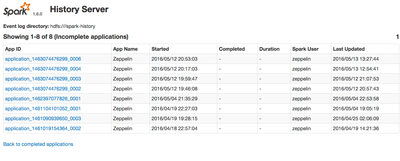
The Spark History Server UI has a link at the bottom called "Show Incomplete Applications". Click on this link and it will show you the running jobs, like zeppelin (see image).


Created 05-23-2016 11:58 AM
- Mark as New
- Bookmark
- Subscribe
- Mute
- Subscribe to RSS Feed
- Permalink
- Report Inappropriate Content
The Spark History server will have a list of all Jobs that have run using the YARN master.
If you are looking for current running jobs, the RM will give you a full list, though this will of course also include non-spark jobs running on your cluster.
If you are running spark standalone, you will not have any means of listing jobs.
Created 05-24-2016 02:58 AM
- Mark as New
- Bookmark
- Subscribe
- Mute
- Subscribe to RSS Feed
- Permalink
- Report Inappropriate Content
Thanks @Simon Elliston Ball. But is there a way to see created spark jobs that has not been deployed yet?
Created on 05-23-2016 06:20 PM - edited 08-18-2019 04:48 AM
- Mark as New
- Bookmark
- Subscribe
- Mute
- Subscribe to RSS Feed
- Permalink
- Report Inappropriate Content
The Spark History Server UI has a link at the bottom called "Show Incomplete Applications". Click on this link and it will show you the running jobs, like zeppelin (see image).
Created 05-24-2016 02:59 AM
- Mark as New
- Bookmark
- Subscribe
- Mute
- Subscribe to RSS Feed
- Permalink
- Report Inappropriate Content
Thanks @Paul Hargis. Yes, I tried it also but what I wanted to see is the created spark jobs that has not yet been deployed. Is there a way to find this jobs?

Created 11-12-2019 06:16 AM
- Mark as New
- Bookmark
- Subscribe
- Mute
- Subscribe to RSS Feed
- Permalink
- Report Inappropriate Content
Hi,
Could you please let us know what do you mean by not yet deployed? Does you mean that the jobs that has not been kicked off after you running the spark submit command (or) Could you please explain in detail.
Thanks
Akr
Created on 05-24-2016 04:43 PM - edited 08-18-2019 04:48 AM
- Mark as New
- Bookmark
- Subscribe
- Mute
- Subscribe to RSS Feed
- Permalink
- Report Inappropriate Content
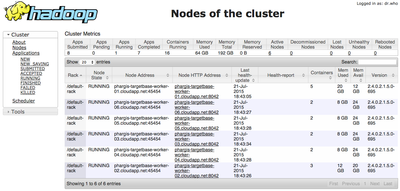
If you are running with deploy mode = yarn (previously, master set to "yarn-client" or "yarn-cluster"), then you can discover the state of the spark job by bringing up the Yarn ResourceManager UI. In Ambari, select Yarn service from left-hand panel, choose "Quick Links", and click on "ResourceManager UI". It will open web page on port 8088.
Here is an example (click on 'Applications' in left panel to see all states):
Created 05-26-2016 01:43 PM
- Mark as New
- Bookmark
- Subscribe
- Mute
- Subscribe to RSS Feed
- Permalink
- Report Inappropriate Content
Thanks for the info, appreciate your help on this.


