
Our Community is getting an upgrade! To get everything ready for the relaunch, we’ll be placing the site in read-only mode starting September 21st.
We really appreciate your understanding while we get things set up behind the scenes. Catch up on all the exciting details about the move here.
Need help or have questions? Drop us a line at [email protected]

Archives of Support Questions (Read Only)
- Cloudera Community
- Board Archive
- Archives of Support Questions (Read Only)
- Metron Deployment failure
- Subscribe to RSS Feed
- Mark Question as New
- Mark Question as Read
- Float this Question for Current User
- Bookmark
- Subscribe
- Mute
- Printer Friendly Page
- Subscribe to RSS Feed
- Mark Question as New
- Mark Question as Read
- Float this Question for Current User
- Bookmark
- Subscribe
- Mute
- Printer Friendly Page
Metron Deployment failure
- Labels:
-
Apache Metron


Created 12-05-2017 12:08 PM
- Mark as New
- Bookmark
- Subscribe
- Mute
- Subscribe to RSS Feed
- Permalink
- Report Inappropriate Content
I have deployed Apache Metron on a single node VM, I am facing 3-4 issues
1> I have to vagrant up always when I shutdown my VM
2>I lose my components heartbeat or components fail frequently (mainly storm, metron, hbase)
3> How do I add NiFi in this cluster
4.>Even when I restart some components, it asks me restart some other components


Created 12-06-2017 07:53 AM
- Mark as New
- Bookmark
- Subscribe
- Mute
- Subscribe to RSS Feed
- Permalink
- Report Inappropriate Content
1 -> You can do vagrant halt command (from the folder metron/metron-deployment/vagrant/full-dev-platform) in order to gracefully power down the VM
2 -> Can you do vagrant ssh<code> into the full dev VM and check <code>/var/log/messages to see if you are seeing any issues? I have seen these issues when the system resources are starved.
You can also try increasing the VM system resources by modifying the memory and cpu fields in metron/metron-deployment/vagrant/full-dev-platform/Vagrantfile, under this section
hosts = [{
    hostname: "node1",
    ip: "192.168.66.121",
    memory: "8192",
    cpus: 4,
    promisc: 2  # enables promisc on the 'Nth' network interface
}]
3 -> For adding NiFi, you can follow the below links to have NiFi running and configured, It is recommended to use a separate cluster, since the vagrant full dev Metron platform will not suffice. Check out more details on the following links: https://docs.hortonworks.com/HDPDocuments/HDF3/HDF-3.0.1.1/bk_command-line-installation/content/ch_H...
You can also follow the HCP runbook here to know more: https://docs.hortonworks.com/HDPDocuments/HCP1/HCP-1.3.1/bk_runbook/content/install_nifi_runbook.htm...
4 -> This could be a problem of #2 above. Pls check the logs on the VM.
Created 12-06-2017 04:14 AM
- Mark as New
- Bookmark
- Subscribe
- Mute
- Subscribe to RSS Feed
- Permalink
- Report Inappropriate Content
Need help!!
Created 12-06-2017 07:53 AM
- Mark as New
- Bookmark
- Subscribe
- Mute
- Subscribe to RSS Feed
- Permalink
- Report Inappropriate Content
1 -> You can do vagrant halt command (from the folder metron/metron-deployment/vagrant/full-dev-platform) in order to gracefully power down the VM
2 -> Can you do vagrant ssh<code> into the full dev VM and check <code>/var/log/messages to see if you are seeing any issues? I have seen these issues when the system resources are starved.
You can also try increasing the VM system resources by modifying the memory and cpu fields in metron/metron-deployment/vagrant/full-dev-platform/Vagrantfile, under this section
hosts = [{
    hostname: "node1",
    ip: "192.168.66.121",
    memory: "8192",
    cpus: 4,
    promisc: 2  # enables promisc on the 'Nth' network interface
}]
3 -> For adding NiFi, you can follow the below links to have NiFi running and configured, It is recommended to use a separate cluster, since the vagrant full dev Metron platform will not suffice. Check out more details on the following links: https://docs.hortonworks.com/HDPDocuments/HDF3/HDF-3.0.1.1/bk_command-line-installation/content/ch_H...
You can also follow the HCP runbook here to know more: https://docs.hortonworks.com/HDPDocuments/HCP1/HCP-1.3.1/bk_runbook/content/install_nifi_runbook.htm...
4 -> This could be a problem of #2 above. Pls check the logs on the VM.
Created 12-06-2017 08:20 AM
- Mark as New
- Bookmark
- Subscribe
- Mute
- Subscribe to RSS Feed
- Permalink
- Report Inappropriate Content
I am restarting the process, will upload the errors if I get stuck somewhere and also only my Metron component faces errors
Is there any host problem there or the service go up even if I dont configure any hosts
Created 12-06-2017 12:31 PM
- Mark as New
- Bookmark
- Subscribe
- Mute
- Subscribe to RSS Feed
- Permalink
- Report Inappropriate Content
Metron Indexing fails to install, what might be the reason??
fatal: [node1]: FAILED! => {"changed": false, "failed": true, "invocation": {"module_args": {"blueprint_name": "metron_blueprint", "blueprint_var": {"groups": [{"cardinality": 1, "components": [{"name": "NAMENODE"}, {"name": "SECONDARY_NAMENODE"}, {"name": "RESOURCEMANAGER"}, {"name": "HISTORYSERVER"}, {"name": "ZOOKEEPER_SERVER"}, {"name": "NIMBUS"}, {"name": "STORM_UI_SERVER"}, {"name": "DRPC_SERVER"}, {"name": "HBASE_MASTER"}, {"name": "HBASE_CLIENT"}, {"name": "APP_TIMELINE_SERVER"}, {"name": "DATANODE"}, {"name": "HDFS_CLIENT"}, {"name": "NODEMANAGER"}, {"name": "YARN_CLIENT"}, {"name": "MAPREDUCE2_CLIENT"}, {"name": "ZOOKEEPER_CLIENT"}, {"name": "SUPERVISOR"}, {"name": "KAFKA_BROKER"}, {"name": "HBASE_REGIONSERVER"}, {"name": "KIBANA_MASTER"}, {"name": "METRON_INDEXING"}, {"name": "METRON_PROFILER"}, {"name": "METRON_ENRICHMENT_MASTER"}, {"name": "METRON_PARSERS"}, {"name": "METRON_REST"}, {"name": "METRON_MANAGEMENT_UI"}, {"name": "METRON_ALERTS_UI"}, {"name": "ES_MASTER"}], "configurations": [], "name": "host_group_1"}], "required_configurations": [{"metron-env": {"es_hosts": "node1", "storm_rest_addr": "http://node1:8744", "zeppelin_server_url": "node1:9995"}}, {"metron-rest-env": {"metron_jdbc_driver": "org.h2.Driver", "metron_jdbc_password": "root", "metron_jdbc_platform": "h2", "metron_jdbc_url": "jdbc:h2:file:~/metrondb", "metron_jdbc_username": "root"}}, {"kibana-env": {"kibana_default_application": "dashboard/Metron-Dashboard", "kibana_es_url": "http://node1:9200", "kibana_log_dir": "/var/log/kibana", "kibana_pid_dir": "/var/run/kibana", "kibana_server_port": 5000}}], "stack_name": "HDP", "stack_version": "2.5"}, "cluster_name": "metron_cluster", "cluster_state": "present", "configurations": [{"zoo.cfg": {"dataDir": "/data1/hadoop/zookeeper"}}, {"hadoop-env": {"dtnode_heapsize": 512, "hadoop_heapsize": 1024, "namenode_heapsize": 2048, "namenode_opt_permsize": "128m"}}, {"hbase-env": {"hbase_master_heapsize": 512, "hbase_regionserver_heapsize": 512, "hbase_regionserver_xmn_max": 512}}, {"hdfs-site": {"dfs.datanode.data.dir": "/data1/hadoop/hdfs/data,/data2/hadoop/hdfs/data", "dfs.journalnode.edits.dir": "/data1/hadoop/hdfs/journalnode", "dfs.namenode.checkpoint.dir": "/data1/hadoop/hdfs/namesecondary", "dfs.namenode.name.dir": "/data1/hadoop/hdfs/namenode", "dfs.replication": 1}}, {"yarn-env": {"apptimelineserver_heapsize": 512, "nodemanager_heapsize": 512, "resourcemanager_heapsize": 1024, "yarn_heapsize": 512}}, {"mapred-env": {"jobhistory_heapsize": 256}}, {"mapred-site": {"mapreduce.jobhistory.recovery.store.leveldb.path": "/data1/hadoop/mapreduce/jhs", "mapreduce.map.java.opts": "-Xmx1024m", "mapreduce.map.memory.mb": 1229, "mapreduce.reduce.java.opts": "-Xmx1024m", "mapreduce.reduce.memory.mb": 1229}}, {"yarn-site": {"yarn.nodemanager.local-dirs": "/data1/hadoop/yarn/local", "yarn.nodemanager.log-dirs": "/data1/hadoop/yarn/log", "yarn.nodemanager.resource.memory-mb": 4096, "yarn.timeline-service.leveldb-state-store.path": "/data1/hadoop/yarn/timeline", "yarn.timeline-service.leveldb-timeline-store.path": "/data1/hadoop/yarn/timeline"}}, {"storm-site": {"storm.local.dir": "/data1/hadoop/storm", "supervisor.slots.ports": "[6700, 6701, 6702, 6703, 6704]", "topology.classpath": "/etc/hbase/conf:/etc/hadoop/conf"}}, {"kafka-env": {"content": "\n#!/bin/bash\n\n# Set KAFKA specific environment variables here.\n\n# The java implementation to use.\nexport KAFKA_HEAP_OPTS=\"-Xms256M -Xmx256M\"\nexport KAFKA_JVM_PERFORMANCE_OPTS=\"-server -XX:+UseG1GC -XX:+DisableExplicitGC -Djava.awt.headless=true\"\nexport JAVA_HOME={{java64_home}}\nexport PATH=$PATH:$JAVA_HOME/bin\nexport PID_DIR={{kafka_pid_dir}}\nexport LOG_DIR={{kafka_log_dir}}\nexport KAFKA_KERBEROS_PARAMS={{kafka_kerberos_params}}\n# Add kafka sink to classpath and related depenencies\nif [ -e \"/usr/lib/ambari-metrics-kafka-sink/ambari-metrics-kafka-sink.jar\" ]; then\n export CLASSPATH=$CLASSPATH:/usr/lib/ambari-metrics-kafka-sink/ambari-metrics-kafka-sink.jar\n export CLASSPATH=$CLASSPATH:/usr/lib/ambari-metrics-kafka-sink/lib/*\nfi\nif [ -f /etc/kafka/conf/kafka-ranger-env.sh ]; then\n . /etc/kafka/conf/kafka-ranger-env.sh\nfi"}}, {"kafka-broker": {"delete.topic.enable": "true", "log.dirs": "/data1/kafka-log"}}, {"metron-rest-env": {"metron_spring_profiles_active": "dev"}}, {"metron-parsers-env": {"parsers": "bro,snort"}}, {"elastic-site": {"gateway_recover_after_data_nodes": 1, "index_number_of_replicas": 0, "index_number_of_shards": 1, "masters_also_are_datanodes": "1", "network_host": "[ _local_, _eth1_ ]", "zen_discovery_ping_unicast_hosts": "[ node1 ]"}}], "host": "node1", "password": "admin", "port": 8080, "username": "admin", "wait_for_complete": true}, "module_name": "ambari_cluster_state"}, "msg": "Request failed with status FAILED"} PLAY RECAP ********************************************************************* node1 : ok=55 changed=32 unreachable=0 failed=1 Ansible failed to complete successfully. Any error output should be visible above. Please fix these errors and try again.
Created on 12-08-2017 10:23 AM - edited 08-17-2019 08:04 PM
- Mark as New
- Bookmark
- Subscribe
- Mute
- Subscribe to RSS Feed
- Permalink
- Report Inappropriate Content
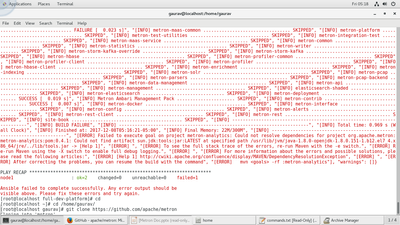
When I do vagrant up , I get this error, from were do I download the Apache-metron folder ?? @asubramanian
Created on 12-12-2017 11:14 AM - edited 08-17-2019 08:04 PM
- Mark as New
- Bookmark
- Subscribe
- Mute
- Subscribe to RSS Feed
- Permalink
- Report Inappropriate Content
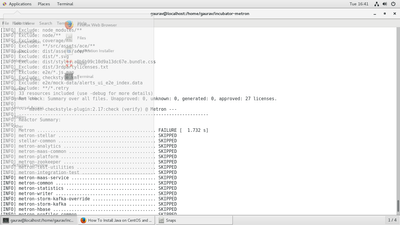
All the components get failed when I run mvn clean install from the top directory, what can be the error??


