
Our Community is getting an upgrade! To get everything ready for the relaunch, we’ll be placing the site in read-only mode starting September 21st.
We really appreciate your understanding while we get things set up behind the scenes. Catch up on all the exciting details about the move here.
Need help or have questions? Drop us a line at [email protected]

Archives of Support Questions (Read Only)
- Cloudera Community
- Board Archive
- Archives of Support Questions (Read Only)
- Most services fail to start after Ambari setup com...
- Subscribe to RSS Feed
- Mark Question as New
- Mark Question as Read
- Float this Question for Current User
- Bookmark
- Subscribe
- Mute
- Printer Friendly Page
- Subscribe to RSS Feed
- Mark Question as New
- Mark Question as Read
- Float this Question for Current User
- Bookmark
- Subscribe
- Mute
- Printer Friendly Page
Most services fail to start after Ambari setup completes(with warnings)
- Labels:
-
Apache Ambari


Created on 11-29-2016 06:22 AM - edited 08-19-2019 03:03 AM
- Mark as New
- Bookmark
- Subscribe
- Mute
- Subscribe to RSS Feed
- Permalink
- Report Inappropriate Content
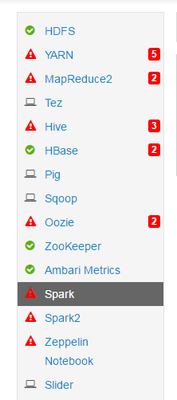
After complete HDP 2.5 install with Ambai, I am unable to start many services. They fail.
App Timeline Server Start - stderr:
Traceback (most recent call last):
  File "/var/lib/ambari-agent/cache/common-services/YARN/2.1.0.2.0/package/scripts/application_timeline_server.py", line 155, in <module>
    ApplicationTimelineServer().execute()
  File "/usr/lib/python2.6/site-packages/resource_management/libraries/script/script.py", line 280, in execute
    method(env)
  File "/var/lib/ambari-agent/cache/common-services/YARN/2.1.0.2.0/package/scripts/application_timeline_server.py", line 44, in start
    self.configure(env) # FOR SECURITY
  File "/var/lib/ambari-agent/cache/common-services/YARN/2.1.0.2.0/package/scripts/application_timeline_server.py", line 55, in configure
    yarn(name='apptimelineserver')
  File "/usr/lib/python2.6/site-packages/ambari_commons/os_family_impl.py", line 89, in thunk
    return fn(*args, **kwargs)
  File "/var/lib/ambari-agent/cache/common-services/YARN/2.1.0.2.0/package/scripts/yarn.py", line 337, in yarn
    mode=0755
  File "/usr/lib/python2.6/site-packages/resource_management/core/base.py", line 155, in __init__
    self.env.run()
  File "/usr/lib/python2.6/site-packages/resource_management/core/environment.py", line 160, in run
    self.run_action(resource, action)
  File "/usr/lib/python2.6/site-packages/resource_management/core/environment.py", line 124, in run_action
    provider_action()
  File "/usr/lib/python2.6/site-packages/resource_management/libraries/providers/hdfs_resource.py", line 459, in action_create_on_execute
    self.action_delayed("create")
  File "/usr/lib/python2.6/site-packages/resource_management/libraries/providers/hdfs_resource.py", line 456, in action_delayed
    self.get_hdfs_resource_executor().action_delayed(action_name, self)
  File "/usr/lib/python2.6/site-packages/resource_management/libraries/providers/hdfs_resource.py", line 247, in action_delayed
    self._assert_valid()
  File "/usr/lib/python2.6/site-packages/resource_management/libraries/providers/hdfs_resource.py", line 231, in _assert_valid
    self.target_status = self._get_file_status(target)
  File "/usr/lib/python2.6/site-packages/resource_management/libraries/providers/hdfs_resource.py", line 292, in _get_file_status
    list_status = self.util.run_command(target, 'GETFILESTATUS', method='GET', ignore_status_codes=['404'], assertable_result=False)
  File "/usr/lib/python2.6/site-packages/resource_management/libraries/providers/hdfs_resource.py", line 179, in run_command
    _, out, err = get_user_call_output(cmd, user=self.run_user, logoutput=self.logoutput, quiet=False)
  File "/usr/lib/python2.6/site-packages/resource_management/libraries/functions/get_user_call_output.py", line 61, in get_user_call_output
    raise Fail(err_msg)
resource_management.core.exceptions.Fail: Execution of 'curl -sS -L -w '%{http_code}' -X GET 'http://sgscaiu0376.in623.corpintra.net:50070/webhdfs/v1/ats/done?op=GETFILESTATUS&user.name=hdfs' 1>/tmp/tmpyehBKW 2>/tmp/tmp1opf2_' returned 7. curl: (7) Failed to connect to sgscaiu0376.in623.corpintra.net port 50070: Connection refused
000
Could somebody tell me what could be the possible issue?
OS: Ubuntu14.04
HDP: 2.5
Ambari: 2.4.1.0
Created 12-01-2016 07:36 AM
- Mark as New
- Bookmark
- Subscribe
- Mute
- Subscribe to RSS Feed
- Permalink
- Report Inappropriate Content
It was Namenode connectivity issue. The hosts file on the namenode had to be fixed.
The first line should be `127.0.0.1 localhost`
In my hosts file it was `127.0.0.1 hostname1 localhost`
I removed the `hostname1` and it was fixed.


Created 11-29-2016 07:08 AM
- Mark as New
- Bookmark
- Subscribe
- Mute
- Subscribe to RSS Feed
- Permalink
- Report Inappropriate Content
Seems the namenode is not connecting/responding on port 50070. Can you check using $netstat -an |grep 50070 if you are able to see the port.
Also try to start yarn service. Paste if you are able to see any error.
Created 12-01-2016 07:33 AM
- Mark as New
- Bookmark
- Subscribe
- Mute
- Subscribe to RSS Feed
- Permalink
- Report Inappropriate Content
Yes, that was the problem.
Created 12-01-2016 07:36 AM
- Mark as New
- Bookmark
- Subscribe
- Mute
- Subscribe to RSS Feed
- Permalink
- Report Inappropriate Content
It was Namenode connectivity issue. The hosts file on the namenode had to be fixed.
The first line should be `127.0.0.1 localhost`
In my hosts file it was `127.0.0.1 hostname1 localhost`
I removed the `hostname1` and it was fixed.


