
Our Community is getting an upgrade! To get everything ready for the relaunch, we’ll be placing the site in read-only mode starting September 21st.
We really appreciate your understanding while we get things set up behind the scenes. Catch up on all the exciting details about the move here.
Need help or have questions? Drop us a line at [email protected]

Archives of Support Questions (Read Only)
- Cloudera Community
- Board Archive
- Archives of Support Questions (Read Only)
- NIFI - save file with date of file tittle
- Subscribe to RSS Feed
- Mark Question as New
- Mark Question as Read
- Float this Question for Current User
- Bookmark
- Subscribe
- Mute
- Printer Friendly Page
- Subscribe to RSS Feed
- Mark Question as New
- Mark Question as Read
- Float this Question for Current User
- Bookmark
- Subscribe
- Mute
- Printer Friendly Page
NIFI - save file with date of file tittle
- Labels:
-
Apache NiFi

Created 09-26-2018 09:45 PM
- Mark as New
- Bookmark
- Subscribe
- Mute
- Subscribe to RSS Feed
- Permalink
- Report Inappropriate Content
Hello,
I have a dataflow that give a files to ftp and save thats files into HDFS. The problem is the name of folders in HDFS is the date that the name file contains, for example:
test_20180926.txt --> HDFS: /2018/09/26/test_20180926.txt
Thanks


Created on 09-26-2018 10:06 PM - edited 08-17-2019 11:42 PM
- Mark as New
- Bookmark
- Subscribe
- Mute
- Subscribe to RSS Feed
- Permalink
- Report Inappropriate Content
The FTP processors (listFTP or GetFTP) create an attribute (filename) on the created NiFi FlowFiles they output. You can use the UpdateAttribute processor and NiFi Expression Language to manipulate the filename string to create a new FlowFile attribute with the desired path you want to they use in your PutHDFS processor.
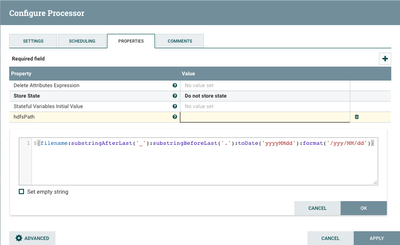
Here you can see the configuration of the UpdateAttribute processor. I have added a "new property" and named it "hdfsPath". This property name will become the name of my new FlowFileAttribute. I then created a NiFi Expression Language statement that extracts the date string from the existing "filename" attribute and converts it in to a path format using:
${filename:substringAfterLast('_'):substringBeforeLast('.'):toDate('yyyyMMdd'):format('/yyy/MM/dd')}The result of above is assigned to "hdfsPath".
I can then use that new attribute as my path in the PutHDFS processor for example:

Thank you,
Matt
-
If you found this answer addressed your question, please take a moment to login in and click the "ACCEPT" link.
Created on 09-26-2018 10:06 PM - edited 08-17-2019 11:42 PM
- Mark as New
- Bookmark
- Subscribe
- Mute
- Subscribe to RSS Feed
- Permalink
- Report Inappropriate Content
The FTP processors (listFTP or GetFTP) create an attribute (filename) on the created NiFi FlowFiles they output. You can use the UpdateAttribute processor and NiFi Expression Language to manipulate the filename string to create a new FlowFile attribute with the desired path you want to they use in your PutHDFS processor.
Here you can see the configuration of the UpdateAttribute processor. I have added a "new property" and named it "hdfsPath". This property name will become the name of my new FlowFileAttribute. I then created a NiFi Expression Language statement that extracts the date string from the existing "filename" attribute and converts it in to a path format using:
${filename:substringAfterLast('_'):substringBeforeLast('.'):toDate('yyyyMMdd'):format('/yyy/MM/dd')}The result of above is assigned to "hdfsPath".
I can then use that new attribute as my path in the PutHDFS processor for example:
Thank you,
Matt
-
If you found this answer addressed your question, please take a moment to login in and click the "ACCEPT" link.
Created 09-27-2018 11:23 AM
- Mark as New
- Bookmark
- Subscribe
- Mute
- Subscribe to RSS Feed
- Permalink
- Report Inappropriate Content
Thank you very much I have to solve it 🙂


