
Our Community is getting an upgrade! To get everything ready for the relaunch, we’ll be placing the site in read-only mode starting September 21st.
We really appreciate your understanding while we get things set up behind the scenes. Catch up on all the exciting details about the move here.
Need help or have questions? Drop us a line at [email protected]

Archives of Support Questions (Read Only)
- Cloudera Community
- Board Archive
- Archives of Support Questions (Read Only)
- Re: NIFI splittext to split the single file into m...
- Subscribe to RSS Feed
- Mark Question as New
- Mark Question as Read
- Float this Question for Current User
- Bookmark
- Subscribe
- Mute
- Printer Friendly Page
- Subscribe to RSS Feed
- Mark Question as New
- Mark Question as Read
- Float this Question for Current User
- Bookmark
- Subscribe
- Mute
- Printer Friendly Page
NIFI splittext to split the single file into multiple
- Labels:
-
Apache NiFi


Created 11-30-2016 08:02 AM
- Mark as New
- Bookmark
- Subscribe
- Mute
- Subscribe to RSS Feed
- Permalink
- Report Inappropriate Content
I split the file successfully using splitText into three file but when I try store using putfile its throwing error as 'file with same name'. Please suggest which processor do I need to use to save the files in same directory. I used update attribute to update file name but it still throwing the same error


Created on 11-30-2016 12:27 PM - edited 08-19-2019 02:35 AM
- Mark as New
- Bookmark
- Subscribe
- Mute
- Subscribe to RSS Feed
- Permalink
- Report Inappropriate Content
Suggestion is to use UpdateAttribute to append timestamp to filename.
Here is an example of how to do this:
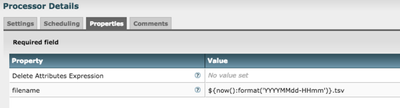
If this is what you are looking for, let me know by accepting the answer; else, let me know of any gaps or followup questions.
Created on 11-30-2016 12:27 PM - edited 08-19-2019 02:35 AM
- Mark as New
- Bookmark
- Subscribe
- Mute
- Subscribe to RSS Feed
- Permalink
- Report Inappropriate Content
Suggestion is to use UpdateAttribute to append timestamp to filename.
Here is an example of how to do this:
If this is what you are looking for, let me know by accepting the answer; else, let me know of any gaps or followup questions.


Created 11-30-2016 12:56 PM
- Mark as New
- Bookmark
- Subscribe
- Mute
- Subscribe to RSS Feed
- Permalink
- Report Inappropriate Content
Depending on how fast the flow files are coming through, using the timestamp might result in the same filename as well. You could use ${uuid}, which is the UUID of the flow file (guaranteed to be unique), or ${nextInt()}, which is an auto-incrementing value
Created 12-01-2016 04:27 AM
- Mark as New
- Bookmark
- Subscribe
- Mute
- Subscribe to RSS Feed
- Permalink
- Report Inappropriate Content
Thank You @Matt Burgess and @greyKeys . Previously I used timestamp which results in error, then I changed it to ${uuid} its working fine.


