
Our Community is getting an upgrade! To get everything ready for the relaunch, we’ll be placing the site in read-only mode starting September 21st.
We really appreciate your understanding while we get things set up behind the scenes. Catch up on all the exciting details about the move here.
Need help or have questions? Drop us a line at [email protected]

Archives of Support Questions (Read Only)
- Cloudera Community
- Board Archive
- Archives of Support Questions (Read Only)
- Re: Need help please. I have used Ambari and HDP 2...
- Subscribe to RSS Feed
- Mark Question as New
- Mark Question as Read
- Float this Question for Current User
- Bookmark
- Subscribe
- Mute
- Printer Friendly Page
- Subscribe to RSS Feed
- Mark Question as New
- Mark Question as Read
- Float this Question for Current User
- Bookmark
- Subscribe
- Mute
- Printer Friendly Page
Need help please. I have used Ambari and HDP 2.3 and all the services got started manually the first time but then it's not starting. Not able to start data node or name node or secondary node.
- Labels:
-
Apache Ambari
-
Apache Hadoop


Created 02-04-2016 11:49 PM
- Mark as New
- Bookmark
- Subscribe
- Mute
- Subscribe to RSS Feed
- Permalink
- Report Inappropriate Content
Below is the exception I am getting:
Traceback (most recent call last):
  File "/var/lib/ambari-agent/cache/common-services/HDFS/2.1.0.2.0/package/scripts/namenode.py", line 433, in <module>
    NameNode().execute()
  File "/usr/lib/python2.6/site-packages/resource_management/libraries/script/script.py", line 219, in execute
    method(env)
  File "/var/lib/ambari-agent/cache/common-services/HDFS/2.1.0.2.0/package/scripts/namenode.py", line 102, in start
    namenode(action="start", hdfs_binary=hdfs_binary, upgrade_type=upgrade_type, env=env)
  File "/usr/lib/python2.6/site-packages/ambari_commons/os_family_impl.py", line 89, in thunk
    return fn(*args, **kwargs)
  File "/var/lib/ambari-agent/cache/common-services/HDFS/2.1.0.2.0/package/scripts/hdfs_namenode.py", line 112, in namenode
    create_log_dir=True
  File "/var/lib/ambari-agent/cache/common-services/HDFS/2.1.0.2.0/package/scripts/utils.py", line 267, in service
    Execute(daemon_cmd, not_if=process_id_exists_command, environment=hadoop_env_exports)
  File "/usr/lib/python2.6/site-packages/resource_management/core/base.py", line 154, in __init__
    self.env.run()
  File "/usr/lib/python2.6/site-packages/resource_management/core/environment.py", line 158, in run
    self.run_action(resource, action)
  File "/usr/lib/python2.6/site-packages/resource_management/core/environment.py", line 121, in run_action
    provider_action()
  File "/usr/lib/python2.6/site-packages/resource_management/core/providers/system.py", line 238, in action_run
    tries=self.resource.tries, try_sleep=self.resource.try_sleep)
  File "/usr/lib/python2.6/site-packages/resource_management/core/shell.py", line 70, in inner
    result = function(command, **kwargs)
  File "/usr/lib/python2.6/site-packages/resource_management/core/shell.py", line 92, in checked_call
    tries=tries, try_sleep=try_sleep)
  File "/usr/lib/python2.6/site-packages/resource_management/core/shell.py", line 140, in _call_wrapper
    result = _call(command, **kwargs_copy)
  File "/usr/lib/python2.6/site-packages/resource_management/core/shell.py", line 291, in _call
    raise Fail(err_msg)
resource_management.core.exceptions.Fail: Execution of 'ambari-sudo.sh su hdfs -l -s /bin/bash -c 'ulimit -c unlimited ;  /usr/hdp/current/hadoop-client/sbin/hadoop-daemon.sh --config /usr/hdp/current/hadoop-client/conf start namenode'' returned 1. starting namenode, logging to /var/log/hadoop/hdfs/hadoop-hdfs-namenode-pp-hdp-m.out


Created 02-08-2016 03:06 PM
- Mark as New
- Bookmark
- Subscribe
- Mute
- Subscribe to RSS Feed
- Permalink
- Report Inappropriate Content
@Prakash
Have you tried using internal ip instead?
Please give it a shot if not already done.


Created 02-04-2016 11:50 PM
- Mark as New
- Bookmark
- Subscribe
- Mute
- Subscribe to RSS Feed
- Permalink
- Report Inappropriate Content
What's the output of /var/log/hadoop/hdfs/hadoop-hdfs-namenode-pp-hdp-m.log ?

Created 02-05-2016 06:43 AM
- Mark as New
- Bookmark
- Subscribe
- Mute
- Subscribe to RSS Feed
- Permalink
- Report Inappropriate Content
Can you please post logs from /var/log/hadoop/hdfs/hadoop-hdfs-namenode-pp-hdp-m.out. Also post ulimit -a from the nodes where DN and NN are running ?
Created 02-05-2016 08:40 PM
- Mark as New
- Bookmark
- Subscribe
- Mute
- Subscribe to RSS Feed
- Permalink
- Report Inappropriate Content
Hi ! Saurabh - Thank you so much. @Saurabh Kumar
output of /var/log/hadoop/hdfs/hadoop-hdfs-namenode-pp-hdp-m.out
ulimit -a for user hdfs
core file size (blocks, -c) unlimited
data seg size (kbytes, -d) unlimited
scheduling priority (-e) 0
file size (blocks, -f) unlimited
pending signals (-i) 63413
max locked memory (kbytes, -l) 64
max memory size (kbytes, -m) unlimited
open files (-n) 128000
pipe size (512 bytes, -p) 8
POSIX message
queues (bytes, -q) 819200
real-time priority (-r) 0
stack size (kbytes, -s) 8192
cpu time (seconds, -t)
unlimited max user processes (-u) 65536
virtual memory (kbytes, -v)
unlimited file locks (-x) unlimited
Created 02-05-2016 09:19 PM
- Mark as New
- Bookmark
- Subscribe
- Mute
- Subscribe to RSS Feed
- Permalink
- Report Inappropriate Content
Looks like what is happening is it's not able to assign port 50070 to the hostname.
java.net.BindException: Port in use: pp-hdp-m:50070
But when I checked this port is not used by any other process..
thanks
Prakash Punj


Created 02-05-2016 09:32 PM
- Mark as New
- Bookmark
- Subscribe
- Mute
- Subscribe to RSS Feed
- Permalink
- Report Inappropriate Content
Are you using vm? Please provide more details on your environment. vagrant?
5:12:21,968 ERROR namenode.NameNode (NameNode.java:main(1712)) - Failed to start namenode. java.net.BindException: Port in use: pp-hdp-m:50070 at org.apache.hadoop.http.HttpServer2.openListeners(HttpServer2.java:919) at org.apache.hadoop.http.HttpServer2.start(HttpServer2.java:856) at
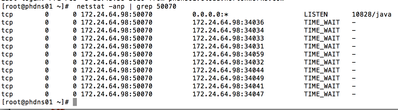
netstat -anp| grep 50070
Created on 02-06-2016 01:58 AM - edited 08-19-2019 02:57 AM
- Mark as New
- Bookmark
- Subscribe
- Mute
- Subscribe to RSS Feed
- Permalink
- Report Inappropriate Content
See this from my environment.
There is issue with the networking in your environment. You have to find out whats running in your environment and kill those processes.

Created 02-05-2016 10:01 PM
- Mark as New
- Bookmark
- Subscribe
- Mute
- Subscribe to RSS Feed
- Permalink
- Report Inappropriate Content
Kill the process that is using the port 50070
15:12:21,968 ERROR namenode.NameNode (NameNode.java:main(1712)) - Failed to start namenode. java.net.BindException: Port in use: pp-hdp-m:50070 at org.apache.hadoop.http.HttpServer2.openListeners(HttpServer2.java:919) at org.apache.hadoop.http.HttpServer2.start(HttpServer2.java:856) at
Created 02-05-2016 10:02 PM
- Mark as New
- Bookmark
- Subscribe
- Mute
- Subscribe to RSS Feed
- Permalink
- Report Inappropriate Content
Thanks @Neeraj Sabharwal. I am very new to to this. I am using HDP 2.3 on Ambari. Thanks for helping me out..
Yes I am using VM - centos7. Looks like something messed up on hostname configuration, Internal IP or something like that.
content of /etc/hosts file:
127.0.0.1 localhost localhost.localdomain localhost4 localhost4.localdomain4
192.168.24.116 pp-hdp-s2
192.168.24.117 pp-hdp-s1
192.168.24.118 pp-hdp-m - This is where I am installing Ambari and Namenode
Content of cat /etc/resolv.conf
; generated by /usr/sbin/dhclient-script
search ASOTC ( where is this asotc coming from as I do see this name getting appended in some of the hdfs.site.xml as host name)
nameserver 192.168.24.1
Below is one entry from netstat ( looks like VM has one more internal IP 10.0.2.14)
tcp 0 0 10.0.2.14:49100 pp-hdp-m: eforward TIME_WAIT
hostname -f
pp-hdp-m
hostname -i
192.168.24.118
NETWORK configuration file:
NETWORKING=yes
HOSTNAME=pp-hdp-m
NOZEROCONF=yes
Created 02-05-2016 10:09 PM
- Mark as New
- Bookmark
- Subscribe
- Mute
- Subscribe to RSS Feed
- Permalink
- Report Inappropriate Content
@Prakash Punj try rebooting that server ans restart the Ambari server.. Then log you upload says "Port in use: pp-hdp-m:50070 at org.apache.hadoop.http.HttpServer2.openListeners"
If you want help then you need to follow some tips from this forum by elimination we cn come to your rescue !


