
Our Community is getting an upgrade! To get everything ready for the relaunch, we’ll be placing the site in read-only mode starting September 21st.
We really appreciate your understanding while we get things set up behind the scenes. Catch up on all the exciting details about the move here.
Need help or have questions? Drop us a line at [email protected]

Archives of Support Questions (Read Only)
- Cloudera Community
- Board Archive
- Archives of Support Questions (Read Only)
- Re: [NiFi] Combine FlowFile Attribute and Content
- Subscribe to RSS Feed
- Mark Question as New
- Mark Question as Read
- Float this Question for Current User
- Bookmark
- Subscribe
- Mute
- Printer Friendly Page
- Subscribe to RSS Feed
- Mark Question as New
- Mark Question as Read
- Float this Question for Current User
- Bookmark
- Subscribe
- Mute
- Printer Friendly Page
[NiFi] Combine FlowFile Attribute and Content
- Labels:
-
Apache NiFi


Created 10-14-2016 08:51 AM
- Mark as New
- Bookmark
- Subscribe
- Mute
- Subscribe to RSS Feed
- Permalink
- Report Inappropriate Content
Im trying to create a xml structure which is required by an external application. The format that they require would be something like this
<root>
<attributeOne></attributeOne>
<attributeTwo></attributeTwo>
<flowfile-content></flowfile-content>
</root>
Im able to get the appropriate structure and the required attributes(passed as Parameters) using TransformXML processor.
However im not sure how to access complete flowfile-content (which is a binary) and append into the structure(inside flowfile-content tag).


Created on 10-14-2016 12:29 PM - edited 08-19-2019 02:26 AM
- Mark as New
- Bookmark
- Subscribe
- Mute
- Subscribe to RSS Feed
- Permalink
- Report Inappropriate Content
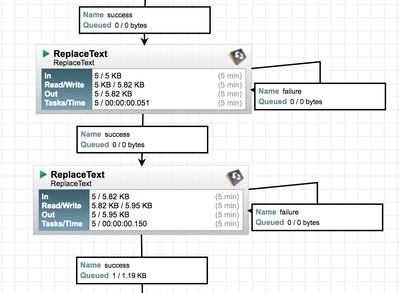
You should be able to simply use two ReplaceText processors in series to create the XML structure you are looking for:
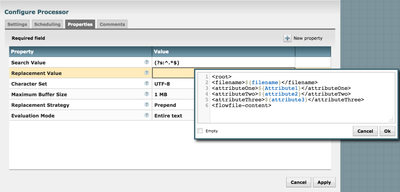
First replace text configured to prepend text to the binary content as follows:
and the second to append text to the resulting content from the above:
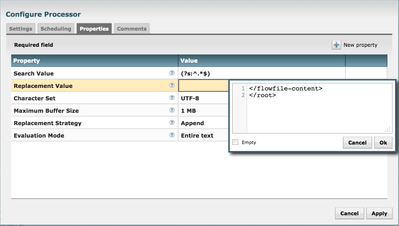
*** Note: if you hold shift key while hitting enter, you will create a new line in the text editor as shown in the above examples. An example of the output from the above would look like this:
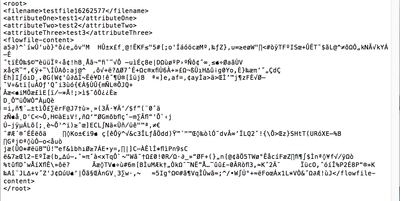
There you have the binary content between <flowfile-content> and </flowfile-content>
Now all you need to do is adjust the specific prepend and append values you need.
Thanks,
Matt
Created on 10-14-2016 12:29 PM - edited 08-19-2019 02:26 AM
- Mark as New
- Bookmark
- Subscribe
- Mute
- Subscribe to RSS Feed
- Permalink
- Report Inappropriate Content
You should be able to simply use two ReplaceText processors in series to create the XML structure you are looking for:
First replace text configured to prepend text to the binary content as follows:
and the second to append text to the resulting content from the above:
*** Note: if you hold shift key while hitting enter, you will create a new line in the text editor as shown in the above examples. An example of the output from the above would look like this:
There you have the binary content between <flowfile-content> and </flowfile-content>
Now all you need to do is adjust the specific prepend and append values you need.
Thanks,
Matt
Created 10-14-2016 02:41 PM
- Mark as New
- Bookmark
- Subscribe
- Mute
- Subscribe to RSS Feed
- Permalink
- Report Inappropriate Content
@mclark
That certainly worked! Thank you so much.
One additional question related to this, is there any other way for me to access the flowfile-content within the XSLT file which i would use through Transform XML?


