
Our Community is getting an upgrade! To get everything ready for the relaunch, we’ll be placing the site in read-only mode starting September 21st.
We really appreciate your understanding while we get things set up behind the scenes. Catch up on all the exciting details about the move here.
Need help or have questions? Drop us a line at [email protected]

Archives of Support Questions (Read Only)
- Cloudera Community
- Board Archive
- Archives of Support Questions (Read Only)
- NiFi - ConvertCSVtoAVRO (without inferring schema)...
- Subscribe to RSS Feed
- Mark Question as New
- Mark Question as Read
- Float this Question for Current User
- Bookmark
- Subscribe
- Mute
- Printer Friendly Page
- Subscribe to RSS Feed
- Mark Question as New
- Mark Question as Read
- Float this Question for Current User
- Bookmark
- Subscribe
- Mute
- Printer Friendly Page
NiFi - ConvertCSVtoAVRO (without inferring schema) - how to rename the output file?
- Labels:
-
Apache NiFi


Created 01-20-2017 02:56 PM
- Mark as New
- Bookmark
- Subscribe
- Mute
- Subscribe to RSS Feed
- Permalink
- Report Inappropriate Content
Hi,
I am using ConvertCSVtoAVRO transformation in NiFi to obtain an avro file (from local to local address) with a predefined schema.
All the records successfully go through, however I cannot find a place in PutFile block (connected direclty to ConvertCSVtoAVRO) where I can change the filename.
Does anyone know how to do it?
Let's assume I have input.csv and want to obtain output.avro file.
Thanks, Michal


Created on 01-20-2017 03:05 PM - edited 08-19-2019 01:32 AM
- Mark as New
- Bookmark
- Subscribe
- Mute
- Subscribe to RSS Feed
- Permalink
- Report Inappropriate Content
You can use an UpdateAttribute processor to change the filename.
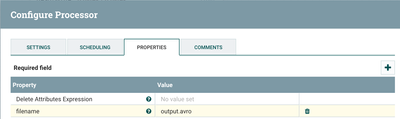
However, this would end up with every file having the same filename.
Assuming each input filename is unique excpet has a .csv extension, you could do the following:
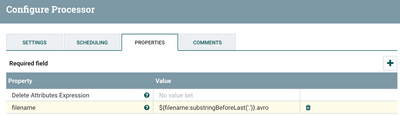
This would essentially replace the .csv extension with .avro while leaving the rest of the original filename unchanged.
Thanks,
Matt


Created 01-20-2017 02:58 PM
- Mark as New
- Bookmark
- Subscribe
- Mute
- Subscribe to RSS Feed
- Permalink
- Report Inappropriate Content
You can use an UpdateAttribute processor and change the 'filename' attribute.


Created 01-20-2017 02:58 PM
- Mark as New
- Bookmark
- Subscribe
- Mute
- Subscribe to RSS Feed
- Permalink
- Report Inappropriate Content
Hi @Michal R,
What you are looking for can be achieved with an UpdateAttribute processor, and you just need to update the 'filename' attribute, this is the attribute used by the PutFile processor.
Hope this helps.
Created on 01-20-2017 03:05 PM - edited 08-19-2019 01:32 AM
- Mark as New
- Bookmark
- Subscribe
- Mute
- Subscribe to RSS Feed
- Permalink
- Report Inappropriate Content
You can use an UpdateAttribute processor to change the filename.
However, this would end up with every file having the same filename.
Assuming each input filename is unique excpet has a .csv extension, you could do the following:
This would essentially replace the .csv extension with .avro while leaving the rest of the original filename unchanged.
Thanks,
Matt


