Archives of Support Questions (Read Only)

This is an archived board for historical reference. Information and links may no longer be available or relevant
Announcements
This board is archived and read-only for historical reference. To ask a new question, please post a new topic on the appropriate active board.

NiFi Expression - Multiple AND - AND Conditions

avatar
New Member

Hi,

I am using RouteONAttribute Processor and i defined a property and its value contains multiple AND conditions like the following:

Property Name: ROUTE1

Property Value:

${text.tag.type:equals('XXX'):and(${txt:contains('AAA')}):and(${txt:contains('BBB')})}

The Issue i am facing is that after generating a flow file with attributes text.tag.type = XXX and txt = AAA,BBB it always route to unmatched while it should route to ROUTE1

Thanks ...

1 ACCEPTED SOLUTION

avatar
Master Mentor
@yazeed salem

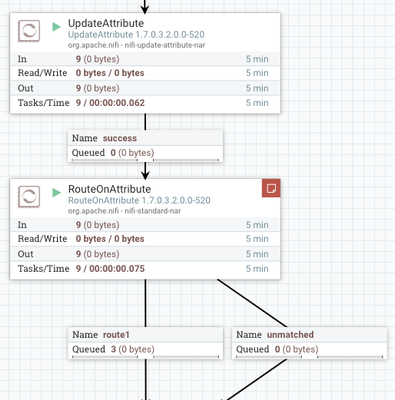
Your NiFi expression Language statement looks good. I even tested base on your example and it routed my flowfiles correctly

92617-screen-shot-2018-10-01-at-14402-pm.png

Make sure that each of the FlowFiles being processed have required FlowFile Attributes set on them.
You can stop your RouteOnAttribute processor and allow a few files to queue in the connection feeding it.
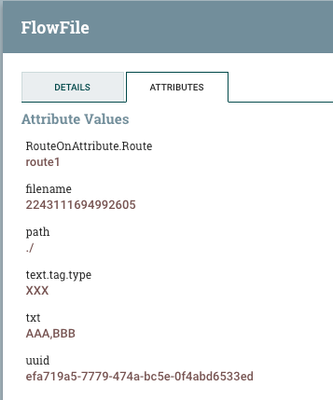
Then right click on connection and select "List queue". You can then click on "details" icon to far left of any FlowFIle to verify that it does have correct attributes set on it.

-

92618-screen-shot-2018-10-01-at-15006-pm.png

-

Thank you,

Matt

-

If you found this answer addressed your question, please take a moment to login in and click the "ACCEPT" link.

View solution in original post

1 REPLY 1

avatar
Master Mentor
@yazeed salem

Your NiFi expression Language statement looks good. I even tested base on your example and it routed my flowfiles correctly

92617-screen-shot-2018-10-01-at-14402-pm.png

Make sure that each of the FlowFiles being processed have required FlowFile Attributes set on them.
You can stop your RouteOnAttribute processor and allow a few files to queue in the connection feeding it.
Then right click on connection and select "List queue". You can then click on "details" icon to far left of any FlowFIle to verify that it does have correct attributes set on it.

-

92618-screen-shot-2018-10-01-at-15006-pm.png

-

Thank you,

Matt

-

If you found this answer addressed your question, please take a moment to login in and click the "ACCEPT" link.