Archives of Support Questions (Read Only)

This is an archived board for historical reference. Information and links may no longer be available or relevant
Announcements
This board is archived and read-only for historical reference. To ask a new question, please post a new topic on the appropriate active board.

NiFi - Extract attributes from JSON as argument in InvokeHTTP Processor

avatar

I'm trying to load weather data as http API request. Therefore I need to extract the geo information from an incoming JSON flowfile. This is my JSON data

{
  "id" : 590575476,
  "sampling_rate" : null,
  "timestamp" : "2017-12-19 13:23:20",
  "location" : {
    "id" : 1311,
    "latitude" : "47.967",
    "longitude" : "7.959",
    "country" : "DE"
  },
  "sensor" : {
    "id" : 2602,
    "pin" : "1",
    "sensor_type" : {
      "id" : 14,
      "name" : "SDS011",
      "manufacturer" : "Nova Fitness"
    }
  },
  "sensordatavalues" : [ {
    "id" : 1291686812,
    "value" : "25.87",
    "value_type" : "P1"
  }, {
    "id" : 1291686813,
    "value" : "15.63",
    "value_type" : "P2"
  } ]
}

Any idea how to access latitude and longitude as attributes for the URL in the InvokeHTTP processor?

http://api.openweathermap.org/data/2.5/weather?lat=${location.latitude}&lon=${location.longitude}&AP...
1 ACCEPTED SOLUTION

avatar
Master Guru
@Lukas Müller

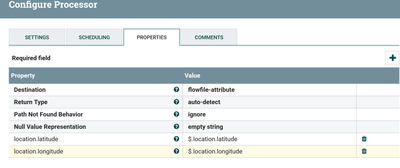
Use EvaluateJSON path processor with below configs:-

45480-evaljson.png

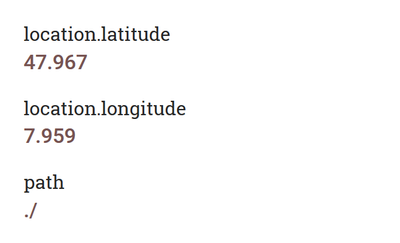
then we are adding longitude and latitude attributes to the flowfile as

45481-output.png

then use url in invoke http processor as

http://api.openweathermap.org/data/2.5/weather?lat=${location.latitude}&lon=${location.longitude}&AP...

If the Answer helped to resolve your issue, Click on Accept button below to accept the answer, That would be great help to Community users to find solution quickly for these kind of errors.

View solution in original post

1 REPLY 1

avatar
Master Guru
@Lukas Müller

Use EvaluateJSON path processor with below configs:-

45480-evaljson.png

then we are adding longitude and latitude attributes to the flowfile as

45481-output.png

then use url in invoke http processor as

http://api.openweathermap.org/data/2.5/weather?lat=${location.latitude}&lon=${location.longitude}&AP...

If the Answer helped to resolve your issue, Click on Accept button below to accept the answer, That would be great help to Community users to find solution quickly for these kind of errors.