
Our Community is getting an upgrade! To get everything ready for the relaunch, we’ll be placing the site in read-only mode starting September 21st.
We really appreciate your understanding while we get things set up behind the scenes. Catch up on all the exciting details about the move here.
Need help or have questions? Drop us a line at [email protected]

Archives of Support Questions (Read Only)
- Cloudera Community
- Board Archive
- Archives of Support Questions (Read Only)
- NiFi - View data provenance - FlowFile name
- Subscribe to RSS Feed
- Mark Question as New
- Mark Question as Read
- Float this Question for Current User
- Bookmark
- Subscribe
- Mute
- Printer Friendly Page
- Subscribe to RSS Feed
- Mark Question as New
- Mark Question as Read
- Float this Question for Current User
- Bookmark
- Subscribe
- Mute
- Printer Friendly Page
NiFi - View data provenance - FlowFile name
- Labels:
-
Apache NiFi


Created 11-19-2018 12:18 PM
- Mark as New
- Bookmark
- Subscribe
- Mute
- Subscribe to RSS Feed
- Permalink
- Report Inappropriate Content
Hi, my question is about the option "View data provenance" in the context menu.
Is there a possibility to show the FlowFile name as extra column (maybe by configuration) analog the display when I choose "List queue"? Searching for a concrete FlowFile while testing would be much easier if I haven't got to click "i" numerous times until I find the right one.


Created on 11-19-2018 09:56 PM - edited 08-17-2019 04:36 PM
- Mark as New
- Bookmark
- Subscribe
- Mute
- Subscribe to RSS Feed
- Permalink
- Report Inappropriate Content
Starting from NiFi-1.8.0 we are going to have filename same as flowfileuuid so you are able to search based on flowfileuuid to find out the specific filename.
If you are using prior to NiFi-1.8 then you can search based on filename using below process instead of clicking on "i"
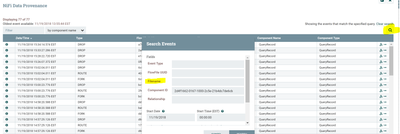
Click on the right search then you are able to view search events box then keep your desired filename overthere then click on search to get only the specific file from the provenance.
Created on 11-19-2018 09:56 PM - edited 08-17-2019 04:36 PM
- Mark as New
- Bookmark
- Subscribe
- Mute
- Subscribe to RSS Feed
- Permalink
- Report Inappropriate Content
Starting from NiFi-1.8.0 we are going to have filename same as flowfileuuid so you are able to search based on flowfileuuid to find out the specific filename.
If you are using prior to NiFi-1.8 then you can search based on filename using below process instead of clicking on "i"
Click on the right search then you are able to view search events box then keep your desired filename overthere then click on search to get only the specific file from the provenance.
Created 11-20-2018 06:54 AM
- Mark as New
- Bookmark
- Subscribe
- Mute
- Subscribe to RSS Feed
- Permalink
- Report Inappropriate Content
Thanks for Your answer! Using NiFi 1.6.0 --- must have been blind - indeed I haven't seen this search option, sorry. Bye!


