Archives of Support Questions (Read Only)

This is an archived board for historical reference. Information and links may no longer be available or relevant
Announcements
This board is archived and read-only for historical reference. To ask a new question, please post a new topic on the appropriate active board.

NiFi: split response json for a subsequent http request

avatar
Expert Contributor

I need to read an API where my first call will return a JSON with objectIDs in this form:

{

  • objectIdFieldName: "ID",
  • objectIds: [
    • 64916,
    • 67266,
    • 67237,
    • 64511,
    • ....
    • ..]

}

I need to use the objectIds above to send requests for each of these IDs to the API that will return the data that i need.

I was thinking a flow:

GetHTTP (get response JSON) --> EvaluateJSONpath (parse only objectIds field: $.objectIds) --> ? --> InvokeHTTP (new query per ID)

My problem comes after that as what i get is a sort of objectIds array in the form of:

[64916, 67266, 67237, 64511,...,]

How to i manage to split/parse each ID from this array in a flowfile attribute so that i can send it along with other data/headers to the InvokeHTTP processor?

I thought to use SplitJson processor but i am having difficulties to understand its usage in this case.

Any help much appreciated!

1 ACCEPTED SOLUTION

avatar
Master Guru
@balalaika

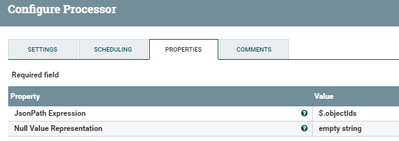
Use SplitJson Processor with the following configs:-

42794-split.png

Input Json:-

{
"objectIdFieldName": "ID",
"objectIds": [
64916,
67266,
67237,
64511]
}

Output:-

will be different flowfiles per objectId

64916
67266
67237
64511

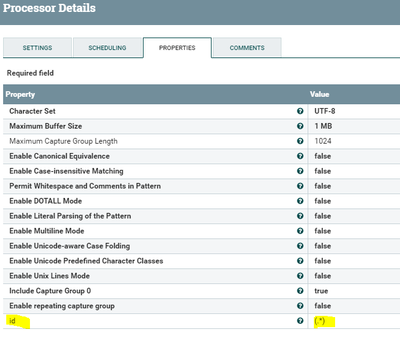
Use Extract Text processor:-

42795-extracttext.png

extract the content of the flowfile by adding new property

id as

(.*)

Right now you will have id attribute added to the flowfile

then you can use the id attribute when you are doing InvokeHTTP processor

Flow:-

GetHTTP (get response JSON) --> SplitJson -->ExtractText--> InvokeHTTP (new query per ID)

View solution in original post

1 REPLY 1

avatar
Master Guru
@balalaika

Use SplitJson Processor with the following configs:-

42794-split.png

Input Json:-

{
"objectIdFieldName": "ID",
"objectIds": [
64916,
67266,
67237,
64511]
}

Output:-

will be different flowfiles per objectId

64916
67266
67237
64511

Use Extract Text processor:-

42795-extracttext.png

extract the content of the flowfile by adding new property

id as

(.*)

Right now you will have id attribute added to the flowfile

then you can use the id attribute when you are doing InvokeHTTP processor

Flow:-

GetHTTP (get response JSON) --> SplitJson -->ExtractText--> InvokeHTTP (new query per ID)