
Our Community is getting an upgrade! To get everything ready for the relaunch, we’ll be placing the site in read-only mode starting September 21st.
We really appreciate your understanding while we get things set up behind the scenes. Catch up on all the exciting details about the move here.
Need help or have questions? Drop us a line at [email protected]

Archives of Support Questions (Read Only)
- Cloudera Community
- Board Archive
- Archives of Support Questions (Read Only)
- Nifi ListFile Processor
- Subscribe to RSS Feed
- Mark Question as New
- Mark Question as Read
- Float this Question for Current User
- Bookmark
- Subscribe
- Mute
- Printer Friendly Page
- Subscribe to RSS Feed
- Mark Question as New
- Mark Question as Read
- Float this Question for Current User
- Bookmark
- Subscribe
- Mute
- Printer Friendly Page
Nifi ListFile Processor
- Labels:
-
Apache NiFi


Created on 05-11-2017 10:57 AM - edited 08-17-2019 06:10 PM
- Mark as New
- Bookmark
- Subscribe
- Mute
- Subscribe to RSS Feed
- Permalink
- Report Inappropriate Content
Hello guys,
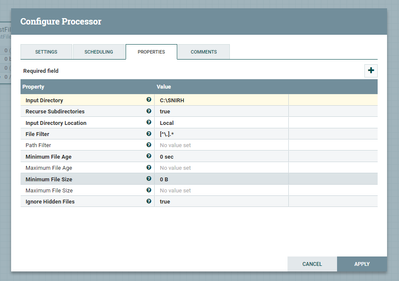
I'm having trouble passing the input directory in configuration of ListFile Processor.
Says that directory is invalid or does not exist.
I want' to list files in my local file system in C drive and the folder is SNIRH.
Here is the pic:
Thanks
Created 05-21-2017 10:15 AM
- Mark as New
- Bookmark
- Subscribe
- Mute
- Subscribe to RSS Feed
- Permalink
- Report Inappropriate Content
I resolved my issue because in fact i have 3 environments, and i was ponting the listProcessor to the wrong environment.
I have my local file system Windows 8.1, with VirtualBox, running CentOS 7, and on top of CentOS i have the sandbox, and i was pointing my folder to the CentOS layer.
My /media/sf_SharedFolder was placed in CentOS and not in sandbox. I have to thank you for your help.
Created on 05-12-2017 10:45 AM - edited 08-17-2019 06:09 PM
- Mark as New
- Bookmark
- Subscribe
- Mute
- Subscribe to RSS Feed
- Permalink
- Report Inappropriate Content
@Wynner with /var/log works! So, why doesn't work with mu shared folder...?
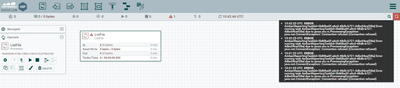
do you think that can be related to this error:



Created 05-12-2017 12:39 PM
- Mark as New
- Bookmark
- Subscribe
- Mute
- Subscribe to RSS Feed
- Permalink
- Report Inappropriate Content
No, that error has nothing to do with the issue for the ListFile processor.
Maybe it has something to do with the mixed case, I am not sure since I don't have a CentOS 7 VirtualBox VM. Try changing the case to all lower case and no underscores for the mounted partition name and see if that makes a difference.
Created 05-12-2017 02:44 PM
- Mark as New
- Bookmark
- Subscribe
- Mute
- Subscribe to RSS Feed
- Permalink
- Report Inappropriate Content
I was able to use the sf_SharedFolder path name, so that is not the issue.
Will you take snapshot of the property Input Directory with the current configuration?
The only time I am able to reproduce the error you are seeing is when I add a blank space before or after the path or when I add a carriage return in the property. Make sure there is only a single line in the property value.
Created on 05-13-2017 02:21 PM - edited 08-17-2019 06:09 PM
- Mark as New
- Bookmark
- Subscribe
- Mute
- Subscribe to RSS Feed
- Permalink
- Report Inappropriate Content
Try clearing your browser cache or try deleting the processor and dropping a new ListFile processor on the graph. What version of HDF are you running?
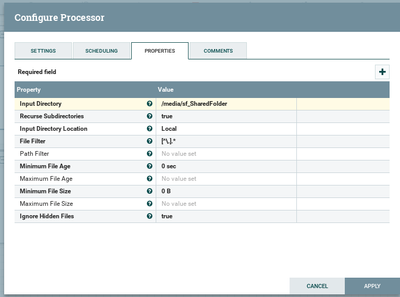
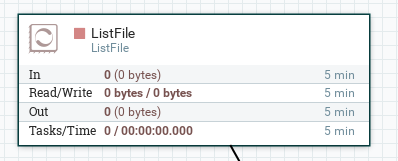
Here is my environment where it works just fine. I am running CentOS 7.3 in VirtualBox 5.1.22 on MacOS Sierra, HDF 2.1.2.
Created on 05-13-2017 10:48 AM - edited 08-17-2019 06:09 PM
- Mark as New
- Bookmark
- Subscribe
- Mute
- Subscribe to RSS Feed
- Permalink
- Report Inappropriate Content
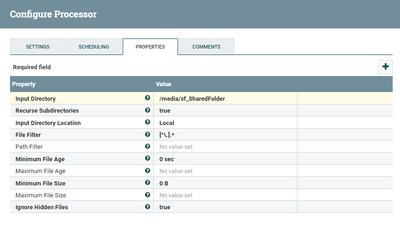
I tried yesterday changing the name without '_' and lowered the path but still not working.
Here is the current config. of my processor:
Created 05-21-2017 10:15 AM
- Mark as New
- Bookmark
- Subscribe
- Mute
- Subscribe to RSS Feed
- Permalink
- Report Inappropriate Content
I resolved my issue because in fact i have 3 environments, and i was ponting the listProcessor to the wrong environment.
I have my local file system Windows 8.1, with VirtualBox, running CentOS 7, and on top of CentOS i have the sandbox, and i was pointing my folder to the CentOS layer.
My /media/sf_SharedFolder was placed in CentOS and not in sandbox. I have to thank you for your help.

- « Previous
- Next »

