
Our Community is getting an upgrade! To get everything ready for the relaunch, we’ll be placing the site in read-only mode starting September 21st.
We really appreciate your understanding while we get things set up behind the scenes. Catch up on all the exciting details about the move here.
Need help or have questions? Drop us a line at [email protected]

Archives of Support Questions (Read Only)
- Cloudera Community
- Board Archive
- Archives of Support Questions (Read Only)
- No space left on device while installing CDH using...
- Subscribe to RSS Feed
- Mark Question as New
- Mark Question as Read
- Float this Question for Current User
- Bookmark
- Subscribe
- Mute
- Printer Friendly Page
- Subscribe to RSS Feed
- Mark Question as New
- Mark Question as Read
- Float this Question for Current User
- Bookmark
- Subscribe
- Mute
- Printer Friendly Page
No space left on device while installing CDH using Cloudera Manager


Created on 05-28-2014 03:08 AM - edited 09-16-2022 01:59 AM
- Mark as New
- Bookmark
- Subscribe
- Mute
- Subscribe to RSS Feed
- Permalink
- Report Inappropriate Content
Hi,
I'm trying to install CDH on my cluster through Coudera Manager. However, while trying to download the parcels, I get this error:
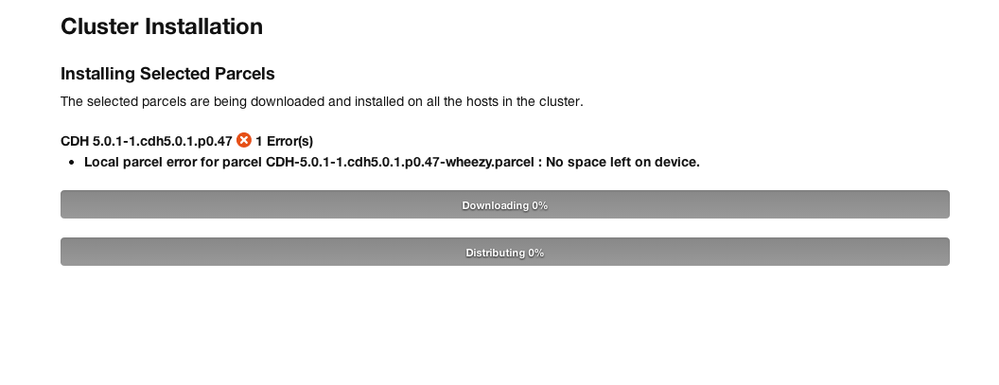
However, df -h shows me this:
Filesystem Size Used Avail Use% Mounted on
rootfs 19G 3.0G 15G 17% /
udev 10M 0 10M 0% /dev
tmpfs 201M 224K 201M 1% /run
/dev/disk/by-uuid/1a724f4b-1c04-45d5-ad66-979208a20ba1 19G 3.0G 15G 17% /
tmpfs 5.0M 0 5.0M 0% /run/lock
tmpfs 578M 0 578M 0% /run/shm
cm_processes 1003M 0 1003M 0% /run/cloudera-scm-agent/process
There seems to be ample space on the device. Any suggestions?
Created 05-28-2014 09:46 AM
- Mark as New
- Bookmark
- Subscribe
- Mute
- Subscribe to RSS Feed
- Permalink
- Report Inappropriate Content
Hi,
I figured out what the problem was. The parcel was not being downloaded on the cloudera manager host because there was not enough disk space on that. However, after I changed the path and the parcel was successfully downloaded. It is fixed now thanks!


Created 05-28-2014 09:25 AM
- Mark as New
- Bookmark
- Subscribe
- Mute
- Subscribe to RSS Feed
- Permalink
- Report Inappropriate Content
Created 05-28-2014 09:46 AM
- Mark as New
- Bookmark
- Subscribe
- Mute
- Subscribe to RSS Feed
- Permalink
- Report Inappropriate Content
Hi,
I figured out what the problem was. The parcel was not being downloaded on the cloudera manager host because there was not enough disk space on that. However, after I changed the path and the parcel was successfully downloaded. It is fixed now thanks!


Created 01-20-2016 11:11 PM
- Mark as New
- Bookmark
- Subscribe
- Mute
- Subscribe to RSS Feed
- Permalink
- Report Inappropriate Content
How did you alter the path? I have the same issue
Created 01-21-2016 08:16 AM
- Mark as New
- Bookmark
- Subscribe
- Mute
- Subscribe to RSS Feed
- Permalink
- Report Inappropriate Content
Change the download path when you go through the initial setup of CDH where it asks to specify the parcel repository


