
Our Community is getting an upgrade! To get everything ready for the relaunch, we’ll be placing the site in read-only mode starting September 21st.
We really appreciate your understanding while we get things set up behind the scenes. Catch up on all the exciting details about the move here.
Need help or have questions? Drop us a line at [email protected]

Archives of Support Questions (Read Only)
- Cloudera Community
- Board Archive
- Archives of Support Questions (Read Only)
- Re: Not able to connect phoenix via java jdbc
- Subscribe to RSS Feed
- Mark Question as New
- Mark Question as Read
- Float this Question for Current User
- Bookmark
- Subscribe
- Mute
- Printer Friendly Page
- Subscribe to RSS Feed
- Mark Question as New
- Mark Question as Read
- Float this Question for Current User
- Bookmark
- Subscribe
- Mute
- Printer Friendly Page
Not able to connect phoenix via java jdbc
- Labels:
-
Apache HBase
-
Apache Phoenix


Created 04-11-2016 03:28 PM
- Mark as New
- Bookmark
- Subscribe
- Mute
- Subscribe to RSS Feed
- Permalink
- Report Inappropriate Content
i'm trying to connect to phoenix using java jdbc , but i not succeed to etablish connection ,there is exemple show me how to write url of connection ??, i succeed to connect to phoenix by using sqlline.py
". /sqlline.py node4.bigdatau:2181 " this is my code java , thx
  try {
Class.forName("org.apache.phoenix.jdbc.PhoenixDriver");
    }catch (ClassNotFoundException e) {
		System.out.println("Where is your  JDBC Driver?");
		e.printStackTrace();
	}
   conn =  DriverManager.getConnection(" jdbc:phoenix:195.154.55.93:2181");
    System.out.println("got connection");


Created on 05-24-2016 09:43 AM - edited 08-18-2019 04:20 AM
- Mark as New
- Bookmark
- Subscribe
- Mute
- Subscribe to RSS Feed
- Permalink
- Report Inappropriate Content
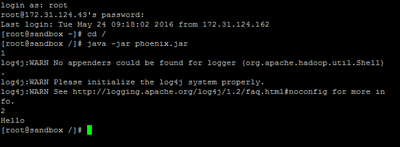
Hi @nejm hadjmbarek, I'm Posting my code, which is working Fine:
import java.sql.Connection;
import java.sql.DriverManager;
import java.sql.ResultSet;
import java.sql.SQLException;
import java.sql.PreparedStatement;
import java.sql.Statement;
public class phoenix_hbase
{
 public static void main(String[] args) throws SQLException
 {
  @SuppressWarnings("unused")
  Statement stmt = null;
  ResultSet rset = null;

  try
  {
   Class.forName("org.apache.phoenix.jdbc.PhoenixDriver");
  }
  catch (ClassNotFoundException e1)
  {
   System.out.println("Exception Loading Driver");
   e1.printStackTrace();
  }
  try
  {
   Connection con = DriverManager.getConnection("jdbc:phoenix:172.31.124.43:2181:/hbase-unsecure");  //172.31.124.43 is the adress of VM, not needed if ur running the program from vm itself
   stmt = con.createStatement();

   PreparedStatement statement = con.prepareStatement("select * from javatest");
   rset = statement.executeQuery();
   while (rset.next())
   {
    System.out.println(rset.getString("mycolumn"));
   }
   statement.close();
   con.close();
  }
  catch(Exception e)
  {
   System.out.println(e.getMessage());
  }
 }
}

Created 04-11-2016 03:33 PM
- Mark as New
- Bookmark
- Subscribe
- Mute
- Subscribe to RSS Feed
- Permalink
- Report Inappropriate Content
Hi @nejm hadjmbarek, can you post the error you're seeing? From the above, it looks like you've forgotten to include the ZooKeeper znode for HBase: "/hbase-unsecure". Try with the following connection string instead: "jdbc:phoenix:195.154.55.93:2181:/hbase-unsecure".
If you need a simple simple java application (with maven pomfile) that embeds and uses the Phoenix JDBC driver, take a look here.



Created 04-11-2016 03:34 PM
- Mark as New
- Bookmark
- Subscribe
- Mute
- Subscribe to RSS Feed
- Permalink
- Report Inappropriate Content
The leading space in your JDBC url is likely problematic.
If that doesn't fix it, you should provide the error you are experiencing.
Created 04-11-2016 03:46 PM
- Mark as New
- Bookmark
- Subscribe
- Mute
- Subscribe to RSS Feed
- Permalink
- Report Inappropriate Content
thx ,@Randy Gelhausen,@Josh Elser
i get this error "
Exception in thread "main" java.sql.SQLException: ERROR 103 (08004): Unable to establish connection
Caused by: java.io.IOException: java.lang.reflect.InvocationTargetException" , yes i 'am using simple java app with maven pomfile but i get always this error .


Created 04-18-2016 11:11 PM
- Mark as New
- Bookmark
- Subscribe
- Mute
- Subscribe to RSS Feed
- Permalink
- Report Inappropriate Content
@nejm hadjmbarek Remove the space inside connection string. Add zookeeper znode in the connection string .
jdbc:phoenix:<quorom>:<port>:[zk_rootNode]
If this doesn't work plz paste whole stack trace.
Created on 05-24-2016 09:43 AM - edited 08-18-2019 04:20 AM
- Mark as New
- Bookmark
- Subscribe
- Mute
- Subscribe to RSS Feed
- Permalink
- Report Inappropriate Content
Hi @nejm hadjmbarek, I'm Posting my code, which is working Fine:
import java.sql.Connection;
import java.sql.DriverManager;
import java.sql.ResultSet;
import java.sql.SQLException;
import java.sql.PreparedStatement;
import java.sql.Statement;
public class phoenix_hbase
{
 public static void main(String[] args) throws SQLException
 {
  @SuppressWarnings("unused")
  Statement stmt = null;
  ResultSet rset = null;

  try
  {
   Class.forName("org.apache.phoenix.jdbc.PhoenixDriver");
  }
  catch (ClassNotFoundException e1)
  {
   System.out.println("Exception Loading Driver");
   e1.printStackTrace();
  }
  try
  {
   Connection con = DriverManager.getConnection("jdbc:phoenix:172.31.124.43:2181:/hbase-unsecure");  //172.31.124.43 is the adress of VM, not needed if ur running the program from vm itself
   stmt = con.createStatement();

   PreparedStatement statement = con.prepareStatement("select * from javatest");
   rset = statement.executeQuery();
   while (rset.next())
   {
    System.out.println(rset.getString("mycolumn"));
   }
   statement.close();
   con.close();
  }
  catch(Exception e)
  {
   System.out.println(e.getMessage());
  }
 }
}


