
Our Community is getting an upgrade! To get everything ready for the relaunch, we’ll be placing the site in read-only mode starting September 21st.
We really appreciate your understanding while we get things set up behind the scenes. Catch up on all the exciting details about the move here.
Need help or have questions? Drop us a line at [email protected]

Archives of Support Questions (Read Only)
- Cloudera Community
- Board Archive
- Archives of Support Questions (Read Only)
- Oozie Stuck in PREP - HDP 2.5.3
- Subscribe to RSS Feed
- Mark Question as New
- Mark Question as Read
- Float this Question for Current User
- Bookmark
- Subscribe
- Mute
- Printer Friendly Page
- Subscribe to RSS Feed
- Mark Question as New
- Mark Question as Read
- Float this Question for Current User
- Bookmark
- Subscribe
- Mute
- Printer Friendly Page
Oozie Stuck in PREP - HDP 2.5.3


Created on 03-04-2017 05:14 AM - edited 08-19-2019 01:43 AM
- Mark as New
- Bookmark
- Subscribe
- Mute
- Subscribe to RSS Feed
- Permalink
- Report Inappropriate Content
When running any jobs, that were previously working, the job goes to PREP state (after the Start). Jobs were previously working with no issue.
When running an Oozie Service check, the following is received.
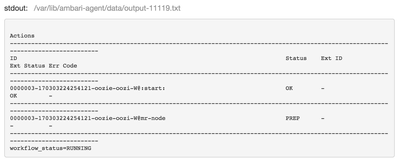
We recently upgraded from 2.3.0 to 2.5.3 and the jobs ran for a couple of days with no issue then in the middle of the day the jobs started acting like this.
When on the phone with Hortonworks Tech Support, we did set oozie.service.AuthorizationService.security.enabled to false and it temporarily started working and then quit again.
We do have HA enabled, but any of the posts that I have found didn't fix the issue.
Created 03-04-2017 03:47 PM
- Mark as New
- Bookmark
- Subscribe
- Mute
- Subscribe to RSS Feed
- Permalink
- Report Inappropriate Content
After further troubleshooting and the changing of properties (with no success), I took the last resort of deleting the Oozie service and setting up on a new DB.
For now everything is back to normal. Root cause I suspect is db corruption.
This StackOverflow post kind of led me to do the inevitable.


Created 03-04-2017 05:17 AM
- Mark as New
- Bookmark
- Subscribe
- Mute
- Subscribe to RSS Feed
- Permalink
- Report Inappropriate Content
@Jesse Passwaters please share job.properties and workflow.xml files
Created 03-04-2017 05:27 AM
- Mark as New
- Bookmark
- Subscribe
- Mute
- Subscribe to RSS Feed
- Permalink
- Report Inappropriate Content
Here are the 2 files. This is what is used when I run the service check which fails.
Created 03-04-2017 03:47 PM
- Mark as New
- Bookmark
- Subscribe
- Mute
- Subscribe to RSS Feed
- Permalink
- Report Inappropriate Content
After further troubleshooting and the changing of properties (with no success), I took the last resort of deleting the Oozie service and setting up on a new DB.
For now everything is back to normal. Root cause I suspect is db corruption.
This StackOverflow post kind of led me to do the inevitable.


