
Our Community is getting an upgrade! To get everything ready for the relaunch, we’ll be placing the site in read-only mode starting September 21st.
We really appreciate your understanding while we get things set up behind the scenes. Catch up on all the exciting details about the move here.
Need help or have questions? Drop us a line at [email protected]

Archives of Support Questions (Read Only)
- Cloudera Community
- Board Archive
- Archives of Support Questions (Read Only)
- Output Port: Port X is invalid because Output Conn...
- Subscribe to RSS Feed
- Mark Question as New
- Mark Question as Read
- Float this Question for Current User
- Bookmark
- Subscribe
- Mute
- Printer Friendly Page
- Subscribe to RSS Feed
- Mark Question as New
- Mark Question as Read
- Float this Question for Current User
- Bookmark
- Subscribe
- Mute
- Printer Friendly Page
Output Port: Port X is invalid because Output Connection for port X is not defined
- Labels:
-
Apache NiFi


Created 09-04-2017 07:31 PM
- Mark as New
- Bookmark
- Subscribe
- Mute
- Subscribe to RSS Feed
- Permalink
- Report Inappropriate Content
Hello All,
I dragged an Output Port in canvas inside a Process Group and I am getting error that - Port X is invalid because Output Connection for port X is not defined.
What configuration am I missing?
Thanks!!



Created on 09-05-2017 08:32 PM - edited 08-18-2019 03:05 AM
- Mark as New
- Bookmark
- Subscribe
- Mute
- Subscribe to RSS Feed
- Permalink
- Report Inappropriate Content
You need to connect the output port to some other object outside of the process group the output port is in.
For example, I have a output port in a process group
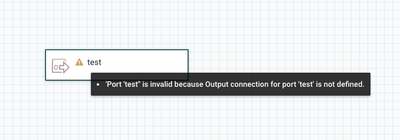
In the level above the process group, if I hover the cursor over the process group an icon appears

Now, I left click, hold and drag the cursor over to a processor, funnel or another process group with an input port, another window will pop up with the name of the output port
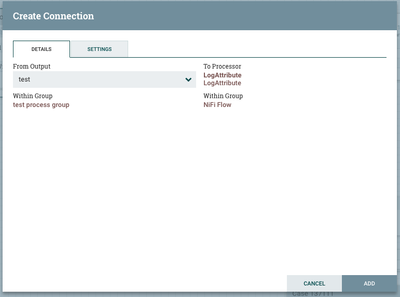
Select ADD and then you'll see a connection to the object, if you go back into the original process group, you'll see the output port is ready to be started and there you go.

Created on 09-05-2017 08:32 PM - edited 08-18-2019 03:05 AM
- Mark as New
- Bookmark
- Subscribe
- Mute
- Subscribe to RSS Feed
- Permalink
- Report Inappropriate Content
You need to connect the output port to some other object outside of the process group the output port is in.
For example, I have a output port in a process group
In the level above the process group, if I hover the cursor over the process group an icon appears
Now, I left click, hold and drag the cursor over to a processor, funnel or another process group with an input port, another window will pop up with the name of the output port
Select ADD and then you'll see a connection to the object, if you go back into the original process group, you'll see the output port is ready to be started and there you go.
Created 09-05-2017 08:33 PM
- Mark as New
- Bookmark
- Subscribe
- Mute
- Subscribe to RSS Feed
- Permalink
- Report Inappropriate Content
Thanks. My issue is resolved now.


