
Our Community is getting an upgrade! To get everything ready for the relaunch, we’ll be placing the site in read-only mode starting September 21st.
We really appreciate your understanding while we get things set up behind the scenes. Catch up on all the exciting details about the move here.
Need help or have questions? Drop us a line at [email protected]

Archives of Support Questions (Read Only)
- Cloudera Community
- Board Archive
- Archives of Support Questions (Read Only)
- Override default Hive Database Path
- Subscribe to RSS Feed
- Mark Question as New
- Mark Question as Read
- Float this Question for Current User
- Bookmark
- Subscribe
- Mute
- Printer Friendly Page
- Subscribe to RSS Feed
- Mark Question as New
- Mark Question as Read
- Float this Question for Current User
- Bookmark
- Subscribe
- Mute
- Printer Friendly Page
Override default Hive Database Path
- Labels:
-
Apache Hive


Created on 06-02-2017 03:39 PM - edited 08-17-2019 11:32 PM
- Mark as New
- Bookmark
- Subscribe
- Mute
- Subscribe to RSS Feed
- Permalink
- Report Inappropriate Content
Hi All,
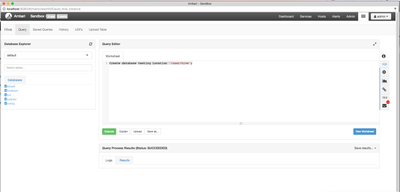
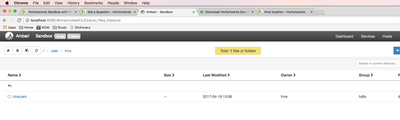
I was trying to create a hive database by specifying a different location. The query got executed successfully, but I don't see the database in the specified location. Am I missing anything here?
PFA for the screenshots.
Created 06-13-2017 12:53 AM
- Mark as New
- Bookmark
- Subscribe
- Mute
- Subscribe to RSS Feed
- Permalink
- Report Inappropriate Content
I found that this is how hive works when I provide (override the default ) the path.
It will use the specified path assuming the path subdirectory ex: /user/hive/warehouse/, "warehouse" folder in this case as the main DB folder and it will create all the tables underneath.
Created on 06-02-2017 03:50 PM - edited 08-17-2019 11:31 PM
- Mark as New
- Bookmark
- Subscribe
- Mute
- Subscribe to RSS Feed
- Permalink
- Report Inappropriate Content
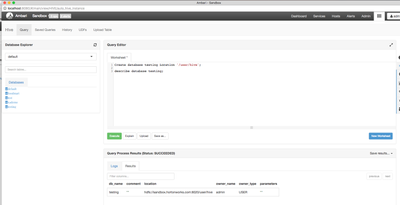
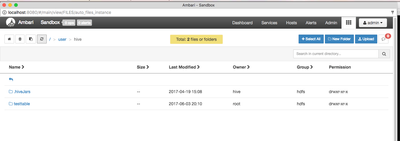
When I execute with describe to check the location of the database, it gives me the same path that was mentioned while creating it, but when I browse the location, i don't see anything there. PFA for the screenshot.
Created 06-03-2017 03:55 PM
- Mark as New
- Bookmark
- Subscribe
- Mute
- Subscribe to RSS Feed
- Permalink
- Report Inappropriate Content
cross checked on the path through command prompt with hadoop command, even I don't see any .db folder. Please let me know if I am missing anything here.


Created 06-03-2017 08:53 PM
- Mark as New
- Bookmark
- Subscribe
- Mute
- Subscribe to RSS Feed
- Permalink
- Report Inappropriate Content
How did you look for the db folder?
Usually running the below command
# su - hdfs
$ hdfs dfs -ls /
This should give you ,the most probably
hdfs dfs -ls /apps/hive/warehouse/
And also check the below property in the hive-site.xml file
<property>
   <name>hive.metastore.warehouse.dir</name>
   <value>/usr/hive/warehouse </value>
   <description>location of the warehouse directory</description>
 </property>
Created 06-04-2017 09:47 PM
- Mark as New
- Bookmark
- Subscribe
- Mute
- Subscribe to RSS Feed
- Permalink
- Report Inappropriate Content
The default path is /apps/hive/warehouse. But, for this database, I have mentioned different path to create and I am am not able to find the .db folder in the mentioned path, I can see the table folder when I create one. The .db folder should be created under the same mentioned path right?
Created on 06-03-2017 11:57 PM - edited 08-17-2019 11:31 PM
- Mark as New
- Bookmark
- Subscribe
- Mute
- Subscribe to RSS Feed
- Permalink
- Report Inappropriate Content
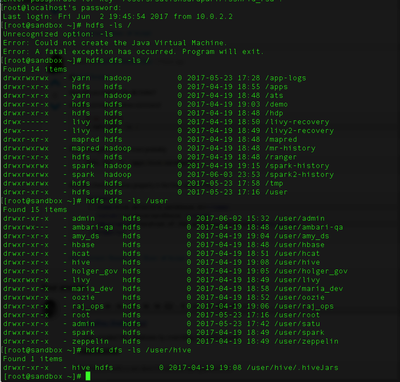
I have created this database by overriding the default path (used user/hive).
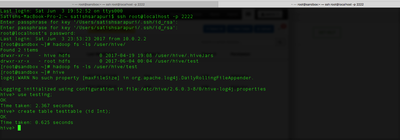
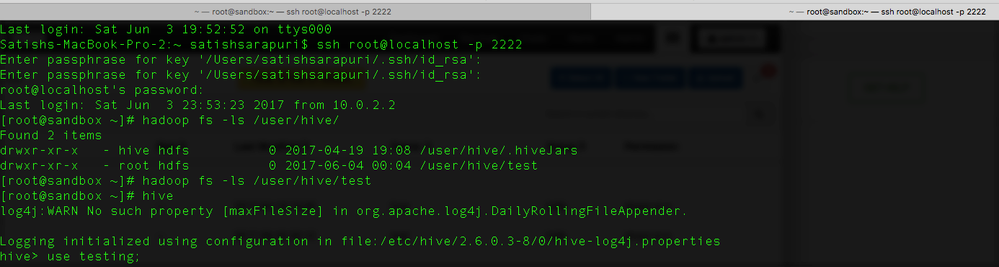
I used both hdfs dfs and hadoop fs commands to check the .db folder. I don't see anything on the mentioned path that was used while creating. PFA for the attached screenshot.
Created on 06-04-2017 12:13 AM - edited 08-17-2019 11:31 PM
- Mark as New
- Bookmark
- Subscribe
- Mute
- Subscribe to RSS Feed
- Permalink
- Report Inappropriate Content
I tried to create a table in this db, when I created, I see a folder with same name as table in /user/hive path. but no folder with .db. PFA for the screenshots.
Created 06-06-2017 02:18 PM
- Mark as New
- Bookmark
- Subscribe
- Mute
- Subscribe to RSS Feed
- Permalink
- Report Inappropriate Content
Could anyone please let me know on this?


Created 06-07-2017 07:10 AM
- Mark as New
- Bookmark
- Subscribe
- Mute
- Subscribe to RSS Feed
- Permalink
- Report Inappropriate Content
My default hive warehouse:

hive> dfs -ls /user/hive/warehouse/;
Found 8 items
drwxrwxrwx   - hive     hive          0 2016-02-22 23:04 /user/hive/warehouse/clickstream
drwxrwxrwx   - hive     hive          0 2015-12-02 21:52 /user/hive/warehouse/clickstream1
drwxrwxrwx   - cloudera hive          0 2017-02-15 23:03 /user/hive/warehouse/emp1
drwxrwxrwx   - cloudera hive          0 2016-09-07 23:10 /user/hive/warehouse/emp1_1
drwxrwxrwx   - cloudera hive          0 2016-09-07 23:12 /user/hive/warehouse/emp1_2
drwxrwxrwx   - cloudera hive          0 2017-02-15 23:03 /user/hive/warehouse/emp1_orc
drwxrwxrwx   - cloudera hive          0 2016-09-07 23:09 /user/hive/warehouse/emp2
drwxrwxrwx   - hive     hive          0 2017-02-16 01:24 /user/hive/warehouse/employee
Creating database without LOCATION:
hive> create database testing1;
OK
Time taken: 0.048 seconds
hive> dfs -ls /user/hive/warehouse/;
Found 9 items
drwxrwxrwx   - hive     hive          0 2016-02-22 23:04 /user/hive/warehouse/clickstream
drwxrwxrwx   - hive     hive          0 2015-12-02 21:52 /user/hive/warehouse/clickstream1
drwxrwxrwx   - cloudera hive          0 2017-02-15 23:03 /user/hive/warehouse/emp1
drwxrwxrwx   - cloudera hive          0 2016-09-07 23:10 /user/hive/warehouse/emp1_1
drwxrwxrwx   - cloudera hive          0 2016-09-07 23:12 /user/hive/warehouse/emp1_2
drwxrwxrwx   - cloudera hive          0 2017-02-15 23:03 /user/hive/warehouse/emp1_orc
drwxrwxrwx   - cloudera hive          0 2016-09-07 23:09 /user/hive/warehouse/emp2
drwxrwxrwx   - hive     hive          0 2017-02-16 01:24 /user/hive/warehouse/employee
drwxrwxrwx   - cloudera hive          0 2017-06-06 23:38 /user/hive/warehouse/testing1.db
Creating database with LOCATION:
hive> create database testing location '/user/hive/testing';
OK
Time taken: 0.147 seconds
hive> dfs -ls /user/hive/;
Found 2 items
drwxrwxrwx   - cloudera hive          0 2017-06-06 23:35 /user/hive/testing
drwxrwxrwx   - hive     hive          0 2017-02-15 23:01 /user/hive/warehouse
In hive explicit LOCATION is just a pointer.
Created 06-07-2017 07:53 PM
- Mark as New
- Bookmark
- Subscribe
- Mute
- Subscribe to RSS Feed
- Permalink
- Report Inappropriate Content
Here my question is, It should create the <dbname>.db folder (as it does in default path), why It's not creating the <dbname>.db folder when I pass /override the default location? There supposed to be Testing.db under the testing folder right (in your case)?
It's strange behaviour when you override the database default path.


