
Archives of Support Questions (Read Only)
- Cloudera Community
- Board Archive
- Archives of Support Questions (Read Only)
- Picking Server for Wait\Notify Processors
- Subscribe to RSS Feed
- Mark Question as New
- Mark Question as Read
- Float this Question for Current User
- Bookmark
- Subscribe
- Mute
- Printer Friendly Page
- Subscribe to RSS Feed
- Mark Question as New
- Mark Question as Read
- Float this Question for Current User
- Bookmark
- Subscribe
- Mute
- Printer Friendly Page
Picking Server for Wait\Notify Processors
- Labels:
-
Apache NiFi


Created 07-24-2017 01:59 AM
- Mark as New
- Bookmark
- Subscribe
- Mute
- Subscribe to RSS Feed
- Permalink
- Report Inappropriate Content
Hi
I am trying out the Wait\Notify Processors in Nifi 1.2 for the first time. In the Property for Distributed Cache Service I choose create new service.
Under Properties of that service I just pick the hostname of the localserver where nifi is running as Server Hostname and all lights changed on go.
But when i started the Prozessors I got this error messege:
2017-07-12 14:28:09,563 ERROR [Timer-Driven Process Thread-6] org.apache.nifi.processors.standard.Wait Wait[id=115238a2-299b-1267-98b6-14d1a4eb45e8] Failed to process session due to org.apache.nifi.processor.exception.ProcessException: Failed to get signal for TOC_2017cw14_WGS84_umts due to java.net.ConnectException: Connection refused: {} org.apache.nifi.processor.exception.ProcessException: Failed to get signal for TOC_2017cw14_WGS84_umts due to java.net.ConnectException: Connection refused at org.apache.nifi.processors.standard.Wait.onTrigger(Wait.java:354) at org.apache.nifi.processor.AbstractProcessor.onTrigger(AbstractProcessor.java:27) at org.apache.nifi.controller.StandardProcessorNode.onTrigger(StandardProcessorNode.java:1120) at org.apache.nifi.controller.tasks.ContinuallyRunProcessorTask.call(ContinuallyRunProcessorTask.java:147) at org.apache.nifi.controller.tasks.ContinuallyRunProcessorTask.call(ContinuallyRunProcessorTask.java:47) at org.apache.nifi.controller.scheduling.TimerDrivenSchedulingAgent$1.run(TimerDrivenSchedulingAgent.java:132) at java.util.concurrent.Executors$RunnableAdapter.call(Executors.java:511) at java.util.concurrent.FutureTask.runAndReset(FutureTask.java:308) at java.util.concurrent.ScheduledThreadPoolExecutor$ScheduledFutureTask.access$301(ScheduledThreadPoolExecutor.java:180) at java.util.concurrent.ScheduledThreadPoolExecutor$ScheduledFutureTask.run(ScheduledThreadPoolExecutor.java:294) at java.util.concurrent.ThreadPoolExecutor.runWorker(ThreadPoolExecutor.java:1142) at java.util.concurrent.ThreadPoolExecutor$Worker.run(ThreadPoolExecutor.java:617) at java.lang.Thread.run(Thread.java:748) Caused by: java.net.ConnectException: Connection refused at sun.nio.ch.SocketChannelImpl.checkConnect(Native Method) at sun.nio.ch.SocketChannelImpl.finishConnect(SocketChannelImpl.java:717) at sun.nio.ch.SocketAdaptor.connect(SocketAdaptor.java:111) ♥



Created on 08-16-2017 02:57 PM - edited 08-18-2019 02:29 AM
- Mark as New
- Bookmark
- Subscribe
- Mute
- Subscribe to RSS Feed
- Permalink
- Report Inappropriate Content
In order to use a DistributedMapCacheClientService, you also need to configure a DistributedMapCacheServer controller service. Then in the property "Server Hostname " in the Client service, make sure and put one server if running in a cluster.
For example;

You can use the default settings for the DistributedMapCacheServer
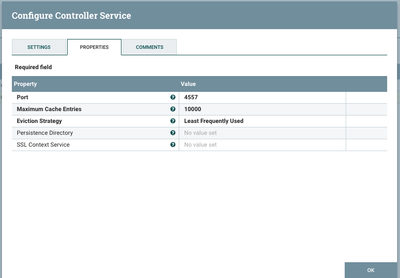
Then configure the DistributedMapCacheClientService
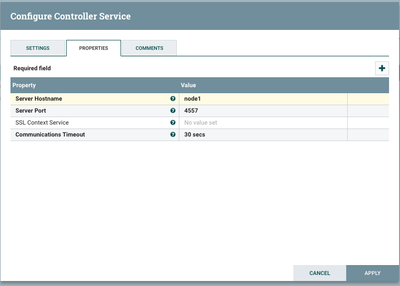
Created on 08-16-2017 02:57 PM - edited 08-18-2019 02:29 AM
- Mark as New
- Bookmark
- Subscribe
- Mute
- Subscribe to RSS Feed
- Permalink
- Report Inappropriate Content
In order to use a DistributedMapCacheClientService, you also need to configure a DistributedMapCacheServer controller service. Then in the property "Server Hostname " in the Client service, make sure and put one server if running in a cluster.
For example;
You can use the default settings for the DistributedMapCacheServer
Then configure the DistributedMapCacheClientService
Created 09-18-2017 06:52 PM
- Mark as New
- Bookmark
- Subscribe
- Mute
- Subscribe to RSS Feed
- Permalink
- Report Inappropriate Content
Do you follow the above explanation?
Created 09-19-2017 08:34 AM
- Mark as New
- Bookmark
- Subscribe
- Mute
- Subscribe to RSS Feed
- Permalink
- Report Inappropriate Content
Yes, thx. I allredy did get it to work.


