Archives of Support Questions (Read Only)

This is an archived board for historical reference. Information and links may no longer be available or relevant
Announcements
This board is archived and read-only for historical reference. To ask a new question, please post a new topic on the appropriate active board.

RANGER install missing "Configure Identies" screen

avatar
Super Collaborator

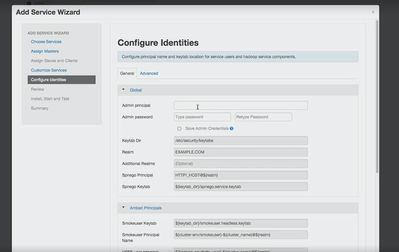
I am reinstalling Ranger via ambari following an online tutorial but I am not getting the "Configure Identies" screen after "Customize Service" The picture below shows the missing screen from my setup . Why iam not seeing this screen?

10874-capture1.jpg

1 ACCEPTED SOLUTION

avatar
Super Collaborator

@Sami Ahmad

"Configure Identities" is related to creating and customizing principal/keytab for the new service being added which is required if you have Kerberos environment.

That screen is shown only if you have enabled Kerberos in your setup and then add a service.

If you don't have Kerberos service in your cluster that screen will not be shown and that is an expected behavior.

View solution in original post

1 REPLY 1

avatar
Super Collaborator

@Sami Ahmad

"Configure Identities" is related to creating and customizing principal/keytab for the new service being added which is required if you have Kerberos environment.

That screen is shown only if you have enabled Kerberos in your setup and then add a service.

If you don't have Kerberos service in your cluster that screen will not be shown and that is an expected behavior.