
Our Community is getting an upgrade! To get everything ready for the relaunch, we’ll be placing the site in read-only mode starting September 21st.
We really appreciate your understanding while we get things set up behind the scenes. Catch up on all the exciting details about the move here.
Need help or have questions? Drop us a line at [email protected]

Archives of Support Questions (Read Only)
- Cloudera Community
- Board Archive
- Archives of Support Questions (Read Only)
- Ranger Audit stopped working after server reboot
- Subscribe to RSS Feed
- Mark Question as New
- Mark Question as Read
- Float this Question for Current User
- Bookmark
- Subscribe
- Mute
- Printer Friendly Page
- Subscribe to RSS Feed
- Mark Question as New
- Mark Question as Read
- Float this Question for Current User
- Bookmark
- Subscribe
- Mute
- Printer Friendly Page
Ranger Audit stopped working after server reboot
- Labels:
-
Apache Hive
-
Apache Ranger


Created on 11-29-2016 09:12 AM - edited 08-19-2019 02:59 AM
- Mark as New
- Bookmark
- Subscribe
- Mute
- Subscribe to RSS Feed
- Permalink
- Report Inappropriate Content
Hello
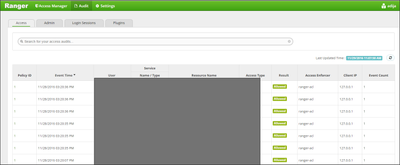
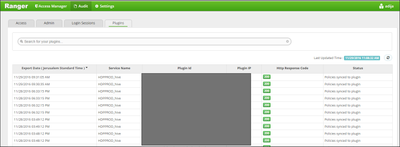
We use Ranger for auditing Hive. Yesterday at 15:20 after restarting the Server that runs Ambari (Ambari audits to the default mysql which is on the same server) the auditing has stopped working. Ranger is up & running, mysql is also running, plugins are working and synced with Hiveserver2. Yet no data is being audited to he db since the reboot of the server. I've queried the xa_ranger_audit table and it shows entries up until the server reboot.
Clearly something imperative is not running.
Any suggestions are appreciated !
Created 11-29-2016 05:40 PM
- Mark as New
- Bookmark
- Subscribe
- Mute
- Subscribe to RSS Feed
- Permalink
- Report Inappropriate Content
Found the problem.
Investigating the hiveserver2.log showed that rangerlogger failed to flush data to the db due to permission problem (Internal Exception: java.sql.SQLException: Access denied for user 'rangerlogger'@'<server>' (using password: YES) Error Code: 1045)
After granting the permissions it flushed the data successfully.
Now i just need to figure out what caused the loss of permissions and how the hell it is related to the server reboot....
Thanks for all your help !


Created 11-29-2016 09:19 AM
- Mark as New
- Bookmark
- Subscribe
- Mute
- Subscribe to RSS Feed
- Permalink
- Report Inappropriate Content
Can you check if you see any error in xa_portal.log?
Can you try disabling the plugin from configs for respective services and re-enable?
Please try to enable ranger debug -
p.p1 {margin: 0.0px 0.0px 0.0px 0.0px; font: 14.0px Menlo} span.s1 {font-variant-ligatures: no-common-ligatures}
/usr/hdp/current/ranger-admin/ews/webapp/WEB-INF/log4j.xml
Change From:

<category name="org.apache.ranger" additivity="false">
		<priority value="info" />
		<appender-ref ref="xa_log_appender" />
</category>


Change To:
<category name="org.apache.ranger" additivity="false">
		<priority value="debug" />
		<appender-ref ref="xa_log_appender" />
</category>
Restart Ranger admin and check the xa_portal logs again.
Created 11-29-2016 12:13 PM
- Mark as New
- Bookmark
- Subscribe
- Mute
- Subscribe to RSS Feed
- Permalink
- Report Inappropriate Content
@Sagar Shimpi Thank you for replying. I wanted to add that login sessions are being audited. It's just the Access information (Hive access) ism't audited. I enabled debug as per your recommendation and restarted ranger but haven't found any errors regarding audit or connection to db. There is an LDAP error: DEBUG org.apache.ranger.security.handler.RangerAuthenticationProvider (RangerAuthenticationProvider.java:280) - AD Authentication Failed: org.springframework.security.authentication.BadCredentialsException: Bad credentials
But it doesn't say which user and i'm not sure it is related. Our Hive is configured for LDAP auth so maybe it is related.

Created 11-29-2016 09:23 AM
- Mark as New
- Bookmark
- Subscribe
- Mute
- Subscribe to RSS Feed
- Permalink
- Report Inappropriate Content
please check properties:
- xasecure.audit.destination.db.user
- xasecure.audit.destination.db.password
- xasecure.audit.destination.db.jdbc.url
- xasecure.audit.destination.db.jdbc.driver
and whether "Audit to DB" is checked in Ambari -> Hive -> Configs -> Advanced -> Advanced ranger-hive-audit. Try to type your own values instead of {{variable}}.
Created 11-29-2016 12:15 PM
- Mark as New
- Bookmark
- Subscribe
- Mute
- Subscribe to RSS Feed
- Permalink
- Report Inappropriate Content
Thank you for replying.
Audit to DB is checked in Ambari. I also unchecked, saved and restarted, then checked again, saved and restarted - but still problem remains.
Regarding using own values instead of variables - i'm not sure exactly what to enter and again - until the reboot it worked flawlessly.
Created 11-29-2016 12:20 PM
- Mark as New
- Bookmark
- Subscribe
- Mute
- Subscribe to RSS Feed
- Permalink
- Report Inappropriate Content
I had a similar problem to yours once (works till reboot). I typed the values of these parameters:
- xasecure.audit.destination.db.user
- xasecure.audit.destination.db.password
as "plain text" and it worked for me. First one is a MySQL Username which has access to ranger_audit database and second parameter is his password.
Created 11-29-2016 03:58 PM
- Mark as New
- Bookmark
- Subscribe
- Mute
- Subscribe to RSS Feed
- Permalink
- Report Inappropriate Content
I've changed those settings to clear text and restarted hive + Ranger but problem remains unfortunately.
Created 11-29-2016 12:23 PM
- Mark as New
- Bookmark
- Subscribe
- Mute
- Subscribe to RSS Feed
- Permalink
- Report Inappropriate Content
One more thing to add: we restarted the server after installing and configuring sssd on the server for group mapping.
Created 11-29-2016 01:46 PM
- Mark as New
- Bookmark
- Subscribe
- Mute
- Subscribe to RSS Feed
- Permalink
- Report Inappropriate Content
If ranger is integrated with ldap then you need to revisit the config.
Created 11-29-2016 03:43 PM
- Mark as New
- Bookmark
- Subscribe
- Mute
- Subscribe to RSS Feed
- Permalink
- Report Inappropriate Content
Can you be more specific ? The Ranger authentication is LDAP, meaning in order to login to it's UI you can only login using your Active Directory credentials. This works without any problems.


