
Our Community is getting an upgrade! To get everything ready for the relaunch, we’ll be placing the site in read-only mode starting September 21st.
We really appreciate your understanding while we get things set up behind the scenes. Catch up on all the exciting details about the move here.
Need help or have questions? Drop us a line at [email protected]

Archives of Support Questions (Read Only)
- Cloudera Community
- Board Archive
- Archives of Support Questions (Read Only)
- Reading data from HDFS on AWS EC2 cluster
- Subscribe to RSS Feed
- Mark Question as New
- Mark Question as Read
- Float this Question for Current User
- Bookmark
- Subscribe
- Mute
- Printer Friendly Page
- Subscribe to RSS Feed
- Mark Question as New
- Mark Question as Read
- Float this Question for Current User
- Bookmark
- Subscribe
- Mute
- Printer Friendly Page
Reading data from HDFS on AWS EC2 cluster


Created on 08-02-2016 07:02 PM - edited 08-18-2019 04:52 AM
- Mark as New
- Bookmark
- Subscribe
- Mute
- Subscribe to RSS Feed
- Permalink
- Report Inappropriate Content
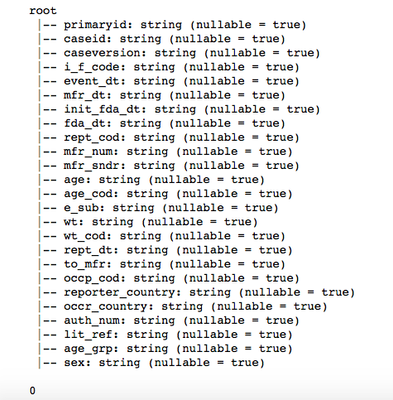
I am trying to read data from HDFS on AWS EC2 cluster using Jupiter Notebook. It has 7 nodes. I am using HDP 2.4 and my code is below. The table has millions of rows but the code does not return any rows. "ec2-xx-xxx-xxx-xx.compute-1.amazonaws.com" is the server (ambari-server).
from pyspark.sql import SQLContext
sqlContext = HiveContext(sc)
demography = sqlContext.read.load("hdfs://ec2-xx-xxx-xx-xx.compute-1.amazonaws.com:8020/tmp/FAERS/demography_2012q4_2016q1_duplicates_removed. csv", format="com.databricks.spark.csv", header="true", inferSchema="true")
demography.printSchema()
demography.cache()
print demography.count()


Created 12-26-2016 10:34 PM
- Mark as New
- Bookmark
- Subscribe
- Mute
- Subscribe to RSS Feed
- Permalink
- Report Inappropriate Content
This could have due to a problem with the spark-csv jar. i have encountered this myself and I found a solution which I cannot find now.
Here are my notes at the time:
1. Create a folder in your local OS or HDFS and place the proper versions for your case of the jars here (replace ? with your version needed):
- spark-csv_?.jar
- commons-csv-?.jar
- univocity-parsers-?.jar
2. Go to your /conf directory where you have installed Spark and in the spark-defaults.conf file add the line:
spark.driver.extraClassPath D:/Spark/spark_jars/*
The asterisk should include all the jars. Now run Python, create SparkContext, SQLContext as you normally would. Now you should be able to use spark-csv as
sqlContext.read.format('com.databricks.spark.csv').\
options(header='true', inferschema='true').\
load('foobar.csv')Created 12-26-2016 10:34 PM
- Mark as New
- Bookmark
- Subscribe
- Mute
- Subscribe to RSS Feed
- Permalink
- Report Inappropriate Content
This could have due to a problem with the spark-csv jar. i have encountered this myself and I found a solution which I cannot find now.
Here are my notes at the time:
1. Create a folder in your local OS or HDFS and place the proper versions for your case of the jars here (replace ? with your version needed):
- spark-csv_?.jar
- commons-csv-?.jar
- univocity-parsers-?.jar
2. Go to your /conf directory where you have installed Spark and in the spark-defaults.conf file add the line:
spark.driver.extraClassPath D:/Spark/spark_jars/*
The asterisk should include all the jars. Now run Python, create SparkContext, SQLContext as you normally would. Now you should be able to use spark-csv as
sqlContext.read.format('com.databricks.spark.csv').\
options(header='true', inferschema='true').\
load('foobar.csv')

