
Our Community is getting an upgrade! To get everything ready for the relaunch, we’ll be placing the site in read-only mode starting September 21st.
We really appreciate your understanding while we get things set up behind the scenes. Catch up on all the exciting details about the move here.
Need help or have questions? Drop us a line at [email protected]

Archives of Support Questions (Read Only)
- Cloudera Community
- Board Archive
- Archives of Support Questions (Read Only)
- Re: Resource Manager HA and Yarn service-check is ...
- Subscribe to RSS Feed
- Mark Question as New
- Mark Question as Read
- Float this Question for Current User
- Bookmark
- Subscribe
- Mute
- Printer Friendly Page
- Subscribe to RSS Feed
- Mark Question as New
- Mark Question as Read
- Float this Question for Current User
- Bookmark
- Subscribe
- Mute
- Printer Friendly Page
Resource Manager HA and Yarn service-check is failing


Created on 03-25-2016 05:32 PM - edited 08-19-2019 01:01 AM
- Mark as New
- Bookmark
- Subscribe
- Mute
- Subscribe to RSS Feed
- Permalink
- Report Inappropriate Content
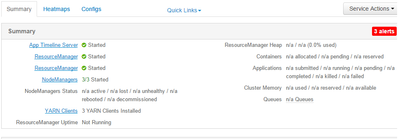
We enabled Yarn Resource Manager HA on our cluster ( HDP 2.3.2 and Ambari 2.1.2.1) and it was working fine until we re-installedRanger KMS server from the cluster. When the ResrouceManager HA was working, I saw one of them as active Resource Manager and the other one as Stand-by but they both are now showing as ResourceManager and also when I run the service check on yarn .. it is failing with the following error message
Traceback (most recent call last):
  File "/var/lib/ambari-agent/cache/common-services/YARN/2.1.0.2.0/package/scripts/service_check.py", line 142, in <module>
    ServiceCheck().execute()
  File "/usr/lib/python2.6/site-packages/resource_management/libraries/script/script.py", line 216, in execute
    method(env)
  File "/var/lib/ambari-agent/cache/common-services/YARN/2.1.0.2.0/package/scripts/service_check.py", line 138, in service_check
    raise Exception("Could not get json response from YARN API")
Exception: Could not get json response from YARN API



Created 04-04-2016 06:43 PM
- Mark as New
- Bookmark
- Subscribe
- Mute
- Subscribe to RSS Feed
- Permalink
- Report Inappropriate Content
@rbalam - It could be possible that both the resource managers are in standby or active state. can you please run below commands and check?
sudo -u yarn yarn rmadmin -getServiceState rm1

sudo -u yarn yarn rmadmin -getServiceState rm2
If you find that both the RMs are in standby state then you can initiate manual failover using below command
sudo -u yarn yarn rmadmin -transitionToActive --forcemanual rm1
Created 04-04-2016 06:43 PM
- Mark as New
- Bookmark
- Subscribe
- Mute
- Subscribe to RSS Feed
- Permalink
- Report Inappropriate Content
@rbalam - It could be possible that both the resource managers are in standby or active state. can you please run below commands and check?
sudo -u yarn yarn rmadmin -getServiceState rm1

sudo -u yarn yarn rmadmin -getServiceState rm2
If you find that both the RMs are in standby state then you can initiate manual failover using below command
sudo -u yarn yarn rmadmin -transitionToActive --forcemanual rm1
Created 04-05-2016 04:58 PM
- Mark as New
- Bookmark
- Subscribe
- Mute
- Subscribe to RSS Feed
- Permalink
- Report Inappropriate Content
Thanks for the update.This issue was resolved by Hortonworks Support Engineering. I am trying to catching up with what they have done to fix the issue.


Created 07-27-2016 02:10 PM
- Mark as New
- Bookmark
- Subscribe
- Mute
- Subscribe to RSS Feed
- Permalink
- Report Inappropriate Content
@Kuldeep Kulkarni I got the same error message. only difference is my env is kerborized & both my rm's are not in standby mode.
[yarn@m1 root]$ yarn rmadmin -getServiceState rm1
standby
[yarn@m1 root]$ yarn rmadmin -getServiceState rm2
active
Ambari doesn't show the state of RM, but getting same exception as above. i tried to switch the roles and that didnot help. Any help is appreciated.


