
Our Community is getting an upgrade! To get everything ready for the relaunch, we’ll be placing the site in read-only mode starting September 21st.
We really appreciate your understanding while we get things set up behind the scenes. Catch up on all the exciting details about the move here.
Need help or have questions? Drop us a line at [email protected]

Archives of Support Questions (Read Only)
- Cloudera Community
- Board Archive
- Archives of Support Questions (Read Only)
- Restart Atlas Metadata Server
- Subscribe to RSS Feed
- Mark Question as New
- Mark Question as Read
- Float this Question for Current User
- Bookmark
- Subscribe
- Mute
- Printer Friendly Page
- Subscribe to RSS Feed
- Mark Question as New
- Mark Question as Read
- Float this Question for Current User
- Bookmark
- Subscribe
- Mute
- Printer Friendly Page
Restart Atlas Metadata Server
- Labels:
-
Apache Ambari


Created 04-23-2018 02:40 PM
- Mark as New
- Bookmark
- Subscribe
- Mute
- Subscribe to RSS Feed
- Permalink
- Report Inappropriate Content
I have the "restart required" around Atlas after installing the ambari metrics service. When I click restart, the SandBox fails to "Restart all components for Atlas", and then the error is Restart Atlas Metadata Server
The log file is as follows


Created 04-24-2018 09:09 AM
- Mark as New
- Bookmark
- Subscribe
- Mute
- Subscribe to RSS Feed
- Permalink
- Report Inappropriate Content
Your Atlas is in maintenance mode !! Can you go to the Ambari UI see attached screenshot Turn Off Maintenance mode and restart Atlas ensure Hbase is running all should work.
If all works remember to accept the answer so others can also use it to resolve similar issue
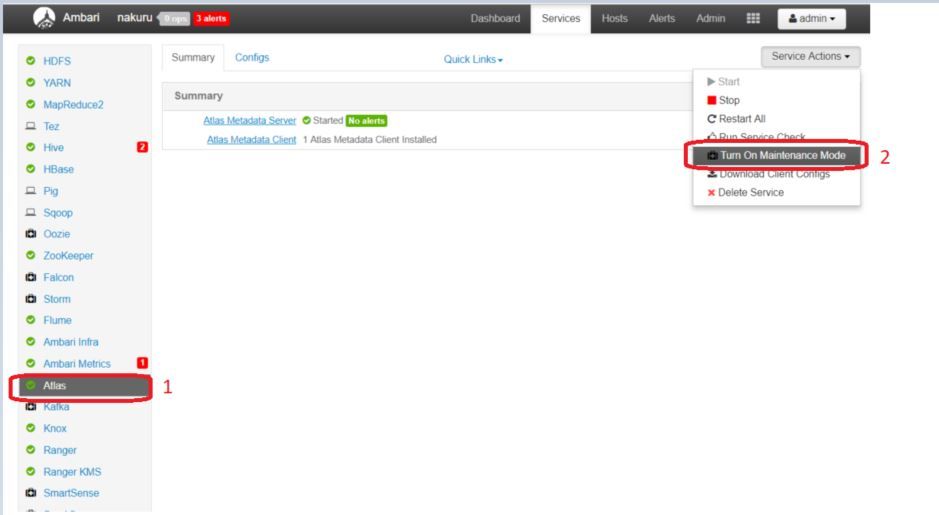
Created on 04-24-2018 09:24 AM - edited 08-18-2019 02:38 AM
- Mark as New
- Bookmark
- Subscribe
- Mute
- Subscribe to RSS Feed
- Permalink
- Report Inappropriate Content
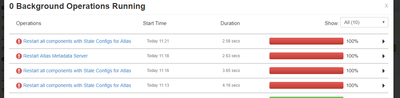
Created on 04-24-2018 10:57 AM - edited 08-18-2019 02:37 AM
- Mark as New
- Bookmark
- Subscribe
- Mute
- Subscribe to RSS Feed
- Permalink
- Report Inappropriate Content
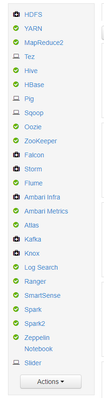
@Geoffrey Shelton Okot Hi ! I solved the issue by stopping atlas from the command line and starting it again from the ambari ui.
I used the following code. On the other hand, is it recommended to turn off all the maintenance or keep it on ?
su $ATLAS_USER
python /usr/hdp/current/atlas-server/bin/atlas_stop.py


Created 08-06-2020 01:15 AM
- Mark as New
- Bookmark
- Subscribe
- Mute
- Subscribe to RSS Feed
- Permalink
- Report Inappropriate Content
@144675 Hi! When I'm trying to stop Atlas service from command line:
python /usr/hdp/current/atlas-server/bin/atlas_stop.py
I'm getting below error: No process ID file found. Server not running?
Although Atlas is in running state.
Any help would be appreciated!!

Created 02-13-2023 08:50 AM
- Mark as New
- Bookmark
- Subscribe
- Mute
- Subscribe to RSS Feed
- Permalink
- Report Inappropriate Content
did you solve it?
I'm having the same issue

- « Previous
-
- 1
- 2
- Next »

