
Our Community is getting an upgrade! To get everything ready for the relaunch, we’ll be placing the site in read-only mode starting September 21st.
We really appreciate your understanding while we get things set up behind the scenes. Catch up on all the exciting details about the move here.
Need help or have questions? Drop us a line at [email protected]

Archives of Support Questions (Read Only)
- Cloudera Community
- Board Archive
- Archives of Support Questions (Read Only)
- Services won't restart after upgrading Ambari to 2...
- Subscribe to RSS Feed
- Mark Question as New
- Mark Question as Read
- Float this Question for Current User
- Bookmark
- Subscribe
- Mute
- Printer Friendly Page
- Subscribe to RSS Feed
- Mark Question as New
- Mark Question as Read
- Float this Question for Current User
- Bookmark
- Subscribe
- Mute
- Printer Friendly Page
Services won't restart after upgrading Ambari to 2.4.0.1
- Labels:
-
Apache Ambari


Created on 09-13-2016 02:07 PM - edited 08-18-2019 06:09 AM
- Mark as New
- Bookmark
- Subscribe
- Mute
- Subscribe to RSS Feed
- Permalink
- Report Inappropriate Content
Hello
We've upgraded Ambari from 2.1.2.1 to 2.4.0.1 according to the the upgrade guide http://docs.hortonworks.com/HDPDocuments/Ambari-2.4.0.1/bk_ambari-upgrade/content/ambari_upgrade_gui...
The entire process was successful and was performed according to the guide.
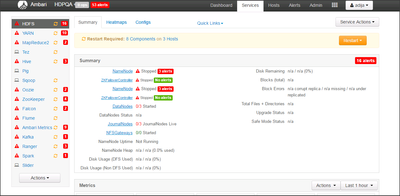
After starting the Ambari i'm able to login and there is a restart indicator near every service (according to point 14 in the guide) http://docs.hortonworks.com/HDPDocuments/Ambari-2.4.0.1/bk_ambari-upgrade/content/upgrade_ambari.htm...
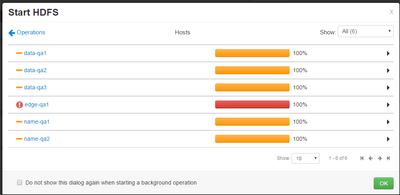
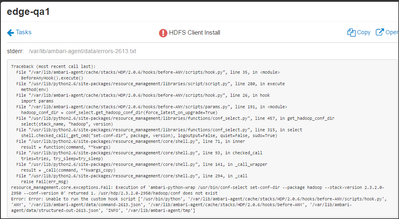
However - the services won't start \ restart at all. Every service fails with the same error: resource_management.core.exceptions.Fail: Execution of 'ambari-python-wrap /usr/bin/conf-select set-conf-dir --package hadoop --stack-version 2.3.2.0-2950 --conf-version 0' returned 1. /usr/hdp/2.3.2.0-2950/hadoop/conf does not exist
Error: Error: Unable to run the custom hook script ['/usr/bin/python', '/var/lib/ambari-agent/cache/stacks/HDP/2.0.6/hooks/before-ANY/scripts/hook.py', 'ANY', '/var/lib/ambari-agent/data/command-2602.json', '/var/lib/ambari-agent/cache/stacks/HDP/2.0.6/hooks/before-ANY', '/var/lib/ambari-agent/data/structured-out-2602.json', 'INFO', '/var/lib/ambari-agent/tmp']
Any ideas ?
Is this a known bug i missed ??

Created 09-13-2016 02:22 PM
- Mark as New
- Bookmark
- Subscribe
- Mute
- Subscribe to RSS Feed
- Permalink
- Report Inappropriate Content
Do you have a symlink inside the "/usr/hdp/2.3.2.0-2950/hadoop/" directory with name "conf" pointing to "/etc/hadoop/2.3.2.0-2950/0" ?
If not then can you create a symlink inside the "/usr/hdp/2.3.2.0-2950/hadoop/" pointing to it like following and then try again:
lrwxrwxrwx. 1 root root 12 Sep 18 06:33 conf -> /etc/hadoop/2.3.2.0-2950/0
Created 09-13-2016 02:22 PM
- Mark as New
- Bookmark
- Subscribe
- Mute
- Subscribe to RSS Feed
- Permalink
- Report Inappropriate Content
Do you have a symlink inside the "/usr/hdp/2.3.2.0-2950/hadoop/" directory with name "conf" pointing to "/etc/hadoop/2.3.2.0-2950/0" ?
If not then can you create a symlink inside the "/usr/hdp/2.3.2.0-2950/hadoop/" pointing to it like following and then try again:
lrwxrwxrwx. 1 root root 12 Sep 18 06:33 conf -> /etc/hadoop/2.3.2.0-2950/0
Created 09-13-2016 02:48 PM
- Mark as New
- Bookmark
- Subscribe
- Mute
- Subscribe to RSS Feed
- Permalink
- Report Inappropriate Content
Thank you ! It was the missing link !


