
Our Community is getting an upgrade! To get everything ready for the relaunch, we’ll be placing the site in read-only mode starting September 21st.
We really appreciate your understanding while we get things set up behind the scenes. Catch up on all the exciting details about the move here.
Need help or have questions? Drop us a line at [email protected]

Archives of Support Questions (Read Only)
- Cloudera Community
- Board Archive
- Archives of Support Questions (Read Only)
- Re: Spark is not able to load Phoenix Tables.,Not ...
- Subscribe to RSS Feed
- Mark Question as New
- Mark Question as Read
- Float this Question for Current User
- Bookmark
- Subscribe
- Mute
- Printer Friendly Page
- Subscribe to RSS Feed
- Mark Question as New
- Mark Question as Read
- Float this Question for Current User
- Bookmark
- Subscribe
- Mute
- Printer Friendly Page
Spark is not able to load Phoenix Tables.,Not able to load Phoenix table in spark
- Labels:
-
Apache HBase
-
Apache Phoenix
-
Apache Spark


Created 09-21-2016 11:46 AM
- Mark as New
- Bookmark
- Subscribe
- Mute
- Subscribe to RSS Feed
- Permalink
- Report Inappropriate Content
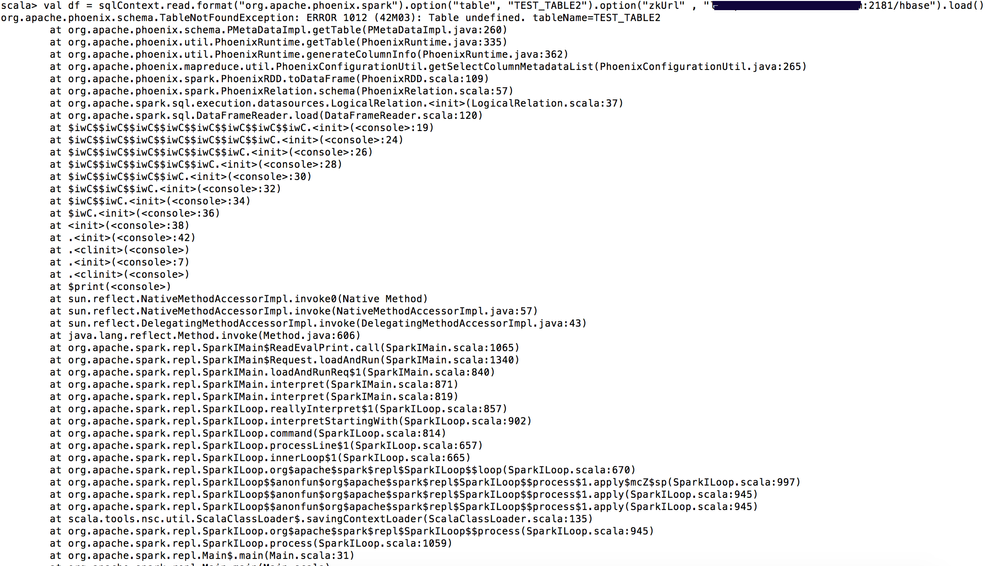
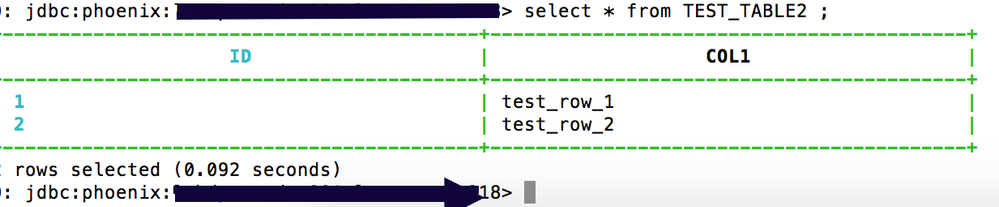
I have created a table in phoenix and tried to load it using dataframe api in spark-shell.
I am getting error as " org.apache.phoenix.schema.TableNotFoundException: ERROR 1012 (42M03): Table undefined. tableName=TEST"
phoenixtable.pngspark-phoenix-tableread2.png
Note :
1. I checked in Hbase shell, and table which I created using Phoenix shell exists in Hbase too.
2. I am launching the spark shell as below :
spark-shell --master yarn-client \ --jars /usr/hdp/current/phoenix-client/phoenix-4.4.0.2.3.4.0-3485-client.jar,/usr/hdp/current/phoenix-client/lib/phoenix-spark-4.4.0.2.3.4.0-3485.jar \ --conf "spark.executor.extraClassPath=/usr/hdp/current/phoenix-client/phoenix-4.4.0.2.3.4.0-3485-client.jar"
- Attached the snapshots.



Created 09-21-2016 04:25 PM
- Mark as New
- Bookmark
- Subscribe
- Mute
- Subscribe to RSS Feed
- Permalink
- Report Inappropriate Content
try
/usr/hdp/current/phoenix-client/bin/sqlline.py myserver:2181:/hbase-unsecure
check your table and table space.
make sure the table is there. is there a schema?
and try the same query
0: jdbc:phoenix:coolserverhortonworks> !tables
+------------+--------------+--------------+---------------+----------+------------+----------------------------+-----------------+--------------+-----------------+---------------+---+
| TABLE_CAT  | TABLE_SCHEM  |  TABLE_NAME  |  TABLE_TYPE   | REMARKS  | TYPE_NAME  | SELF_REFERENCING_COL_NAME  | REF_GENERATION  | INDEX_STATE  | IMMUTABLE_ROWS  | SALT_BUCKETS  | M |
+------------+--------------+--------------+---------------+----------+------------+----------------------------+-----------------+--------------+-----------------+---------------+---+
|            | SYSTEM       | CATALOG      | SYSTEM TABLE  |          |            |                            |                 |              | false           | null          | f |
|            | SYSTEM       | FUNCTION     | SYSTEM TABLE  |          |            |                            |                 |              | false           | null          | f |
|            | SYSTEM       | SEQUENCE     | SYSTEM TABLE  |          |            |                            |                 |              | false           | null          | f |
|            | SYSTEM       | STATS        | SYSTEM TABLE  |          |            |                            |                 |              | false           | null          | f |
|            |              | PHILLYCRIME  | TABLE         |          |            |                            |                 |              | false           | null          | f |
|            |              | PRICES       | TABLE         |          |            |                            |                 |              | false           | null          | f |
|            |              | TABLE1       | TABLE         |          |            |                            |                 |              | false           | null          | f |
+------------+--------------+--------------+---------------+----------+------------+----------------------------+-----------------+--------------+-----------------+---------------+---+
0: jdbc:phoenix:coolhortonworks>


Created 09-21-2016 03:28 PM
- Mark as New
- Bookmark
- Subscribe
- Mute
- Subscribe to RSS Feed
- Permalink
- Report Inappropriate Content
It is actually weird, if table is not found in MeteData cache , it should catch the exception and try to update the cache with the server. Not sure, why the exception is propagated out so early.


Created 09-21-2016 04:12 PM
- Mark as New
- Bookmark
- Subscribe
- Mute
- Subscribe to RSS Feed
- Permalink
- Report Inappropriate Content
have you tried changing the hbase tablespace into '<host>:2181/hbase-unsecure' in stead of /hbase ?
Created on 09-22-2016 08:36 AM - edited 08-18-2019 04:35 AM
- Mark as New
- Bookmark
- Subscribe
- Mute
- Subscribe to RSS Feed
- Permalink
- Report Inappropriate Content
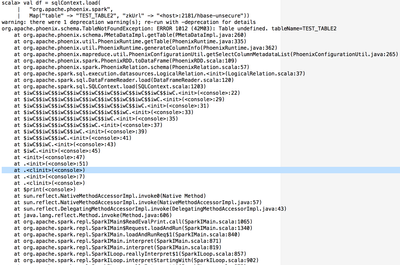
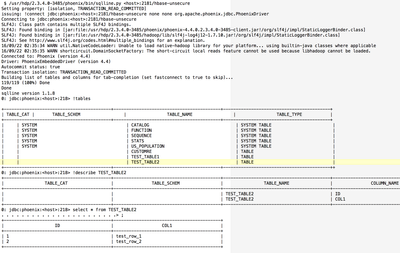
I tried with <host>:2181/hbase-unsecure, but still same issue.


Created 09-21-2016 04:25 PM
- Mark as New
- Bookmark
- Subscribe
- Mute
- Subscribe to RSS Feed
- Permalink
- Report Inappropriate Content
try
/usr/hdp/current/phoenix-client/bin/sqlline.py myserver:2181:/hbase-unsecure
check your table and table space.
make sure the table is there. is there a schema?
and try the same query
0: jdbc:phoenix:coolserverhortonworks> !tables
+------------+--------------+--------------+---------------+----------+------------+----------------------------+-----------------+--------------+-----------------+---------------+---+
| TABLE_CAT  | TABLE_SCHEM  |  TABLE_NAME  |  TABLE_TYPE   | REMARKS  | TYPE_NAME  | SELF_REFERENCING_COL_NAME  | REF_GENERATION  | INDEX_STATE  | IMMUTABLE_ROWS  | SALT_BUCKETS  | M |
+------------+--------------+--------------+---------------+----------+------------+----------------------------+-----------------+--------------+-----------------+---------------+---+
|            | SYSTEM       | CATALOG      | SYSTEM TABLE  |          |            |                            |                 |              | false           | null          | f |
|            | SYSTEM       | FUNCTION     | SYSTEM TABLE  |          |            |                            |                 |              | false           | null          | f |
|            | SYSTEM       | SEQUENCE     | SYSTEM TABLE  |          |            |                            |                 |              | false           | null          | f |
|            | SYSTEM       | STATS        | SYSTEM TABLE  |          |            |                            |                 |              | false           | null          | f |
|            |              | PHILLYCRIME  | TABLE         |          |            |                            |                 |              | false           | null          | f |
|            |              | PRICES       | TABLE         |          |            |                            |                 |              | false           | null          | f |
|            |              | TABLE1       | TABLE         |          |            |                            |                 |              | false           | null          | f |
+------------+--------------+--------------+---------------+----------+------------+----------------------------+-----------------+--------------+-----------------+---------------+---+
0: jdbc:phoenix:coolhortonworks>
Created 09-22-2016 09:42 AM
- Mark as New
- Bookmark
- Subscribe
- Mute
- Subscribe to RSS Feed
- Permalink
- Report Inappropriate Content
Thanks a lot @Timothy Spann for your help. Now I am able to load the phoenix table in spark. I was missing a colon ( : ) between port(2181) number and hbase tablespace (hbase-unsecure) while loading the table in spark.
Now after correcting the issue, spark is loading the phoenix table.
Created 09-22-2016 09:45 AM
- Mark as New
- Bookmark
- Subscribe
- Mute
- Subscribe to RSS Feed
- Permalink
- Report Inappropriate Content
Hi @Timothy Spann and @Jasper , I found the cause of issue now.
The issue was I was not putting colon (: ) between port(2181) and hbase tablespace(hbase-unsecure) in spark-shell properly while loading the table.
- Earlier I was loading the table in spark-shell as below, which was giving me no Table found error.
val jdbcDF = sqlContext.read.format("jdbc").options(
Map(
"driver" -> "org.apache.phoenix.jdbc.PhoenixDriver",
"url" -> "jdbc:phoenix:<host>:2181/hbase-unsecure",
"dbtable" -> "TEST_TABLE2")
).load()
- But now after putting colon ( : ) between port(2181) number andhbase tablespace (hbase-unsecure). I am able to load table.
val jdbcDF = sqlContext.read.format("jdbc").options(
Map(
"driver" -> "org.apache.phoenix.jdbc.PhoenixDriver",
"url" -> "jdbc:phoenix:<host>:2181:/hbase-unsecure",
"dbtable" -> "TEST_TABLE2")
).load()


