
Our Community is getting an upgrade! To get everything ready for the relaunch, we’ll be placing the site in read-only mode starting September 21st.
We really appreciate your understanding while we get things set up behind the scenes. Catch up on all the exciting details about the move here.
Need help or have questions? Drop us a line at [email protected]

Archives of Support Questions (Read Only)
- Cloudera Community
- Board Archive
- Archives of Support Questions (Read Only)
- Re: Spark not using Yarn cluster resources
- Subscribe to RSS Feed
- Mark Question as New
- Mark Question as Read
- Float this Question for Current User
- Bookmark
- Subscribe
- Mute
- Printer Friendly Page
- Subscribe to RSS Feed
- Mark Question as New
- Mark Question as Read
- Float this Question for Current User
- Bookmark
- Subscribe
- Mute
- Printer Friendly Page
Spark not using Yarn cluster resources
- Labels:
-
Apache Spark
-
Apache YARN


Created on 05-11-2016 10:16 AM - edited 08-19-2019 01:13 AM
- Mark as New
- Bookmark
- Subscribe
- Mute
- Subscribe to RSS Feed
- Permalink
- Report Inappropriate Content
I'm trying to run a Python script using Spark (1.6.1) on an Hadoop cluster (2.4.2). The cluster was installed, configured and managed using Ambari (2.2.1.1). I have a cluster of 4 nodes (each 40Gb HD-8 cores-16Gb RAM).
My script uses `sklearn` lib: so in order to parallelize it on spark I use `spark_sklearn` lib (see it on spark-sklearn-link).
At this point I tried to run the script with:
spark-submit spark_example.py --master yarn --deploy-mode client --num-executors 8 --num-executor-core 4 --executor-memory 2G
but it runs always on localhost with only one executor.
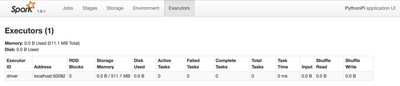
Also from Ambari dashboard I can see that only one node of the cluster is resource-consuming. And also trying different configuration (executors, cores) the execution time is the same.
This is Yarn UI Nodes screenshot:
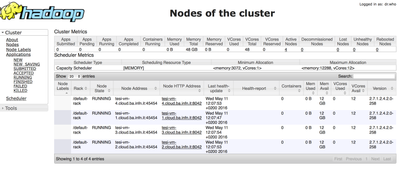
Any ideas? Thanks a lot


Created 05-11-2016 11:05 AM
- Mark as New
- Bookmark
- Subscribe
- Mute
- Subscribe to RSS Feed
- Permalink
- Report Inappropriate Content
You may also need to check your spark-env.sh file and make sure that MASTER=yarn-client variable is set.
Created 05-11-2016 11:05 AM
- Mark as New
- Bookmark
- Subscribe
- Mute
- Subscribe to RSS Feed
- Permalink
- Report Inappropriate Content
You may also need to check your spark-env.sh file and make sure that MASTER=yarn-client variable is set.
Created 05-11-2016 11:20 AM
- Mark as New
- Bookmark
- Subscribe
- Mute
- Subscribe to RSS Feed
- Permalink
- Report Inappropriate Content
Where can I find this file? Thanks a lot
Created 05-11-2016 11:24 AM
- Mark as New
- Bookmark
- Subscribe
- Mute
- Subscribe to RSS Feed
- Permalink
- Report Inappropriate Content
Ok I found it, but there isn't this parameter.
Created 05-11-2016 12:05 PM
- Mark as New
- Bookmark
- Subscribe
- Mute
- Subscribe to RSS Feed
- Permalink
- Report Inappropriate Content
OK, then try to set that parameter and run again?
Created 05-12-2016 08:37 AM
- Mark as New
- Bookmark
- Subscribe
- Mute
- Subscribe to RSS Feed
- Permalink
- Report Inappropriate Content
Ok Thanks! Seems adding this param works for me.
#!/usr/bin/env bash

# This file is sourced when running various Spark programs.
# Copy it as spark-env.sh and edit that to configure Spark for your site.

MASTER="yarn-cluster"

# Options read in YARN client mode
SPARK_EXECUTOR_INSTANCES="3" #Number of workers to start (Default: 2)
#SPARK_EXECUTOR_CORES="1" #Number of cores for the workers (Default: 1).
#SPARK_EXECUTOR_MEMORY="1G" #Memory per Worker (e.g. 1000M, 2G) (Default: 1G)
#SPARK_DRIVER_MEMORY="512 Mb" #Memory for Master (e.g. 1000M, 2G) (Default: 512 Mb)
#SPARK_YARN_APP_NAME="spark" #The name of your application (Default: Spark)
#SPARK_YARN_QUEUE="~@~Xdefault~@~Y" #The hadoop queue to use for allocation requests (Default: @~Xdefault~@~Y)
#SPARK_YARN_DIST_FILES="" #Comma separated list of files to be distributed with the job.
#SPARK_YARN_DIST_ARCHIVES="" #Comma separated list of archives to be distributed with the job.


# Generic options for the daemons used in the standalone deploy mode


# Alternate conf dir. (Default: ${SPARK_HOME}/conf)
export SPARK_CONF_DIR=${SPARK_CONF_DIR:-{{spark_home}}/conf}


# Where log files are stored.(Default:${SPARK_HOME}/logs)
#export SPARK_LOG_DIR=${SPARK_HOME:-{{spark_home}}}/logs
export SPARK_LOG_DIR={{spark_log_dir}}


# Where the pid file is stored. (Default: /tmp)
export SPARK_PID_DIR={{spark_pid_dir}}


# A string representing this instance of spark.(Default: $USER)
SPARK_IDENT_STRING=$USER


# The scheduling priority for daemons. (Default: 0)
SPARK_NICENESS=0


export HADOOP_HOME=${HADOOP_HOME:-{{hadoop_home}}}
export HADOOP_CONF_DIR=${HADOOP_CONF_DIR:-{{hadoop_conf_dir}}}


# The java implementation to use.
export JAVA_HOME={{java_home}}


if [ -d "/etc/tez/conf/" ]; then
  export TEZ_CONF_DIR=/etc/tez/conf
else
  export TEZ_CONF_DIR=
fi
ps:it works well but seems the params passed via command line (e.g.: --num-executors 8--num-executor-core 4--executor-memory 2G) are not taken in consideration. Instead, if I set the executors in "spark-env template" filed of Ambari, the params are taken in consideration. Anyway now it works 🙂
Thanks a lot.


Created 05-11-2016 11:54 AM
- Mark as New
- Bookmark
- Subscribe
- Mute
- Subscribe to RSS Feed
- Permalink
- Report Inappropriate Content
Can you check if somewhere in spark-example.py or any spark-default.conf is overriding the master and deploy-mode properties
Created 05-11-2016 12:06 PM
- Mark as New
- Bookmark
- Subscribe
- Mute
- Subscribe to RSS Feed
- Permalink
- Report Inappropriate Content
This is spark-default.conf
# Generated by Apache Ambari. Wed May 11 10:32:59 2016

spark.eventLog.dir hdfs:///spark-history
spark.eventLog.enabled true
spark.history.fs.logDirectory hdfs:///spark-history
spark.history.kerberos.keytab none
spark.history.kerberos.principal none
spark.history.provider org.apache.spark.deploy.history.FsHistoryProvider
spark.history.ui.port 18080
spark.yarn.containerLauncherMaxThreads 25
spark.yarn.driver.memoryOverhead 384
spark.yarn.executor.memoryOverhead 384
spark.yarn.historyServer.address tesi-vm-3.cloud.ba.infn.it:18080
spark.yarn.max.executor.failures 3
spark.yarn.preserve.staging.files false
spark.yarn.queue default
spark.yarn.scheduler.heartbeat.interval-ms 5000
spark.yarn.submit.file.replication 3
And this is my spark-example.py
from pyspark import SparkContext

import numpy as np
import pandas as pd
from sklearn import grid_search, datasets
from sklearn.svm import SVR
from spark_sklearn import GridSearchCV
import sklearn

import matplotlib.pyplot as plt
plt.switch_backend('agg')
import matplotlib
matplotlib.use('Agg')
matplotlib.style.use('ggplot')
import time
import StringIO

sc = SparkContext(appName="PythonPi")

def show(p):
  img = StringIO.StringIO()
  p.savefig(img, format='svg')
  img.seek(0)
  print "%html <div style='width:1200px'>" + img.buf + "</div>"

#hourlyElectricity = pd.read_excel('hdfs:///dataset/building_6_ALL_hourly.xlsx')
hourlyElectricity = pd.read_excel('/dataset/building_6_ALL_hourly.xlsx')

#display one dataframe
print hourlyElectricity.head()

hourlyElectricity = hourlyElectricity.set_index(['Data'])
hourlyElectricity.index.name = None
print hourlyElectricity.head()

def addHourlyTimeFeatures(df):
    df['hour'] = df.Ora
    df['weekday'] = df.index.weekday
    df['day'] = df.index.dayofyear
    df['week'] = df.index.weekofyear
    return df

hourlyElectricity = addHourlyTimeFeatures(hourlyElectricity)
print hourlyElectricity.head()
df_hourlyelect = hourlyElectricity[['hour', 'weekday', 'day', 'week', 'CosHour', 'Occupancy', 'Power']]

hourlyelect_train = pd.DataFrame(data=df_hourlyelect, index=np.arange('2011-01-01 00:00:00', '2011-10-01 00:00:00', dtype='datetime64[h]')).dropna()
hourlyelect_test = pd.DataFrame(data=df_hourlyelect, index=np.arange('2011-10-01 00:00:00', '2011-11-01 00:00:00', dtype='datetime64[h]')).dropna()

XX_hourlyelect_train = hourlyelect_train.drop('Power', axis = 1).reset_index().drop('index', axis = 1)

XX_hourlyelect_test = hourlyelect_test.drop('Power', axis = 1).reset_index().drop('index', axis = 1)

YY_hourlyelect_train = hourlyelect_train['Power']
YY_hourlyelect_test = hourlyelect_test['Power']

# Optimal parameters for the SVR regressor
gamma_range = [0.001,0.0001,0.00001,0.000001,0.0000001]
epsilon_range = [x * 0.1 for x in range(0, 2)]
C_range = range(3000, 8000, 500)

tuned_parameters = {
    'kernel': ['rbf']
    ,'C': C_range
    ,'gamma': gamma_range
    ,'epsilon': epsilon_range
    }

#start monitoring execution time
start_time = time.time()

# search for the best parameters with crossvalidation.

#svr_hourlyelect = GridSearchCV(SVR(C=5000, epsilon=0.0, gamma=1e-05), param_grid = tuned_parameters, verbose = 0)

svr_hourlyelect = GridSearchCV(sc,SVR(), param_grid = tuned_parameters, verbose = 0)

# Fit regression model
y_hourlyelect = svr_hourlyelect.fit(XX_hourlyelect_train, YY_hourlyelect_train).predict(XX_hourlyelect_test)

print("--- %s minutes ---" % ((time.time() - start_time)/60))
print 'Optimum epsilon and kernel for SVR: ', svr_hourlyelect.best_params_
print "The test score R2: ", svr_hourlyelect.score(XX_hourlyelect_test, YY_hourlyelect_test)

print("SVR mean squared error: %.2f" % np.mean((YY_hourlyelect_test - svr_hourlyelect.predict(XX_hourlyelect_test)) ** 2))
I think there aren't overridings


Created 05-11-2016 01:40 PM
- Mark as New
- Bookmark
- Subscribe
- Mute
- Subscribe to RSS Feed
- Permalink
- Report Inappropriate Content
http://spark.apache.org/docs/latest/submitting-applications.html
--deploy-mode cluster
export HADOOP_CONF_DIR=XXX
./bin/spark-submit \
  --class org.apache.spark.examples.SparkPi \
  --master yarn \
  --deploy-mode cluster \  # can be client for client mode
  --executor-memory 20G \
  --num-executors 50 \
  /path/to/examples.jar \
  1000

