
Our Community is getting an upgrade! To get everything ready for the relaunch, we’ll be placing the site in read-only mode starting September 21st.
We really appreciate your understanding while we get things set up behind the scenes. Catch up on all the exciting details about the move here.
Need help or have questions? Drop us a line at [email protected]

Archives of Support Questions (Read Only)
- Cloudera Community
- Board Archive
- Archives of Support Questions (Read Only)
- Spark2 running forever in zeppelin
- Subscribe to RSS Feed
- Mark Question as New
- Mark Question as Read
- Float this Question for Current User
- Bookmark
- Subscribe
- Mute
- Printer Friendly Page
- Subscribe to RSS Feed
- Mark Question as New
- Mark Question as Read
- Float this Question for Current User
- Bookmark
- Subscribe
- Mute
- Printer Friendly Page
Spark2 running forever in zeppelin
- Labels:
-
Apache Spark
-
Apache Zeppelin


Created on 05-31-2018 01:21 PM - edited 08-17-2019 09:40 PM
- Mark as New
- Bookmark
- Subscribe
- Mute
- Subscribe to RSS Feed
- Permalink
- Report Inappropriate Content
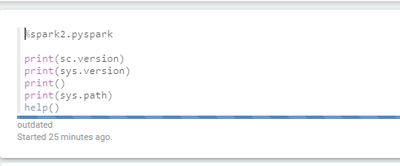
This spark job is running forever, and I cannot seem to stop it.
1) I have restarted spark2 interpreter within Zeppelin
2) I have restarted/Start/stopped Zeppelin from HDP
3) I have tried stopping it from jobs
In all cases it is not responsive. and still keeps on running.
How can I kill thois job ?



Created 05-31-2018 01:31 PM
- Mark as New
- Bookmark
- Subscribe
- Mute
- Subscribe to RSS Feed
- Permalink
- Report Inappropriate Content
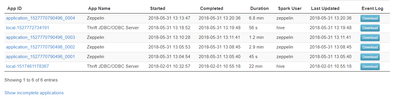
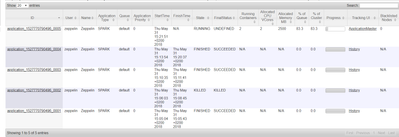
@Victor Usually a restart of the interpreter also kills the yarn application. Check on RM UI, there should be a yarn application running for the interpreter. If you kill the yarn application then you will probably stop this. I see code is pretty simple. To debug you should check the spark2 interpreter log and yarn application log to find out what is happening.
Created 05-31-2018 01:31 PM
- Mark as New
- Bookmark
- Subscribe
- Mute
- Subscribe to RSS Feed
- Permalink
- Report Inappropriate Content
@Victor Usually a restart of the interpreter also kills the yarn application. Check on RM UI, there should be a yarn application running for the interpreter. If you kill the yarn application then you will probably stop this. I see code is pretty simple. To debug you should check the spark2 interpreter log and yarn application log to find out what is happening.
Created on 05-31-2018 01:37 PM - edited 08-17-2019 09:40 PM
- Mark as New
- Bookmark
- Subscribe
- Mute
- Subscribe to RSS Feed
- Permalink
- Report Inappropriate Content
Created 05-31-2018 01:49 PM
- Mark as New
- Bookmark
- Subscribe
- Mute
- Subscribe to RSS Feed
- Permalink
- Report Inappropriate Content
@Victor To kill it you can issue command:
yarn application -kill <Application ID>
Created 05-31-2018 01:41 PM
- Mark as New
- Bookmark
- Subscribe
- Mute
- Subscribe to RSS Feed
- Permalink
- Report Inappropriate Content
@Felix Albani to add this code always worked, when I added help(), it started running forever.


