
Our Community is getting an upgrade! To get everything ready for the relaunch, we’ll be placing the site in read-only mode starting September 21st.
We really appreciate your understanding while we get things set up behind the scenes. Catch up on all the exciting details about the move here.
Need help or have questions? Drop us a line at [email protected]

Archives of Support Questions (Read Only)
- Cloudera Community
- Board Archive
- Archives of Support Questions (Read Only)
- There is no way to get ambari UI after installatio...
- Subscribe to RSS Feed
- Mark Question as New
- Mark Question as Read
- Float this Question for Current User
- Bookmark
- Subscribe
- Mute
- Printer Friendly Page
- Subscribe to RSS Feed
- Mark Question as New
- Mark Question as Read
- Float this Question for Current User
- Bookmark
- Subscribe
- Mute
- Printer Friendly Page
There is no way to get ambari UI after installation
- Labels:
-
Apache Ambari


Created 03-17-2018 06:15 PM
- Mark as New
- Bookmark
- Subscribe
- Mute
- Subscribe to RSS Feed
- Permalink
- Report Inappropriate Content
I installed ambari and setup it with help this man: https://docs.hortonworks.com/HDPDocuments/Ambari-2.6.1.0/bk_ambari-installation/content/log_in_to_ap...
I user virtualbox on which installed centos7.
I installed ambari-server, after I started it. It started with message "Server started listening on 8080". But I can't get ambariUI at all. My inet address in ifconfig -a is "inet 10.0.2.15". So I try to ping 10.0.2.15:8080 and it messages that no such service or server. After I tried to connect via browser, it's the same. I can't get AmbariUI and I don't know how to fix it. It seems to be easy but something went wrong. After ambari installation and starting it I checked log file and everything is fine. So what's the problem can't got it.
Thank you.


Created 03-17-2018 06:42 PM
- Mark as New
- Bookmark
- Subscribe
- Mute
- Subscribe to RSS Feed
- Permalink
- Report Inappropriate Content
Are you accessing the Ambari from your Virtual box host? If so make sure the VirtualBox IP entry is in your local host's file in C:\Windows\System32\drivers\etc assuming you are using windows.
In the below example my VirtualBox network setting is set to Bridged adapter so it picks my LAN network a class C
192.168.0.227 sandbox.hortonworks.com sandbox
So I can access my Ambari from my laptop using http://sandbox:8080
I think 10.0.2.15:8080 is only accessible if you are running firefox from the virtual box can you verify using curl
curl -u username:password -G http://ambari_server_ip:8080/api/v1/check
The desired output should be running that will confirm ambari is indeed accepting connections
Created 03-18-2018 08:02 PM
- Mark as New
- Bookmark
- Subscribe
- Mute
- Subscribe to RSS Feed
- Permalink
- Report Inappropriate Content
The problem was because of iptables. I turn off it and it works with NAT (port forwarding)
Created 03-17-2018 06:50 PM
- Mark as New
- Bookmark
- Subscribe
- Mute
- Subscribe to RSS Feed
- Permalink
- Report Inappropriate Content
Check this HCC learning rope link it should help you with the port forwarding that's the problem you are encountering
Created 03-17-2018 09:41 PM
- Mark as New
- Bookmark
- Subscribe
- Mute
- Subscribe to RSS Feed
- Permalink
- Report Inappropriate Content
Can you share your local hosts entry, make sure you commented out the below
#127.0.0.1       localhost
#::1             localhost
Please revert
Created 03-17-2018 10:49 PM
- Mark as New
- Bookmark
- Subscribe
- Mute
- Subscribe to RSS Feed
- Permalink
- Report Inappropriate Content
My previous hosts file was from my windows laptop I am not conversant with Macbooks 🙂
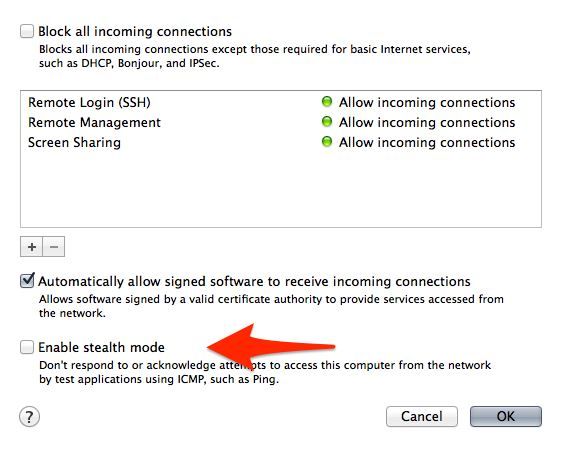
MacOSFirewall setting
Go to System Preferences, Security & Privacy, Firewall, Firewall Options...
see attached screenshot
Your ambari UI should be accessible
http://192.168.0.75:8080 or http://ambari.training:8080
Port forwarding
Quite simple to do, Firstly you will need to enable the remote login service on your mac (System Preferences -> Sharing -> Remote Login). This starts your ssh server. Then run the following command in your OS X Terminal: The format is thus basically:
ssh -L local_addr:local_port:remote_addr:remote_port -N 127.0.0.1
example
ssh -L 200.234.XXX.XXX:10000:10.211.55.5:80 -N 127.0.0.1
You may need to accept the server fingerprint initially as well as type in your local password for ssh login. (You can also set up a local to local ssh public/private key to make it not prompt for a password, but that it a different exercise.)
Created 03-17-2018 11:49 PM
- Mark as New
- Bookmark
- Subscribe
- Mute
- Subscribe to RSS Feed
- Permalink
- Report Inappropriate Content
My ssh works fine. The trouble in another. In virtualmachine curl works fine with port 8080, I really see it works. So, from local machine I make ping to virtualmachine and it works also but when I put port with host it doesnt work. I can't understand what's wrong it really makes me stupid lol. I even add hostonly network it means that no problem in communication localmachine to virtual but anyway with port it doesnt work.
Created 03-17-2018 11:50 PM
- Mark as New
- Bookmark
- Subscribe
- Mute
- Subscribe to RSS Feed
- Permalink
- Report Inappropriate Content
Noway to connect to ambari from local browser, just noway.
Created 03-17-2018 11:51 PM
- Mark as New
- Bookmark
- Subscribe
- Mute
- Subscribe to RSS Feed
- Permalink
- Report Inappropriate Content
Firewall and other gateway is off on my mac.
Created on 03-17-2018 11:53 PM - edited 08-18-2019 12:45 AM
- Mark as New
- Bookmark
- Subscribe
- Mute
- Subscribe to RSS Feed
- Permalink
- Report Inappropriate Content

it's via ssh in virtualbox. See that ambari works in virtualmachine but when I try to connect from local it doesn't see
Created 03-18-2018 08:44 AM
- Mark as New
- Bookmark
- Subscribe
- Mute
- Subscribe to RSS Feed
- Permalink
- Report Inappropriate Content
Created 03-18-2018 12:42 PM
- Mark as New
- Bookmark
- Subscribe
- Mute
- Subscribe to RSS Feed
- Permalink
- Report Inappropriate Content
It didn't help.

- « Previous
-
- 1
- 2
- Next »

