
Our Community is getting an upgrade! To get everything ready for the relaunch, we’ll be placing the site in read-only mode starting September 21st.
We really appreciate your understanding while we get things set up behind the scenes. Catch up on all the exciting details about the move here.
Need help or have questions? Drop us a line at [email protected]

Archives of Support Questions (Read Only)
- Cloudera Community
- Board Archive
- Archives of Support Questions (Read Only)
- Unable to change the replication factor from 3 to ...
- Subscribe to RSS Feed
- Mark Question as New
- Mark Question as Read
- Float this Question for Current User
- Bookmark
- Subscribe
- Mute
- Printer Friendly Page
- Subscribe to RSS Feed
- Mark Question as New
- Mark Question as Read
- Float this Question for Current User
- Bookmark
- Subscribe
- Mute
- Printer Friendly Page
Unable to change the replication factor from 3 to 2
- Labels:
-
Apache Hadoop


Created 12-05-2017 12:26 PM
- Mark as New
- Bookmark
- Subscribe
- Mute
- Subscribe to RSS Feed
- Permalink
- Report Inappropriate Content
Hi Guys,
I have been trying to change the replication factor from "3" to "2". but failed.
Here the steps :
1. First I check the replication factor from Ambari server. it is "3".
2. Then i go to shell and check the replication factor by wrote the commands :
"cd /etc/hadoop/conf" :
"View hdfs-site.xml"
replication factor is "3" also here.
3. Then i go to Ambari server and Change the replication factor from "3" to "2" and final it by click the "Lock" button and then Save.
4. and then i have restart the all services.
after these steps Ambari server show me replication factor "2" . BUT when i go to shell and write the command :
"View hdfs-site.xml"
it show me replication factor still "3" .
What thing i did wrong ?
Thanks


Created 12-05-2017 01:24 PM
- Mark as New
- Bookmark
- Subscribe
- Mute
- Subscribe to RSS Feed
- Permalink
- Report Inappropriate Content
Did you put namenode safemode and save the namespace?
sudo su hdfs -l -c 'hdfs dfsadmin -safemode enter'
sudo su hdfs -l -c 'hdfs dfsadmin -saveNamespace'
restart sevices and see hdfs-site.xml
cat /etc/hadoop/conf/hdfs-site.xml
<property>
 <name>dfs.replication</name>
 <value>2</value>
</property>
You can also check that Ambari Dashboard HDFS Disk Usage is decreased.
Created 12-05-2017 01:24 PM
- Mark as New
- Bookmark
- Subscribe
- Mute
- Subscribe to RSS Feed
- Permalink
- Report Inappropriate Content
Did you put namenode safemode and save the namespace?
sudo su hdfs -l -c 'hdfs dfsadmin -safemode enter'
sudo su hdfs -l -c 'hdfs dfsadmin -saveNamespace'
restart sevices and see hdfs-site.xml
cat /etc/hadoop/conf/hdfs-site.xml
<property>
 <name>dfs.replication</name>
 <value>2</value>
</property>
You can also check that Ambari Dashboard HDFS Disk Usage is decreased.
Created on 12-06-2017 06:16 AM - edited 08-17-2019 07:44 PM
- Mark as New
- Bookmark
- Subscribe
- Mute
- Subscribe to RSS Feed
- Permalink
- Report Inappropriate Content
Thanks @Erkan ŞİRİN
when i write the above command it give me an error. Please see the image :
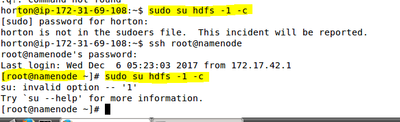
and is it right that Replication-Factor change effect apply on new file not on old file ?
Created 12-06-2017 04:29 PM
- Mark as New
- Bookmark
- Subscribe
- Mute
- Subscribe to RSS Feed
- Permalink
- Report Inappropriate Content
Hi, please give the command with root user.
[root@namenode~]# sudo su hdfs -l -c 'hdfs dfsadmin -safemode enter'
[root@namenode~]# sudo su hdfs -l -c 'hdfs dfsadmin -saveNamespace'
Created 12-07-2017 07:53 AM
- Mark as New
- Bookmark
- Subscribe
- Mute
- Subscribe to RSS Feed
- Permalink
- Report Inappropriate Content
Thanks a lot @Erkan ŞİRİN this works 🙂
Now how i put the @NameNode into "Normal Mode" ?
and what the reason to put the @namenode in safeMode ?
Created 12-07-2017 07:55 AM
- Mark as New
- Bookmark
- Subscribe
- Mute
- Subscribe to RSS Feed
- Permalink
- Report Inappropriate Content
Thanks a lot @Erkan ŞİRİN it works 🙂 How i put the @namenode into normal mode ? and what is the reason to put the @namenode into safe mode ?
Created 12-07-2017 01:44 PM
- Mark as New
- Bookmark
- Subscribe
- Mute
- Subscribe to RSS Feed
- Permalink
- Report Inappropriate Content
It is because the way how namenode works. It merges namespace repo (fsimage) periodically with edit logs file. To prevent namespace inconsistency it stops changing namespace by entering safemode.
hdfs dfsadmin -safemode leave
should work.


