
Our Community is getting an upgrade! To get everything ready for the relaunch, we’ll be placing the site in read-only mode starting September 21st.
We really appreciate your understanding while we get things set up behind the scenes. Catch up on all the exciting details about the move here.
Need help or have questions? Drop us a line at [email protected]

Archives of Support Questions (Read Only)
- Cloudera Community
- Board Archive
- Archives of Support Questions (Read Only)
- Unable to install Ambari server and agent
- Subscribe to RSS Feed
- Mark Question as New
- Mark Question as Read
- Float this Question for Current User
- Bookmark
- Subscribe
- Mute
- Printer Friendly Page
- Subscribe to RSS Feed
- Mark Question as New
- Mark Question as Read
- Float this Question for Current User
- Bookmark
- Subscribe
- Mute
- Printer Friendly Page
Unable to install Ambari server and agent
- Labels:
-
Apache Ambari


Created 09-12-2017 10:50 AM
- Mark as New
- Bookmark
- Subscribe
- Mute
- Subscribe to RSS Feed
- Permalink
- Report Inappropriate Content
Created 09-13-2017 04:49 AM
- Mark as New
- Bookmark
- Subscribe
- Mute
- Subscribe to RSS Feed
- Permalink
- Report Inappropriate Content
Just to filter possibility of any issues with the setup of that particular instance of Centos, I tried installing on another instance as well, but it still fails.
Also to nullify any connection issues, I tried curl on the GPG key from ambari.repo - it works fine and downloads the key.
Surprise.. Surprise.. I just tried Ambari 2.0.0 installation and it works fine.. So it may be problem with Ambari 2.5.2.0 (In fact entire 2.x I think) repository.


Created 09-12-2017 01:30 PM
- Mark as New
- Bookmark
- Subscribe
- Mute
- Subscribe to RSS Feed
- Permalink
- Report Inappropriate Content
Bizarre, can you post the content of
# cat /etc/resolv.conf
The rerun the below
# yum clean all
# yum clean metadata
Then
# yum install -y ambari-server
Let me know
Created 09-12-2017 01:42 PM
- Mark as New
- Bookmark
- Subscribe
- Mute
- Subscribe to RSS Feed
- Permalink
- Report Inappropriate Content
# cat /etc/resolv.conf
; generated by /sbin/dhclient-script
search domain.name pc.com
nameserver 192.168.1.1
domain name above is dummy one and nameserver IP is actually that of my router. could that be a problem? But... I remember having worked in similar setup in past, though long back.
# yum clean all
Loaded plugins: fastestmirror, security
Cleaning repos: ambari-2.5.2.0 base extras updates
Cleaning up Everything
Cleaning up list of fastest mirror
# yum clean metadata
Loaded plugins: fastestmirror, security
Cleaning repos: ambari-2.5.2.0 base extras updates
0 metadata files removed
0 sqlite files removed
0 metadata files removed
yum install -y ambari-server
Loaded plugins: fastestmirror, security
Setting up Install Process
Determining fastest mirrors
 * base: mirrors.viethosting.com
 * extras: mirror.digistar.vn
 * updates: mirrors.vinahost.vn
ambari-2.5.2.0                                           | 2.9 kB     00:00
ambari-2.5.2.0/primary_db                                | 8.6 kB     00:00
base                                                     | 3.7 kB     00:00
base/primary_db                                          | 3.7 MB     00:15
extras                                                   | 3.3 kB     00:00
extras/primary_db                                        |  21 kB     00:00
updates                                                  | 3.4 kB     00:00
updates/primary_db                                       | 3.0 MB     00:25
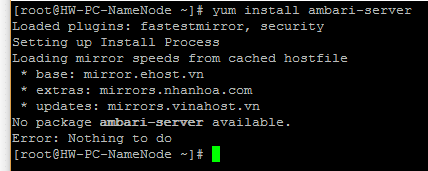
No package ambari-server available.
Error: Nothing to do
Created 09-12-2017 01:52 PM
- Mark as New
- Bookmark
- Subscribe
- Mute
- Subscribe to RSS Feed
- Permalink
- Report Inappropriate Content
Can you edit your resolv.conf and add the 2 names server before your router like this
nameserver 8.8.8.8
nameserver 8.8.4.4
nameserver 192.168.1.1
he rerun the below
# yum clean all
# yum clean metadata
Then
# yum install -y ambari-server
And revert
Created 09-12-2017 02:21 PM
- Mark as New
- Bookmark
- Subscribe
- Mute
- Subscribe to RSS Feed
- Permalink
- Report Inappropriate Content
changed resolv.conf and tried above commands. Still no success.
Created 09-12-2017 02:42 PM
- Mark as New
- Bookmark
- Subscribe
- Mute
- Subscribe to RSS Feed
- Permalink
- Report Inappropriate Content
Can you add the below line in /etc/yum.conf
http_caching=packages
The re-run the previous commands
Created 09-12-2017 02:49 PM
- Mark as New
- Bookmark
- Subscribe
- Mute
- Subscribe to RSS Feed
- Permalink
- Report Inappropriate Content
Thanks. Done, but no success yet.
Created 09-13-2017 04:49 AM
- Mark as New
- Bookmark
- Subscribe
- Mute
- Subscribe to RSS Feed
- Permalink
- Report Inappropriate Content
Just to filter possibility of any issues with the setup of that particular instance of Centos, I tried installing on another instance as well, but it still fails.
Also to nullify any connection issues, I tried curl on the GPG key from ambari.repo - it works fine and downloads the key.
Surprise.. Surprise.. I just tried Ambari 2.0.0 installation and it works fine.. So it may be problem with Ambari 2.5.2.0 (In fact entire 2.x I think) repository.


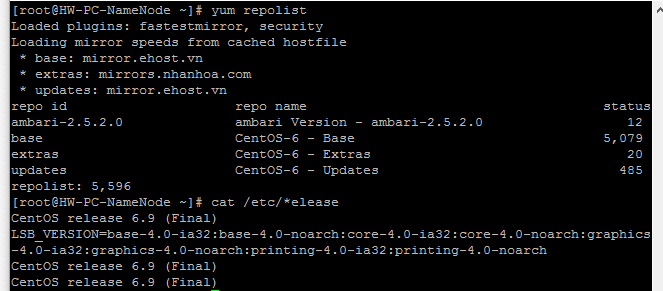
Created 10-06-2017 08:52 AM
- Mark as New
- Bookmark
- Subscribe
- Mute
- Subscribe to RSS Feed
- Permalink
- Report Inappropriate Content
+1 2.5.2.0 version has the problem. 2.5.1.0 version works fine.

Created 10-12-2017 08:51 PM
- Mark as New
- Bookmark
- Subscribe
- Mute
- Subscribe to RSS Feed
- Permalink
- Report Inappropriate Content
is there a solution to this issue?
Created 10-13-2017 12:38 AM
- Mark as New
- Bookmark
- Subscribe
- Mute
- Subscribe to RSS Feed
- Permalink
- Report Inappropriate Content
please correct the repo file path. 2.5.2.0 also works fine with corrected path. Observer ppc in the path correct it for ambari. Than you should be good. I have done this for RHEL 7.


