
Our Community is getting an upgrade! To get everything ready for the relaunch, we’ll be placing the site in read-only mode starting September 21st.
We really appreciate your understanding while we get things set up behind the scenes. Catch up on all the exciting details about the move here.
Need help or have questions? Drop us a line at [email protected]

Archives of Support Questions (Read Only)
- Cloudera Community
- Board Archive
- Archives of Support Questions (Read Only)
- Unable to start ambari-server - password authentic...
- Subscribe to RSS Feed
- Mark Question as New
- Mark Question as Read
- Float this Question for Current User
- Bookmark
- Subscribe
- Mute
- Printer Friendly Page
- Subscribe to RSS Feed
- Mark Question as New
- Mark Question as Read
- Float this Question for Current User
- Bookmark
- Subscribe
- Mute
- Printer Friendly Page
Unable to start ambari-server - password authentication failed for user "ambari"
- Labels:
-
Apache Ambari


Created 09-16-2016 08:20 AM
- Mark as New
- Bookmark
- Subscribe
- Mute
- Subscribe to RSS Feed
- Permalink
- Report Inappropriate Content
Hello,
I work on a cluster with HDP 2.4.
I'm not able to start ambari. I use this command:
[ambari@ current]$ service ambari-server restart
And I get this error:
ERROR: Exiting with exit code -1.
REASON: Ambari Server java process died with exitcode 1. Check /var/log/ambari-server/ambari-server.out for more information
In the ambari-server.out and ambari-server.log files i get the same error:
15 Sep 2016 10:42:28,893 ERROR [main] DBAccessorImpl:102 - Error while creating database accessor
org.postgresql.util.PSQLException: FATAL: password authentication failed for user "ambari"
So, i guess the ambari-server start command try to connect to the PostgreSQL ambari database, but can't access it because he don't use the correct password.
How can i know which password is used by this command ? What can I do to solve this issue and restart ambari?
Thanks!
Edit: The error appeared after i change the password of the user "ambari" on the PostgreSQL database.
Created 09-16-2016 09:51 AM
- Mark as New
- Bookmark
- Subscribe
- Mute
- Subscribe to RSS Feed
- Permalink
- Report Inappropriate Content
I found the issue and how to solve it. here is my explaination:
ambari-server starts using "ambari" user and the password found in the configuration file /etc/ambari-server/conf/password.dat
By default, the password is "bigdata".
As I updated, via psql, the PostgreSQL ambari password, the password in the configration file was incorrect.
Si i changed the content of the configuration file with the value of my new password and the server restarted well.

Created 09-16-2016 08:38 AM
- Mark as New
- Bookmark
- Subscribe
- Mute
- Subscribe to RSS Feed
- Permalink
- Report Inappropriate Content
@xli
If you are using sandbox2.4 or higher then you can reset password as :
- Start your sandbox, ssh using a terminal or the web browser link:
- Run the following commands:
- ambari-admin-password-reset
In general you can run the following query in yoru ambari DB to reset the password of ambari to default "admin/admin"
1. Log on to ambari server host shell
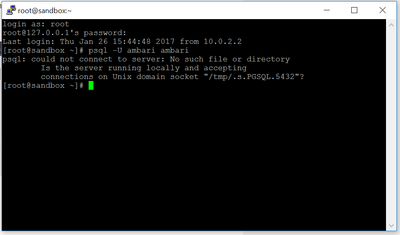
2. Run 'psql -U ambari-server ambari' (OR) 'psql -U ambari ambari'
3. Enter password 'bigdata'
4. In psql query as following:
update ambari.users set user_password='538916f8943ec225d97a9a86a2c6ec0818c1cd400e09e03b660fdaaec4af29ddbb6f2b1033b81b00' where user_name='admin'
5. Quit psql
6. Run 'ambari-server restart'
Created 09-16-2016 08:56 AM
- Mark as New
- Bookmark
- Subscribe
- Mute
- Subscribe to RSS Feed
- Permalink
- Report Inappropriate Content
I'm not using the sandbox. I'm working on a cluster with HDP 2.4.
This procedure updates the password for the "admin" user of Ambari. But the error seems to concern the "ambari" user.

Created on 01-26-2017 04:20 PM - edited 08-18-2019 05:29 AM
- Mark as New
- Bookmark
- Subscribe
- Mute
- Subscribe to RSS Feed
- Permalink
- Report Inappropriate Content
Created 09-16-2016 09:51 AM
- Mark as New
- Bookmark
- Subscribe
- Mute
- Subscribe to RSS Feed
- Permalink
- Report Inappropriate Content
I found the issue and how to solve it. here is my explaination:
ambari-server starts using "ambari" user and the password found in the configuration file /etc/ambari-server/conf/password.dat
By default, the password is "bigdata".
As I updated, via psql, the PostgreSQL ambari password, the password in the configration file was incorrect.
Si i changed the content of the configuration file with the value of my new password and the server restarted well.
Created 01-26-2017 04:08 PM
- Mark as New
- Bookmark
- Subscribe
- Mute
- Subscribe to RSS Feed
- Permalink
- Report Inappropriate Content
Hi @xli, please share how you change the content of the configuration file? any specify command to use?


