
Our Community is getting an upgrade! To get everything ready for the relaunch, we’ll be placing the site in read-only mode starting September 21st.
We really appreciate your understanding while we get things set up behind the scenes. Catch up on all the exciting details about the move here.
Need help or have questions? Drop us a line at [email protected]

Archives of Support Questions (Read Only)
- Cloudera Community
- Board Archive
- Archives of Support Questions (Read Only)
- Unable to verify database connection
- Subscribe to RSS Feed
- Mark Question as New
- Mark Question as Read
- Float this Question for Current User
- Bookmark
- Subscribe
- Mute
- Printer Friendly Page
- Subscribe to RSS Feed
- Mark Question as New
- Mark Question as Read
- Float this Question for Current User
- Bookmark
- Subscribe
- Mute
- Printer Friendly Page
Unable to verify database connection


Created 09-30-2013 08:06 AM
- Mark as New
- Bookmark
- Subscribe
- Mute
- Subscribe to RSS Feed
- Permalink
- Report Inappropriate Content
trying to install for the 1st time, cloudera-manager-installer.bin runs without issue
i go to the web interface & get through several pages taking all the defaults, & then reach database-setup where i'm stuck
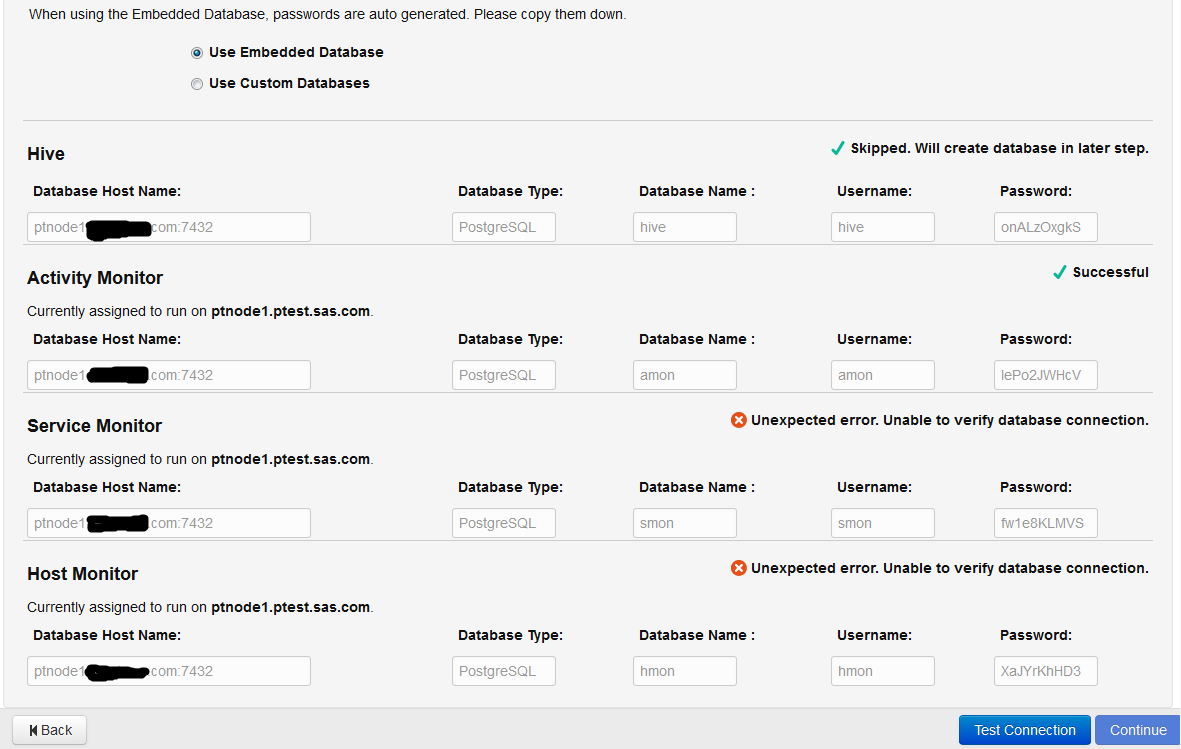
the activity/service/host monitors are all checked & a random 1 always works, but the other 2 complain with:
"Unexpected error. Unable to verify database connection"
if i back up a page a change my role assignments to move the major functions to a different server than the 1 i'm instlaling from i can get 2 of the montiors to work with only 1 failure, again a the failure is from a random monitor
i've uninstalled/reinstalled multiple times trying various perturbations prior to the database-setup
my hostname is the FQDN & /etc/hosts is in the formant of: IP FQDM HOSTNAME
/etc/cloudera-scm-server/db.mgmt.properties uses FQDM for the 3 monitors
my OS is rhel6.4 with all latest updates
lsof shows postgres listening to port 7432 on all interfaces
Created 10-02-2013 05:21 AM
- Mark as New
- Bookmark
- Subscribe
- Mute
- Subscribe to RSS Feed
- Permalink
- Report Inappropriate Content
resolved by changing the default of placing all 3 monitors on the install server to placing them on 3 separate servers in the cluster other than the install server
Created 09-30-2013 08:13 AM
- Mark as New
- Bookmark
- Subscribe
- Mute
- Subscribe to RSS Feed
- Permalink
- Report Inappropriate Content
Created 10-02-2013 05:21 AM
- Mark as New
- Bookmark
- Subscribe
- Mute
- Subscribe to RSS Feed
- Permalink
- Report Inappropriate Content
resolved by changing the default of placing all 3 monitors on the install server to placing them on 3 separate servers in the cluster other than the install server

Created 01-26-2017 11:35 AM
- Mark as New
- Bookmark
- Subscribe
- Mute
- Subscribe to RSS Feed
- Permalink
- Report Inappropriate Content
I'm facing these exact problem, however placing the servers in diferent nodes didn't solve the problem.
I can spot on the cloudera-scm-agent.log the following error:
[26/Jan/2017 19:29:53 +0000] 6579 MainThread agent ERROR Failed to activate {u'refresh_files': [], u'config_generation': 0, u'auto_restart': False, u'running': True, u'required_tags': [], u'one_off': True, u'special_file_info': [], u'group': u'root', u'id': 31, u'status_links': {}, u'name': u'MGMT.REPORTSMANAGER-test-db-connection', u'extra_groups': [], u'run_generation': 1, u'start_timeout_seconds': None, u'environment': {}, u'optional_tags': [], u'program': u'dbconnection/test_db_connection.sh', u'arguments': [u'db.properties'], u'parcels': {}, u'resources': [], u'user': u'root'}
Traceback (most recent call last):
File "/usr/lib64/cmf/agent/build/env/lib/python2.6/site-packages/cmf-5.9.1-py2.6.egg/cmf/agent.py", line 1682, in handle_heartbeat_processes
new_process.update_heartbeat(raw, True)
File "/usr/lib64/cmf/agent/build/env/lib/python2.6/site-packages/cmf-5.9.1-py2.6.egg/cmf/process.py", line 282, in update_heartbeat
self.fs_update()
File "/usr/lib64/cmf/agent/build/env/lib/python2.6/site-packages/cmf-5.9.1-py2.6.egg/cmf/process.py", line 383, in fs_update
raise Exception("Non-root agent cannot execute process as user '%s'" % user)
Exception: Non-root agent cannot execute process as user 'root'
Any change that someone knows how to solve it?


Created 03-25-2017 06:40 PM
- Mark as New
- Bookmark
- Subscribe
- Mute
- Subscribe to RSS Feed
- Permalink
- Report Inappropriate Content
same issue facing any solution found


